SmartSDR v4.1.5 | SmartSDR v4.1.5 Release Notes
SmartSDR v3.10.15 | SmartSDR v3.10.15 Release Notes
The latest 4O3A Genius Product Software:
The latest 4O3A Genius Product Software and Firmware
If you are needing assistance with FlexRadio products, please refer to the product documentation or check the Help Center for known solutions. Need technical support from FlexRadio? It's as simple as creating a HelpDesk ticket.
rumble in the audio/signals have feathers

I am running a 8400M. I am hearing a slight rumble in my audio during receive. I have attached a video that shows it. It's about half way through the video. Also have attached a pic of my waterfall. Notice that all the signals have feather like things out from the signal. Any suggestions. can't get the movie to load, but it's there.

Best Answer
-
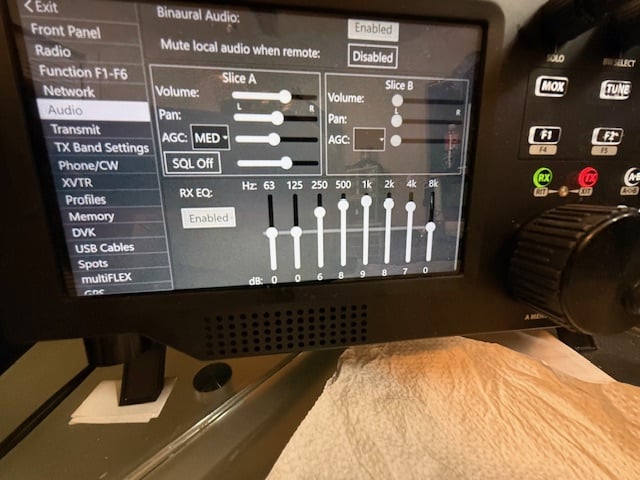
Wow.. that is a lot of EQ gain. You may wish to dial that back a bit.
0

Answers
-
Good Morning ED. The movie does not give the whole picture. I just listened to the audio and yes it does not seem to have the rumble in there. Trust me it's there, not bad but it's there. If you notice, all of the signals have the feather like things on them. Can't be all of them are over driven.
0 -
Good morning John,
Can you do a screen shot and post that? What rig are you running and what version of SSDR? Not sure if you can post videos here.
0 -
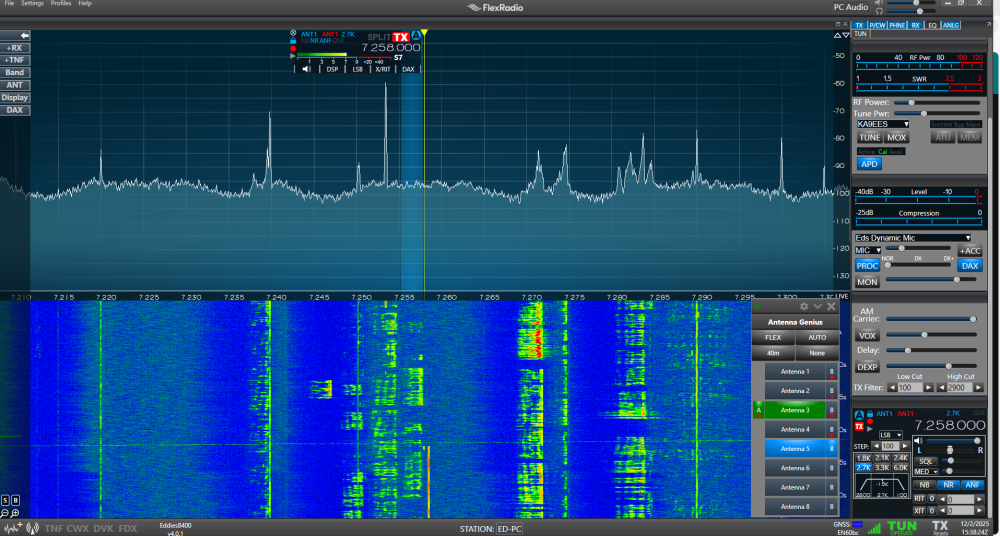
Like this.
0 -
Try turning off ALL your DSP filtering, WNB, NB, ANF, NR and any others you have on and see if the Audio gets cleaner. The DSP Filters will cause weird REC fluttering where the Receiving station is a Strong signal to your station not really over driven but a high rf signal. Looks like from your screen shot you have NR and ANF on at least that are shown on the Desktop.
1 -
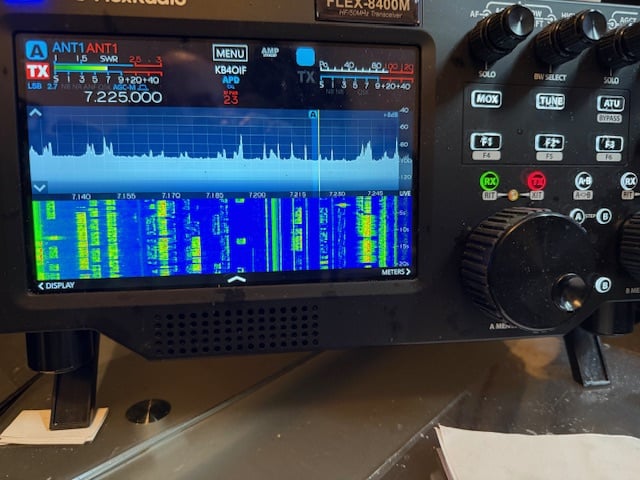
Here is a pic from this morning. I listened for a long time yesterday and also this morning and I do not hear the rumble. None of the filters are engaged. Looking at the pic Ed posted, mine looks the same.
 0
0 -
Just a quick note. I hear the sound now. It ""seems"" that it is only there when the station talking has a baritone type voice. could it be a setting I have set wrong?????
0 -
Have you tried adjusting the receive audio eq? That might be contributing to the problem.
James
WD5GWY
0 -
No I have not James. will have to read up on that. here is a pic of my settings.
 0
0 -
If those settings have been working for you in the past, they should still work depending on your hearing. If your problem is related to audio eq settings, try disabling the eq and see if the rumbling goes away. If it does, then you may need to make some adjustments to your settings as something in your hearing has changed. ( possibly)
I will say this, I once had a set of powered speakers connected to a 6500 I had and it did something similar. It turned out that I had the volume on the powered speakers set all the way up and I was controlling the volume strictly from the volume slider in SmartSDR. I backed down the volume control on the speakers a bit and the rumbling went away. Even though the audio output on the back of the 6500 is a line level output, it was high enough to drive the internal audio amplifier in the powered speakers too much causing the rumbling. And yet,I have other powered speakers that don't do that.
James
WD5GWY
1 -
Mike. I turned it back quite a bit.
0


Categories
- All Categories
- 389 Community Topics
- 2.2K New Ideas
- 658 The Flea Market
- 8.4K Software
- 157 SmartSDR+
- 6.5K SmartSDR for Windows
- 186 SmartSDR for Maestro and M models
- 439 SmartSDR for Mac
- 275 SmartSDR for iOS
- 265 SmartSDR CAT
- 204 DAX
- 386 SmartSDR API
- 9.4K Radios and Accessories
- 53 Aurora
- 297 FLEX-8000 Signature Series
- 7.2K FLEX-6000 Signature Series
- 971 Maestro
- 58 FlexControl
- 866 FLEX Series (Legacy) Radios
- 945 Genius Products
- 472 Power Genius XL Amplifier
- 347 Tuner Genius XL
- 126 Antenna Genius
- 307 Shack Infrastructure
- 215 Networking
- 468 Remote Operation (SmartLink)
- 142 Contesting
- 811 Peripherals & Station Integration
- 144 Amateur Radio Interests
- 1.1K Third-Party Software