SmartSDR v4.1.5 | SmartSDR v4.1.5 Release Notes
SmartSDR v3.10.15 | SmartSDR v3.10.15 Release Notes
The latest 4O3A Genius Product Software:
The latest 4O3A Genius Product Software and Firmware
If you are needing assistance with FlexRadio products, please refer to the product documentation or check the Help Center for known solutions. Need technical support from FlexRadio? It's as simple as creating a HelpDesk ticket.
SmartSDR+ License Install Problem

Installed v4 basic and no problems with license activation. Purchased v4+ license but the Radio Setup button is green. The screen still shows v3 license. Using Refresh crashes the 6400 showing loss of communications. Release Notes procedure followed.
There is no doubt in my mind that I am confused, overlooking a step or….have zero idea what I'm doing.
Attached are screen shots and other information that may be useful in helping me sort the problem. How do I get this completed?
tnx N5LB Lionel
Answers
-
Hi Lionel, try exporting your profiles, then do a factory reset.
0 -
OK Len, this is a good idea.
0 -
Len, I did a factory reset but results are the same. The 6400 is running v4.0.1 Basic. The + license order was completed per Flex automated e-mail. Radio Setup show no v4 license though I am running v4 basic.
Hmmm - a conundrum.
0 -
Please open a support ticket.
0 -
Hi Lionel, just to be sure - your radio does have Internet connectivity, right? If not, try that to see if it gets the proper license info.
If that is not it, you need to submit a help desk ticket.
0 -
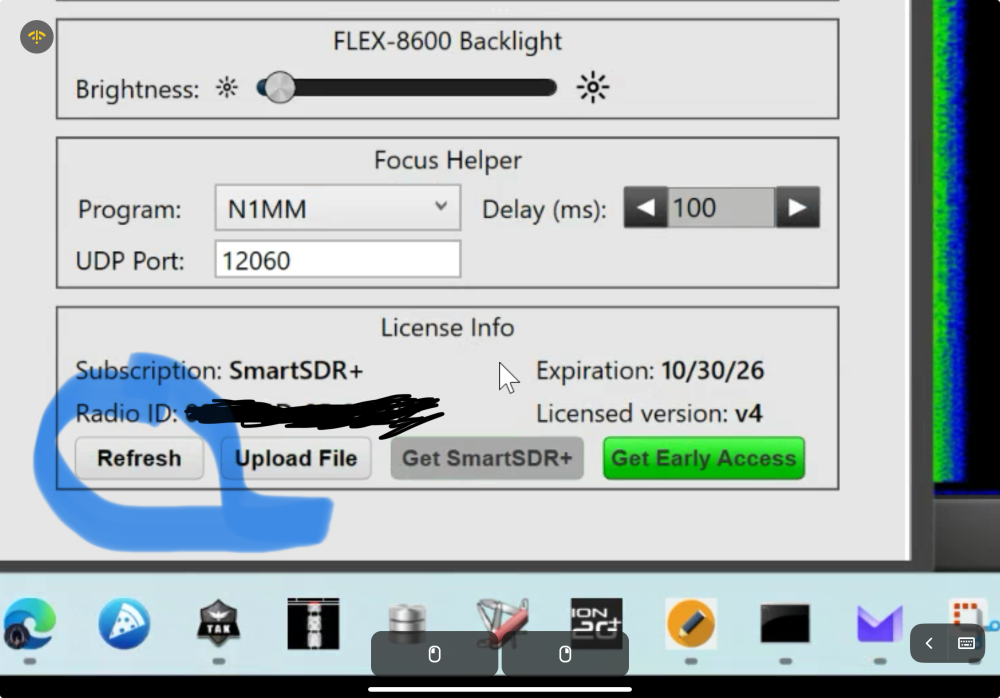
Did you click the refresh button? It’s the green button on the left.
 0
0 -
yes, I have pressed refresh and each time the 6400 loses comm and crashes. Also, the button to the right is not greyed out like your.
Len, yes my internet connection is solid and the Ethernet from the radio to computer is solid.
0 -
thanks Mike, will do.
0 -
It sounds like you may be direct connected from your PC to your radio. If this is the case, the radio likely doesn't have internet access unless you have done some work to setup a bridge to make this happen.
I would recommend checking out the following article: https://helpdesk.flexradio.com/hc/en-us/articles/202118558-How-to-Connect-your-FLEX-6000-FLEX-8000-to-a-LAN
Note that you don't need to leave your radio connected like this. You just need the radio to pull the license down to move forward.
1 -
@Eric-KE5DTO Good link, that article is totally right. I’ve done that before and didn’t know there was an article about it. I know that procedure really works, especially for downloading upgrades.
0 -
ah ha! I think this may do it. I’ll try tomorrow and report back.
Thanks
0 -
when does the new features suppose to go into effect. Mine are still greyed out.
0 -
We are waiting for version 4.1.2 to become available for download I believe. Only then…
0 -
Its ALIVE. SDR+ is licensed and working fine except I guess I have to wait 30 days for the new stuff to go active.
Used bridging.
Thanks All
0 -
Glad to hear that you got it going! The 30 (ish) day wait is from the V 4.0.1 release date, not SmartSDR+ purchase date, so you will get the updated software tomorrow morning when V 4.1.3 releases.
1 -
Excellent news!
Thank you all.
0




Leave a Comment
Categories
- All Categories
- 389 Community Topics
- 2.2K New Ideas
- 658 The Flea Market
- 8.4K Software
- 157 SmartSDR+
- 6.5K SmartSDR for Windows
- 186 SmartSDR for Maestro and M models
- 439 SmartSDR for Mac
- 275 SmartSDR for iOS
- 265 SmartSDR CAT
- 204 DAX
- 386 SmartSDR API
- 9.4K Radios and Accessories
- 53 Aurora
- 297 FLEX-8000 Signature Series
- 7.2K FLEX-6000 Signature Series
- 971 Maestro
- 58 FlexControl
- 866 FLEX Series (Legacy) Radios
- 945 Genius Products
- 472 Power Genius XL Amplifier
- 347 Tuner Genius XL
- 126 Antenna Genius
- 307 Shack Infrastructure
- 215 Networking
- 468 Remote Operation (SmartLink)
- 142 Contesting
- 811 Peripherals & Station Integration
- 144 Amateur Radio Interests
- 1.1K Third-Party Software