SmartSDR v4.1.5 | SmartSDR v4.1.5 Release Notes
SmartSDR v3.10.15 | SmartSDR v3.10.15 Release Notes
The latest 4O3A Genius Product Software:
The latest 4O3A Genius Product Software and Firmware
If you are needing assistance with FlexRadio products, please refer to the product documentation or check the Help Center for known solutions. Need technical support from FlexRadio? It's as simple as creating a HelpDesk ticket.
Purchased SmartSDR+ on 10/30/25, it's been 30 days today???

Comments
-
I read somewhere they will release the new version +- a few days of 30, so it’s not automatic 30 days on the dot.
0 -
On the Flex website it says:
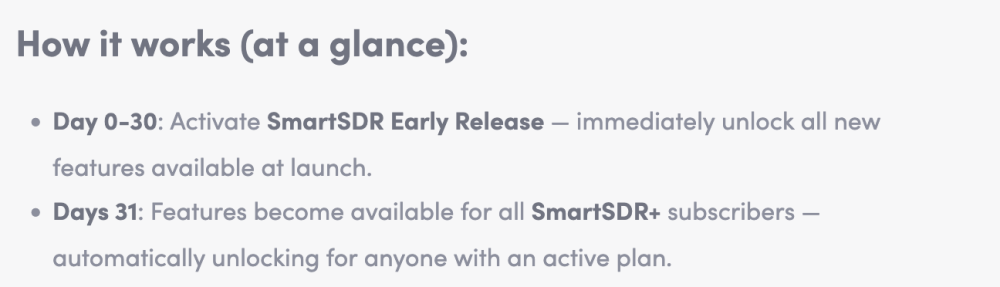
Day 31 is tomorrow, 1st December, but as serialcoder says there may be a few days variance in that, especially as this is the first time that the new licensing mechanism has been deployed.
Also as a former professional software engineer, the idea of pushing a new release on a Sunday when the help desk is shut would be a rather stressfull/silly thing to do! 😀
1 -
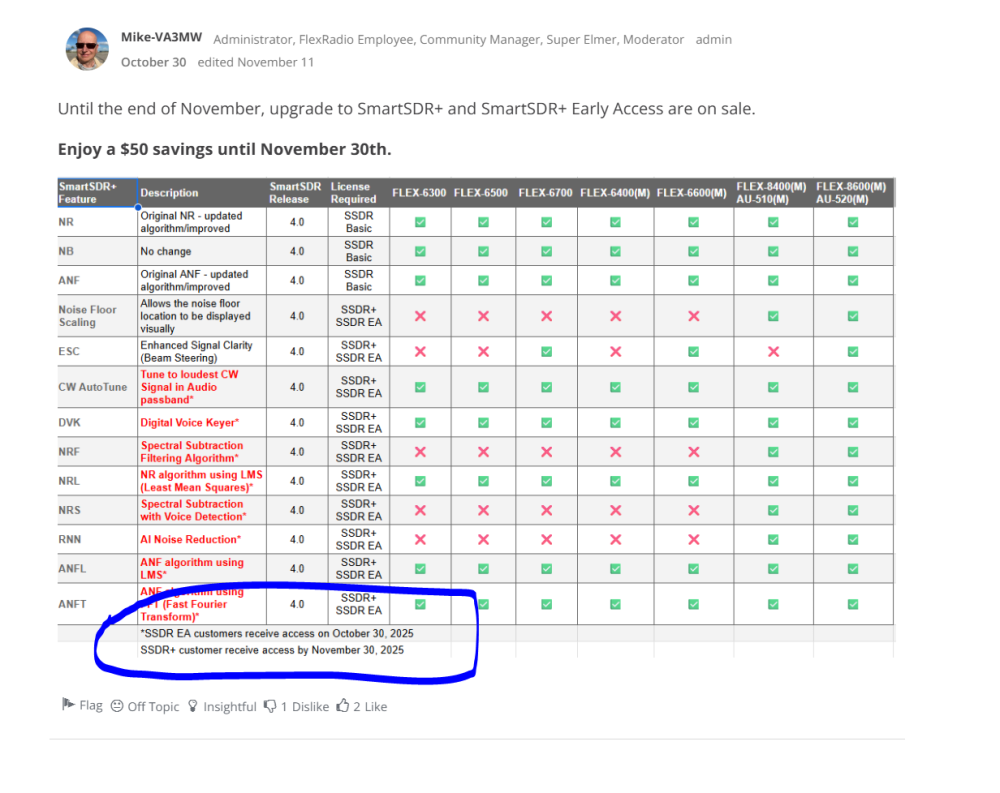
another data point…..by November 30, 2025……..
 0
0 -
what's the harm in promising
0 -
Hi John
We didn’t make that date and we are still working towards releasing 4.1.2 tomorrow. It isn’t a very good idea to release software before it has run through all the release processes.
Thanks for your patience.
73
0 -
Thanks for the reply.
Dave
k4em
0 -
to clarify this confusing software situation…. When you said we (plus users) get any features released while our subscription is in force, you mean any feature release TO EARLY people, right? or are you limiting it to features released to Plus users? I certanly thought we'd get the same features, only 30 days late (as printed in the chart and stated in examples above). Now it seems a new software version is required, and it's released ….whenever.
For example, these features were RELEASED October 30, 2025. If my plus subscripnon was in force on 10/30 then I would get those features, whenever they are eventually released - even if this new version is "released" AFTER my subscription expired - because the feature WAS RELEASED DURING my subscription, right?
0




Leave a Comment
Categories
- All Categories
- 389 Community Topics
- 2.2K New Ideas
- 658 The Flea Market
- 8.4K Software
- 157 SmartSDR+
- 6.5K SmartSDR for Windows
- 186 SmartSDR for Maestro and M models
- 439 SmartSDR for Mac
- 275 SmartSDR for iOS
- 265 SmartSDR CAT
- 204 DAX
- 386 SmartSDR API
- 9.4K Radios and Accessories
- 53 Aurora
- 297 FLEX-8000 Signature Series
- 7.2K FLEX-6000 Signature Series
- 971 Maestro
- 58 FlexControl
- 866 FLEX Series (Legacy) Radios
- 945 Genius Products
- 472 Power Genius XL Amplifier
- 347 Tuner Genius XL
- 126 Antenna Genius
- 307 Shack Infrastructure
- 215 Networking
- 468 Remote Operation (SmartLink)
- 142 Contesting
- 811 Peripherals & Station Integration
- 144 Amateur Radio Interests
- 1.1K Third-Party Software