SmartSDR v4.1.5 | SmartSDR v4.1.5 Release Notes
SmartSDR v3.10.15 | SmartSDR v3.10.15 Release Notes
The latest 4O3A Genius Product Software:
The latest 4O3A Genius Product Software and Firmware
If you are needing assistance with FlexRadio products, please refer to the product documentation or check the Help Center for known solutions. Need technical support from FlexRadio? It's as simple as creating a HelpDesk ticket.
Flex 8600M, Mechanical Noise

Hello all: A search of the 8x00 discussion groups indicates that some are experiencing noise/vibration issues. Here is a description of what I am experiencing:
The noise sounds a lot like a spinning type hard drive when the head is in the"seek" mode. I initially thought that the radio ( 8600M) had a spinning hard drive installed, but given the prevalence of SSHDs today, I concluded that would be unlikely.
The noise manifests itself after the radio has been running for an hour or so, and until recently, has not been intrusive. The noise changed to a much louder version of the previously described. I powered down the radio and let is sit for an hour. Powering back up the usual sound reappeared followed by the noisier version.
A look inside revealed the following:
The fan rotor appeared to be free of any contact with other components and rotated freely. However, the blue Ethernet cable in front of the rotor does have the potential to make contact as it is loosely secured. With the fan running at normal speed the ribbon cable in front of the rotor flutters. None of the previously described seem to be related to the noise; in fact there was no abnormal sounds when running with the cover off . Tapping various parts of the mechanical structure with a finger produced no rattles etc. Tapping the motor area of the fan to cause an axial displacement of the rotor produced a pronounced rattle as if a **** bearing were missing. Additionally, tapping in the vicinity of what I assume is the antenna tuner circuit board produced rattling of the toroid inductors.
I tidied up the loose cables and installed the top cover and powered the unit up. After running several hours the non intrusive "hard drive" sound reappeared but the louder version of the same has not.
My take away:
I believe that there could be better attention to wire/cable management . Also, I believe an upgraded fan is in order. I have several similar sized fans on the bench here and none have perceptible axial play in the rotor assembly or rattle.
That all said, I find the performance of the radio to be remarkable.
Fingers crossed……
73,
KC9KZM
Comments
-
see my comments on fan noise ; mine sounded like the fan hitting the cabinet; i had to sent my 8600M back and it took about 6 weeks to fix now it is ok but frustrating just like my initial 6600M had to go back FOUR times under warranty; have a good holiday
0 -
Thanks for the comment Arnold. Unfortunately the noise has returned after letting the radio run all night. I dread packing the radio up, shipping it , and waiting, waiting, waiting for it to be resolved. I am convinced the fan is the problem as it appears to be the only "active" mechanical device in the radio. Also, the fan does not appear to be of a quality one would expect of a radio in this price range. If I knew the fan specifications I would replace it with a high quality unit- something like the fan I have here on the bench-cast Al frame, dual ball bearings, rated for 67,000 hrs continuous service. Of course that would be done after the warranty expired.
In lieu of the above I could just use headphones….
73,
KC9KZM
0 -
KC9KZM,
My 8600M had exactly the same symptoms. I sent it back to FlexRadio and they fixed it under warranty. After repair all works nice and quiet. Great customer service.
73
Henkka OH5KNL
0 -
Hello Henkka. Thanks for the information. I wonder what was done to fix the issue ? I can't imagine that the repair would be beyond the capabilities of a skilled ham. I hate the idea of having to go through the ritual of packing and shipping the unit. Looks like it's help desk time…
73,
KC9KZM
0 -
They changed new fan and since then no noise/vibration issues anymore. I think it was worth the wait to get the fan fixed and be back on the air.
1 -
Thanks, good to know.
73,
KC9KZM
0 -
Being in the USA, I'd agree with Henkka and you could send it Flex for repair under warranty. Being in Europe, with the repair centre not knowing anything, I did it myself. It's a 10 minute job.
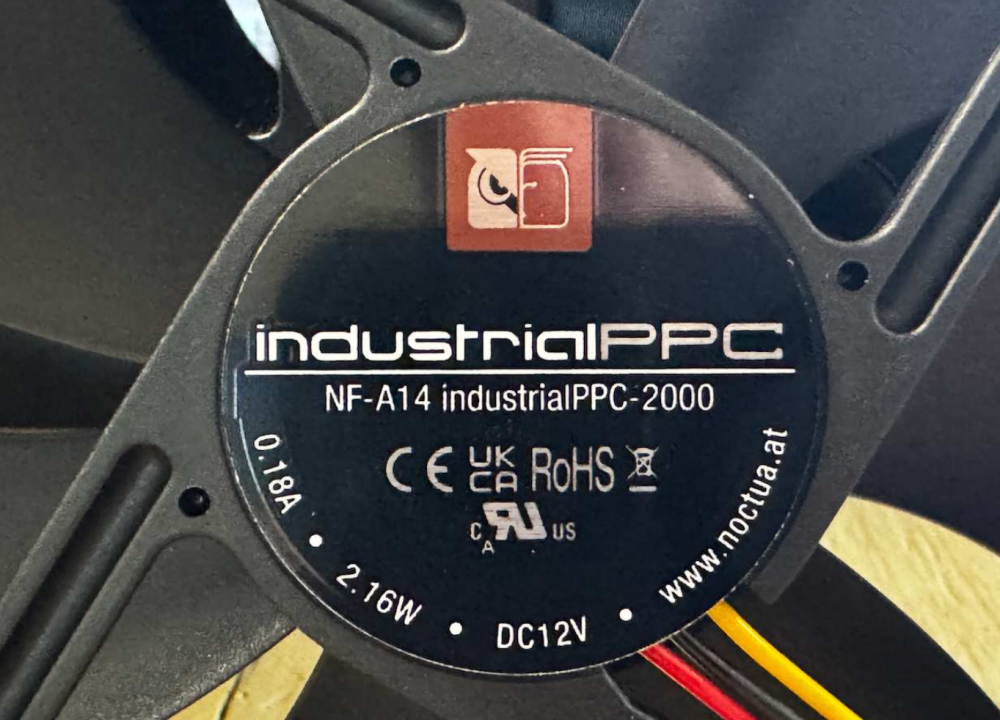
I did add NOCTUA NA-SAVG2 chromax.black Anti-Vibration Gaskets and Noctua NA-SAV4 Silicone Anti-Vibration Fan Mount
1 -
as i said above it took aproximately 6 weeks to fix; just frustrating like my 6600M 5 years ago had to be sent back FOUR times under warranty; was dead out of the box; LOVE the radios HATE the frustration; my tgxl is back in service dept after being left on overnight it has to be reset to work; was looking forward to finally using the tgxl and pgxl remote with my maestro but still can't !!; was sent back over 2 weeks ago and was told they would get to it hopefully this week; I know it is OUT of warrant but the wait seems a bit tool long; i can work on my old collins and efj boatanchors but not this; stay safe everybody
0 -
Hello Erik is this the fan you installed in your radio ?
https://www.noctua.at/en/products/nf-a14-industrialppc-2000
When installed in the radio does this fan's speed vary like the OEM fan, or does it run at at a constant speed ? My assumption is that there is a speed controller circuit in the radio that varies the speed. From the part number shown in your attached image, it appears that this fan is not the PWM unit. Am I correct ?Also, was the installation pretty much "plug and play" ?
This the type of fan that should be installed from the factory. The existing fan does not appear to be very robust and given the fact that there have been many instances of problems I am curious as to how long these things will last (beyond the warranty).
Thanks for the information Erik, it was very enlightening. It's great to see you have the Ham spirit !
Hello Arnold. Your experience sounds terrible ! This is why I'm so reluctant to ship the unit in. A fan swap is a trivial endeavor here.
It is an unfortunate trade off that these "state of the art" radios, with their exceptional performance, are exceptionally difficult ( impossible ?) to repair by the user. I still have a couple of Kenwood hybrids that I keep around; repairability, longevity , durability, and they perform pretty good too.
Given the cost of these radios, Flex really needs to step up their game and 'sweat the details". I've read things like poor quality of the labeling (screening or what ever process is used) of the pushbuttons on the front panel of the M models. The buttons on my radio appeared well used right out of the box, I just tolerate it.
And so it goes…..
Again, thanks for all the input !
73,
KC9KZM
2 -
Yes it is.
Yes it does. I believe that so long as you fit a 3 pin fan all is good. PWM confused me - but I was advised to fit this fan and it works. You should probably check this with Flex first. I get 1100 RPM normally, 1300 RPM under load when temp reaches about 50C and in extreme cases speed goes to 1650 RPM. I saw similar with the original fan although that one had an almighty rattle at max RPM.
Yes plug and play. Same size as original so easy to swap. But do note I also added the noise suppression parts just for belt and braces.
According to various EU club reflectors / chat rooms, many Flex 8000 series owners have replaced the original with this fan. One such is Mathias DD5MD who I think would not mind if you asked him about it for a second opinion md @dd5md .de (take out spaces added so his email does not get spammed).
1 -
Big thanks Erik !
I know what I need to do.
73,
KC9KZM
0 -
This is a warranty issue. Please open a support ticket.
0 -
Support ticket has been opened !
0 -
i would send it back but expect a LONG time to fix; that's why i have not traded in my older 6600M in; it is worth the time; they paid for shipping via ups; now waiting for my TGXL to get fixed; when i leave it on overnight i have to repower it in the morning to get it working again just frustrating as i was FINALLY going to use my maestro, pgxl, tgxl,8600M combo remotely; anyway good luck ; also waiting for the auruora; love these radios when they work; I CANT lift up my older Valiant; I used to be able to lift up a Thunderbolt or a 100V;600L but CANT do it anymore !!
1 -
In my opinion you have done the right thing. With warranty repair 'on your doorstep' so to speak, it makes sense to avail yourself of it. We do not have that luxury here in Europe therefore, despite it perhaps being annoying and inconveniencing, you are fortunate. The 6000M deserves seeing some light of day in any case..
0 -
I appreciate everyone's comments. At least there are some options for the fan post warranty. I'm curious as to how many of these fans fail or at least become noisy. I wonder if the units sold to dot gov or dot Mil are ruggedized and have uprated components ? Are they built to a MIL SPEC ?
I ordered the "official Flex shipping box" for $68.54 shipped. Yes, a bargain. I pitched the original box thinking "I'll never need this, why keep it ?" I figure that the Flex approved box I better than anything I could do myself. Doing this during the holiday season is just bad timing, but you have to do what is necessary. I guess I'll be spending some time with my lonely IC 7300…..
73,
KC9KZM
0 -
i found the original TGXL shipping box which I used to ship back my TGXL no word on repair yet; That's why even with my old radios and old car parts can't beat NOS/NIB !!
0 -
@Michael - "This is a warranty issue. Please open a support ticket."
Michael, I am the one who did initial investigation for Flex with Video recording and showed that Fan vibration was the route cause for elevated noise from my new 8600. After that it Flex introduced a fix with a new fan rubber holders and potentially eliminate the vibration noise.
My fix was to insert 3 pieces of foam on the sides of the Fan and from the panel where this fan installed to the front panel. Of coarse my fix will not help if Fan's bearing fails, it is only for Fan vibration.
Now, send radio for a fan or fan's rubber holders replacement will take at least 3-4 weeks without radio. I sent 6600 and Maestro's number of times for repairs and average wait time was 3-4 weeks. I do not have a back up radio to use during that time. So, I am out out of the hobby during that time.
The point of that post is that Flex should trust users to replace the Fan. It will reduce cost of the shipping, Flex time to deal with Tickets, repairs, shipping back and such.
On my 6600 I had the issue that radio would not power up. I opened it , cleaned oxidated Fuse pins and recovered my radio. Going by the logic that that it could be a Warranty issue, I would send my radio for a fuse repair and would wait for 3-4 weeks to get it back. Also, I would pay around $50-70 for shipping and also Flex charge if radio out warranty.
Bottom line, for a simple things like fuse, fan replacement, it can be done by user if user feels comfortable to replace it. Of coarse it will be user responsibility if something broken during that process. Most of the HAM's are very experienced folks and should be able to complete this simple job and save time and money.
Sergey
1 -
Sergey, we appreciate your input, however, this is still a warranty issue and this is why the radios come with a 2 year warranty. Sadly, only some customers are comfortable doing such things.
0 -
Yes, replacing the fan myself would be most convenient, but I understand Flex's position. There is really no way for them to know the level of competence on the other end; there are still people who stick forks in operating toasters and bathe with their hair dryers ….
It looks like the "magic shipping box" will arrive some time today. There will soon be an empty place in my shack where my beautiful 8600M sits. Hopefully the stars will align and a much quieter radio will be back home soon.
Time to get re acquainted with the IC 7300 and the TS-830s…
73,
KC9KZM
0 -
Received the repaired radio today.
Shipped Dec 9
Received Dec 24
Pretty impressive door to door turnaround - I'm in mid TN…
Addition to the fan, they fixed an issue with the front display that was not part of the original request.
Kudos to the Flex team !
1 -
i just got back my 8600M to repair the front display after fixing the fans; then have to send back my older 6600M to reset the front display; my tgxl should be on the way back; hopefully that will fix everything up
0 -
That's interesting that we seem to have had the same issues with the 8600M….
Wow ! Sounds like the radio daemons got into your shack.
I hoping that this will be the last time I will need to do this, but this time I saved the shipping box….
0 -
i SAVE ALL OF THE BOXES have a great holiday
0 -
your turn around great my tgxl has been close to a month and 8600 took about 3 weeks maybe they like you better HIHI
0 -
Update: All is good (after the repair(s)). Fan has a nice quiet whirr, not intrusive at all. No more clicking and rattling. The update ( or whatever) done to the front panel seems to have de-quirkified it.
Quick turnaround + good fix = happy KC9KZM.
Thanks Flex !
1 -
I still have the box the 6400 came in 5+ years ago. One on the air contact said his had been back to Austin so many times is was going to need a NEW box.
0 -
That last sentence is …. interesting. It seems when you get a good one it's bullet proof. I you have the misfortune of getting a turkey ? Again that last sentence. It would be most interesting to "look behind the curtain" and see what are the dominating issues driving radio returns to the mother ship.
My only other QC gripe is the state of the keys on the front panel. They looked pretty well used out of the box. Five of the keys look pretty gnarly, but then I'm fussy.
First world problems I guess….
73,
KC9KZM
0 -
so far my 8600M only crashed once; my 6600M is back in for service re front panel; so far so good with tgxl/pgxl; i am learning that you can control the pgxl from the maestro and tgxl still toon from sdr
0 -
Tim sent me a new 8400 due to antenna 1 issues. All I needed to do was "free" send the defective unit back to FLEX.
Thank you Tim!!
Only one other thought for now……
SDR radios, including FLEX are "light"(meant in a good way) due to components compared to some older ham radios.
I believe that my 8400 weighs appr. 15lbs. I also have as "as new" Kenwood TS890S. Of course, vo tubes or valves as my friends in the old world say….but my solid state Kenwood, many knob radio weighs just short of 38 lbs!!
0







Leave a Comment
Categories
- All Categories
- 388 Community Topics
- 2.2K New Ideas
- 658 The Flea Market
- 8.4K Software
- 156 SmartSDR+
- 6.5K SmartSDR for Windows
- 186 SmartSDR for Maestro and M models
- 439 SmartSDR for Mac
- 275 SmartSDR for iOS
- 265 SmartSDR CAT
- 204 DAX
- 386 SmartSDR API
- 9.4K Radios and Accessories
- 53 Aurora
- 297 FLEX-8000 Signature Series
- 7.2K FLEX-6000 Signature Series
- 970 Maestro
- 58 FlexControl
- 866 FLEX Series (Legacy) Radios
- 944 Genius Products
- 471 Power Genius XL Amplifier
- 347 Tuner Genius XL
- 126 Antenna Genius
- 306 Shack Infrastructure
- 215 Networking
- 468 Remote Operation (SmartLink)
- 142 Contesting
- 811 Peripherals & Station Integration
- 144 Amateur Radio Interests
- 1.1K Third-Party Software