SmartSDR v4.1.5 | SmartSDR v4.1.5 Release Notes
SmartSDR v3.10.15 | SmartSDR v3.10.15 Release Notes
The latest 4O3A Genius Product Software:
The latest 4O3A Genius Product Software and Firmware
If you are needing assistance with FlexRadio products, please refer to the product documentation or check the Help Center for known solutions. Need technical support from FlexRadio? It's as simple as creating a HelpDesk ticket.
Losing cw dits with 8600

Best Answer
-
You may want to review the dream station documentation.
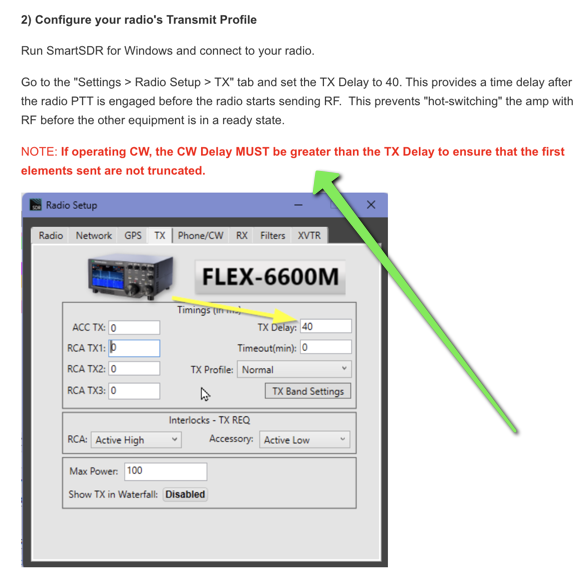
If you have confirmed this setting and are still having issue, please provide the details within a support ticket. At the moment, we are not seeing this a code defect issue, so that is why it is critical to report it.
73
0


Answers
-
Can you try increased your CW Delay to about 125 and see if it goes away.
0 -
I have increased it all the way to 500 and it seems to have no effect.0
-
Hi George, I have been trying to recreate your issue with my 8600 (V 4.0.1 SmartSDR+) and can't seem to get it to fail at any speed or any CW delay setting.
If you haven't already, try exporting your profiles, then do a factory reset. If that doesn't help, try it at low power into a dummy load to see if RF is possibly getting in somewhere. I test this using a second panadapter with the second slice on the same frequency and FDX engaged.
If the problem persists, try cleaning the paddle contacts to see if that could be the issue. To clean mine I draw a piece of clean paper through the contacts while lightly closing them. Don't press too hard, you don't want to leave paper remnants on the contacts.
0 -
If you are having in issue with dropped cw elements, we need some info so we can attempt to recreate it. Right now, we can't. More details is very help. Saying it is broken doesn't help much.
- SmartSDR Version - must be a current version, such as 4.0.1
- Radio model
- CW keying method - paddles if so via radio/Maestro
- Is this a Keyer problem from N1MM?
- Remote Keying via external software
- SmartLink connection
- ATU in used or standby
- PGXL/TGXL engaged
- CW Delay setting?
- TX Delay Setting?
0 -
Understood. Here is the information:
SmartSDR V4.0.1
8600
N3ZN paddles, connected to back of rig
I can key the rig with N1mm and all is well
Not remotely keying
Not using SmartLink
ATU in the rig is in use, none other
No PGXL/TGXL
CW delay doesn't have much effect. Right now at 250
TX delay now set at 2 which has seemed to help even though I am not running a amplifier.
Also, paddle contacts have been cleaned. The paddle works great with my Kenwood 890. This 8600 also has a stutter going from TX to RX that makes it hard to use in high speed CW contests. It is enough of a lag that getting the call sign of callers is difficult but I understand there is a problem number for that.0 -
Set TX Delay to 30ms and see what happens.
73, John K1ESE
0 -
I just tried the 30ms John and hit a couple of beacons so I will see how that goes. Thank you for your help!
George NE5A0 -
Well, I don't have a dream station and am not using an amplifier with the Flex. My CW delay has always been higher than the TX delay because the TX delay has always been set to 0 until I started trying to figure out the missing dits. I have the TX delay set to 30 and the CW delay set at 225 and now I can reliably hit beacons and don't seem to be missing dits.0
-
@George Randolph thanks for the feedback.
0


Leave a Comment
Categories
- All Categories
- 389 Community Topics
- 2.2K New Ideas
- 658 The Flea Market
- 8.4K Software
- 157 SmartSDR+
- 6.5K SmartSDR for Windows
- 186 SmartSDR for Maestro and M models
- 439 SmartSDR for Mac
- 275 SmartSDR for iOS
- 265 SmartSDR CAT
- 204 DAX
- 386 SmartSDR API
- 9.4K Radios and Accessories
- 53 Aurora
- 297 FLEX-8000 Signature Series
- 7.2K FLEX-6000 Signature Series
- 970 Maestro
- 58 FlexControl
- 866 FLEX Series (Legacy) Radios
- 944 Genius Products
- 471 Power Genius XL Amplifier
- 347 Tuner Genius XL
- 126 Antenna Genius
- 307 Shack Infrastructure
- 215 Networking
- 468 Remote Operation (SmartLink)
- 142 Contesting
- 811 Peripherals & Station Integration
- 144 Amateur Radio Interests
- 1.1K Third-Party Software