SmartSDR v4.1.5 | SmartSDR v4.1.5 Release Notes
SmartSDR v3.10.15 | SmartSDR v3.10.15 Release Notes
The latest 4O3A Genius Product Software:
The latest 4O3A Genius Product Software and Firmware
If you are needing assistance with FlexRadio products, please refer to the product documentation or check the Help Center for known solutions. Need technical support from FlexRadio? It's as simple as creating a HelpDesk ticket.
V4 SWR meter display even in RX

Upgraded to V4 radio 6400
I noticed that while in receive, I have a reading on the SWR meter that flickers between nothing and 1.5. Again I'm not Transmitting
My take is that this is a V 4 glitch. Anyone else seeing this?
Comments
-
Can you post a screen shot? Is this in SmartSDR or an M Panel. Is the SWR meter doing double duty as a S Meter as well?
0 -
… and is this on the analog or digital meter (or both)?
0 -
Do you have a nearby AM broadcast station?
AL, K0VM
0 -
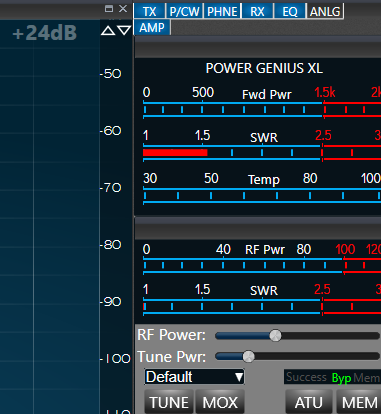
this is just sitting like this with an S1 showing on my S meter . Could be mimicking the S meter, but why?
0 -
also this is not an M model
0 -
Hmmm, I'm not sure about the interface with the Power Genius, but this does look like something do with it specfically. (e.g. the AMP tab)
I'd suggest you open a Help Desk Ticket, as they will be very familiar with what to expect on this part of the interface.
0 -
That is the SWR meter on the PGXL. I would reboot both the radio and the pgxl and see if you still have the issue.
0




Leave a Comment
Categories
- All Categories
- 390 Community Topics
- 2.2K New Ideas
- 664 The Flea Market
- 8.4K Software
- 157 SmartSDR+
- 6.5K SmartSDR for Windows
- 186 SmartSDR for Maestro and M models
- 441 SmartSDR for Mac
- 275 SmartSDR for iOS
- 265 SmartSDR CAT
- 206 DAX
- 386 SmartSDR API
- 9.5K Radios and Accessories
- 59 Aurora
- 297 FLEX-8000 Signature Series
- 7.2K FLEX-6000 Signature Series
- 974 Maestro
- 58 FlexControl
- 867 FLEX Series (Legacy) Radios
- 947 Genius Products
- 473 Power Genius XL Amplifier
- 347 Tuner Genius XL
- 127 Antenna Genius
- 308 Shack Infrastructure
- 216 Networking
- 470 Remote Operation (SmartLink)
- 142 Contesting
- 816 Peripherals & Station Integration
- 144 Amateur Radio Interests
- 1.1K Third-Party Software