SmartSDR v4.1.5 | SmartSDR v4.1.5 Release Notes
SmartSDR v3.10.15 | SmartSDR v3.10.15 Release Notes
The latest 4O3A Genius Product Software:
The latest 4O3A Genius Product Software and Firmware
If you are needing assistance with FlexRadio products, please refer to the product documentation or check the Help Center for known solutions. Need technical support from FlexRadio? It's as simple as creating a HelpDesk ticket.
Losing Radio connection when changing bands with FRStack3 and SmartSDR 4.0.1

I am running FRStack3 v 3.10.20.86. The equipment is a Flex 6600M, TGXL, PGXL and (2) AG's (a master and ****). I am running SmartSDR v 4.0.1. I am having problems changing bands and losing connection to the radio when FRStack3 is loaded and using that to change bands.
To trouble shoot the problem, I did a master reset on the Flex 6000M and created 5 new profiles that involved band changes. When I load FRStack3 and use the profiles to change bands I am getting frequent disconnect. I noticed on the network connection bar on Smart SDR, I get a single red bar and takes often 10-15 seconds before all 5 bars return to green. I am noticing the longer this takes to happen the more chances the radio will disconnect. I did a clean rebuild of the profile to eliminate that as an issue. However, if I do not load FRStack3, when I change bands using SmartSDR by typing in a new frequency on a different band, the switching is immediate and all 5 bars remain green and there are no radio diconnects. The network latency remains excellent when changing bands when not using FRStack3 to change bands. Finally, when I have FRStack3 loaded and do not use it to change bands using the profiles but rather SmartSDR to change, there is no problem. The problem seems to happen when FRStack3 is used to change bands.
Anyone else having this issue?
Randy, KH6XX
Comments
-
Randy, I am running an almost identical setup (only 1 AG here) and use FRStacks to make all band changes. I am not currently having the same problem that you are. I know this does not help you troubleshoot but I did have a similar problem when I upgraded to V4.0.1. The radio would disconnect very often. Not every band change but certainly one in three. After some long troubleshooting I was thinking that it might have been caused by a timing issue with all the traffic that needs to broadcast over the LAN to change all the pieces of equipment. Eventually, I ran across a post of a similar problem that had been reported 8 months ago when the user had upgraded the firmware in the TGXL to the latest version on the 4O3A website (v1.2.20). I had also upgrade several months before and was not having the disconnect issues until I upgraded to SmartSDR v4. So I downgraded the Firmware on the TGXL back to v 2.1.11 and immediately the problem went away. So you might want to check what version your TGXL is using and if it is not V 2.1.11 then you could try downgrading it.
0 -
I am running FW 1.2.11 on the TGXL and FW 4.1.8 on the AGs. I suspect it may have something to do with the AGs. When I do loose the connection I can only see the **** AG when attempting to restart and not the master until the AGs are powered cycled. The only way to clear the problem is to also power cycle the Flex 6600M. A software restart of the radio results in radio not fund. I need to do a cold boot.
0 -
Maybe try taking one of the AG's out of the chain and see what happens. Sorry above I should have typed v 1.2.11 not 2.1.11. Sorry. You are on the same version that are working well for me with only one AG in line.
0 -
Randy, can you open a support ticket for this. There might be a simple fix. thanks
0 -
Opened a ticket on November 20th. Still awaiting a response.
0 -
I don’t remember seeing the ticket from then. Will check the Help Desk system tomorrow.
As far as the master AG not showing, upgrade both AGs to 4.1.16 and see if that resolves the master disappearing.
https://4o3a.com/images/downloads/antenna_genius/windows_application/AntennaGeniusUtility_v4.1.16.exe
We’ve had reports of disconnect issues with 6000 series and TG 1.2.17. In the meantime, downgrade the TG to 1.2.11.
73 Dave wo2x0 -
Hi Randy
Your ticket was closed as a issue with a 3rd party application, FRStack. Please contact the author of FRStack to follow up on. He will engage FRS as required.
You may also want to update your FRStack to the latest version which came out last week.
73
0 -
Resolved Issue: FlexRadio 8600 Rebooting and SmartSDR Blank Panadapter
After carefully monitoring when the radio rebooted and completing the full factory‑reset process typically recommended to resolve this behavior, I identified that the root cause was related to a small number of corrupted profiles. I wanted to avoid rebuilding all of my Mic, TX, and Global profiles from scratch, so I continued troubleshooting until I discovered a consistent pattern.
Ultimately, I found that two Global Profiles were repeatedly triggering either:
- A full reboot of the FlexRadio 8600, or
- A blank panadapter (PAN) display within SmartSDR.
Deleting only those two problematic profiles and recreating them resolved the issue completely.
Detailed Procedure
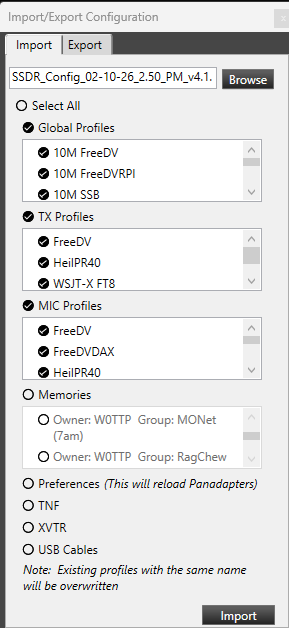
- Exported all radio settings before making changes.
- Performed a full factory reset, following the steps documented by Tim Ellison in the “How to completely reset an Aurora/Flex‑8000/6000” guide.
- Imported only “Custom” profiles, specifically:
- Global Profiles
- TX Profiles
- Mic Profiles
I did not import any built‑in/default profiles.
- Did not import Memories, since those can be reviewed easily via the Excel‑format export.
- Did not import:
- Preferences
- TNFs
- XVTR settings
- USB Cable configurations
- Identified two Global Profiles that consistently caused either radio reboots or SmartSDR display issues.
- Deleted those two profiles, then recreated them manually based on working profile copies.
- After these steps, the radio has been stable with no further issues.
 0
0





Leave a Comment
Categories
- All Categories
- 388 Community Topics
- 2.2K New Ideas
- 658 The Flea Market
- 8.4K Software
- 156 SmartSDR+
- 6.5K SmartSDR for Windows
- 186 SmartSDR for Maestro and M models
- 439 SmartSDR for Mac
- 275 SmartSDR for iOS
- 265 SmartSDR CAT
- 204 DAX
- 386 SmartSDR API
- 9.4K Radios and Accessories
- 53 Aurora
- 297 FLEX-8000 Signature Series
- 7.2K FLEX-6000 Signature Series
- 970 Maestro
- 58 FlexControl
- 866 FLEX Series (Legacy) Radios
- 944 Genius Products
- 471 Power Genius XL Amplifier
- 347 Tuner Genius XL
- 126 Antenna Genius
- 306 Shack Infrastructure
- 215 Networking
- 468 Remote Operation (SmartLink)
- 142 Contesting
- 811 Peripherals & Station Integration
- 144 Amateur Radio Interests
- 1.1K Third-Party Software