SmartSDR v4.1.5 | SmartSDR v4.1.5 Release Notes
SmartSDR v3.10.15 | SmartSDR v3.10.15 Release Notes
The latest 4O3A Genius Product Software:
The latest 4O3A Genius Product Software and Firmware
If you are needing assistance with FlexRadio products, please refer to the product documentation or check the Help Center for known solutions. Need technical support from FlexRadio? It's as simple as creating a HelpDesk ticket.
v2 Flex-6300 after Upgrading to 4.01

Hello Community, today I upgraded my FLEX-6300 from SmartSDR v.2.12.1 to V 4.01.
I should better havent done this!
At the beginning upgrade seems to work, but very fast I mentioned that band changes via CAT causes a hard crash of the radio, only 8 second power button pressing gives a new start. After this the same issue. Using the band change from slice menu does not work even. It closes the slice but does not change the band or frequency. So I decided to downgrad this new software to Smart SDR v.2.12.1 that worked well for many months. The downgrade went to the end of the yellow indicator bar, but the radio came not available. The IP address gave a ping answer. After this try I downgraded to Smart SDRv2.7.6. The downgrade came to an end and the radio seems to be available. After starting SmartSDR, the Slices looked up for 1 second, than the radio crashed again. So I decidedes to go again to V2.12.1. The upgrade does not work, the radio seems to stuck in Boot Mode with blinking power button. No IP answer on his old address, no lookup for further upgrade trys. The radio is bricked now! Thanks very much!
Wat can I do to bring it alive again? All suggestions are welcome. Best 73 de very unlucky DL2KBQ
Comments
-
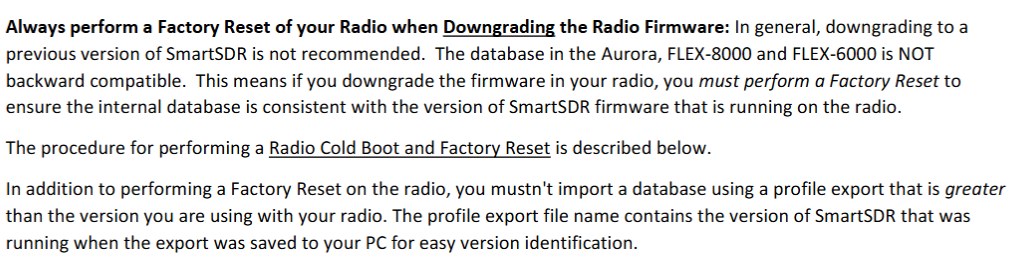
After downgrading, you need to do a factory reset.
0 -
Hello Len, thanks very much for this hint, this helped me out this issue!
Best 73 DL2KBQ
The next issue is there: I have a Problem with Hardware ALC Window, I will make a extra Post.
0 -
I am also seeing a crash on my 6300 on the 4.01 software. Crash happens when I select 80M or just tune SCU into the 3.5MHz to 4MHz range. Strange. Other bands seems fine.
I also found my PGXL was not putting out full power with SSDR 4.01 until I upgraded the PGXL to the latest software. No idea if it was real or just a side effect of resetting everything.
0 -
Hi Asher, you might want to try a factory reset. If that doesn't help, submit a help desk ticket.
1 -
(1a) upgrade seems to work, but very fast I mentioned that band changes via CAT causes a hard crash of the radio
(1b) I am also seeing a crash on my 6300 on the 4.01 software. Crash happens when I select 80M or just tune SCU into the 3.5MHz to 4MHz range.
(2) you might want to try a factory reset
For what it's worth, I saw the same sequence of events. I upgraded to v4.0.1 and saw band changes did not work well at all, then a random sequence of band changes caused the radio to crash. Since I'd never seen the radio crash I was quite surprised. The crash is what made me decide to do the cold boot to factory reset to cold boot sequence and now all is well.0 -
Have to add, same issue here, "bricked" my 6500 with 4.0.1. I just put up an antenna for 160M today so until today, I have not selected the 160M band. Everything was OK prior to today on 6 - 40. I selected 160M from 20M, then suddenly, the radio lost connection, SmartSdr cannot find it.
Powered the radio down, removed power for 5 minutes. Powered up, retried, radio found everything seemed fine. Selected 160M again and display stayed on 20M (Where I was when secting 160). Redio lost connection again.
Peformed a hard reset, no change to the above.
I have just downgraded back to 3.10.15 and see how that goes.
Mike KF9AF
Edit - Everything appears to be working fine after downgrading to 3.10.15.
0 -
Please open a support ticket. there is no reason that v4 should be causing this issue. If you downgraded, reset the radio and rebooted the radio and still had the same issue, then it is something that needs to be looked into.
1 -
I am having the same issue with my FLEX 6300 after upgrading to 4.01. I get a hard crash changing band to 30m. All other bands work fine. So, I downgraded back to 3.9 and am still having the same issue. Never experienced this before.
73
Mark
KK2L
0 -
I am also having an issue that sounds very much like this one, only I have not upgraded to version 4.01 yet. I am currently on 3.9.19 and have had the issue for about six months. In my case, it occurs when either WSJT-X or FRStack3 changes frequencies on the radio. FRStack3 does this via a profile change. Several of the times, it occurred here involved the 6M band, but I have seen it happen with other bands as well. The bad part is my problem may happen multiple times in a row and then not again for several days.
0 -
Mark and Rick
Does the problem still occur after resetting the radio?
Let us know.
0 -
Thanks Mike for the suggestion!
I reset the radio and so far the problem has not occurred again. In my case, the problem was intermittent so only time will tell if it has really been corrected.
Rick - N4RZ
0 -
Sometimes importing the v3 profiles can cause an issue. There might have been some corruption on the original v3 profile. We haven't had time to get to the bottom of it just yet.
Glad to hear it better now.
0 -
I got burned by this right in the middle of CQWW this weekend. I had noticed some flakeyness after updating to 4.0.1, but it was changing to 160m that finally put the nail in the coffin. The radio initially refused to go to 160 and stayed on 80. Crazy to see for sure. But once I convinced it, I was done and unable to connect again.
Sadly, I had done a lot of recent work on my profiles that I hadn't backed up yet. Oh well. As everyone says, a full reset fixed the issue. I made the classic mistake of not exporting before upgrading. Duh.0 -
"Hi everyone! Same problem for me, I upgraded to 4.01 and as soon as I QSY to below 30m the radio (6400) crashes. I opened a ticket and got a new SD card, now it’s impossible to get SmartLink working..
0 -
I upgraded from v3.4.24 to v4 on my 6600. Can't get past radio selection, when I click SELECT, the radio goes belly-up. I put in a service request. Looking forward to a fix.
0 -
You didn't mention you did a cold restart.
If that doesn't help you out, did you try to reset the radio? That should resolve most things.
73
0 -
Following helpdesk (Tim) advice I performed a comprehensive cold boot and factory reset using precise timing at steps this afternoon.
The 6600 is now working.
I have not delved into the profiles, CAT, or DAX. It looks like a job for pencil and paper notes, if the data got corrupted before or after the upgrade, it would do no good to regurgitate that back into the machine.
For now, I am pleased to have the blue glow back.
1






Leave a Comment
Categories
- All Categories
- 388 Community Topics
- 2.2K New Ideas
- 658 The Flea Market
- 8.4K Software
- 156 SmartSDR+
- 6.5K SmartSDR for Windows
- 186 SmartSDR for Maestro and M models
- 439 SmartSDR for Mac
- 275 SmartSDR for iOS
- 265 SmartSDR CAT
- 204 DAX
- 386 SmartSDR API
- 9.4K Radios and Accessories
- 53 Aurora
- 297 FLEX-8000 Signature Series
- 7.2K FLEX-6000 Signature Series
- 970 Maestro
- 58 FlexControl
- 866 FLEX Series (Legacy) Radios
- 944 Genius Products
- 471 Power Genius XL Amplifier
- 347 Tuner Genius XL
- 126 Antenna Genius
- 306 Shack Infrastructure
- 215 Networking
- 468 Remote Operation (SmartLink)
- 142 Contesting
- 811 Peripherals & Station Integration
- 144 Amateur Radio Interests
- 1.1K Third-Party Software