Welcome to the FlexRadio Community! Please review the new Community Rules and other important new Community information on the Message Board.
The latest SmartSDR Software:
SmartSDR v4.2.20 | SmartSDR v4.2.20 Release Notes
SmartSDR v3.10.15 | SmartSDR v3.10.15 Release Notes
The latest 4O3A Genius Product Software:
The latest 4O3A Genius Product Software and Firmware
SmartSDR v4.2.20 | SmartSDR v4.2.20 Release Notes
SmartSDR v3.10.15 | SmartSDR v3.10.15 Release Notes
The latest 4O3A Genius Product Software:
The latest 4O3A Genius Product Software and Firmware
How to Receive Technical Support::
If you are needing assistance with FlexRadio products, please refer to the product documentation or check the Help Center for known solutions. Need technical support from FlexRadio? It's as simple as creating a HelpDesk ticket.
If you are needing assistance with FlexRadio products, please refer to the product documentation or check the Help Center for known solutions. Need technical support from FlexRadio? It's as simple as creating a HelpDesk ticket.
Maestro C Female RJ-45 Connector Missing Locking Tab?
Options

Clint Walker
Member ✭
in Maestro
Hi,
I bought a new to me but unopened box Maestro C and 6400 from the estate of a silent key. The Maestro was shipped in October and still factory sealed when I got it. The Maestro appears to be missing the locking tab and the ethernet cable will fall out if you move the Maestro. Am I missing something here? The cable is fine.
73, Clint
I bought a new to me but unopened box Maestro C and 6400 from the estate of a silent key. The Maestro was shipped in October and still factory sealed when I got it. The Maestro appears to be missing the locking tab and the ethernet cable will fall out if you move the Maestro. Am I missing something here? The cable is fine.
73, Clint
0
Answers
-
Hmmm…. My Maestro C has the "normal" RJ-45 socket, and there is no particular "locking tab" - just the connector's own, usual small recess opposite the wire-connections.
The locking tab to secure the cable is built into the cable-end connector itself. The cable should not simply pull out. Like the top portion in this photo:
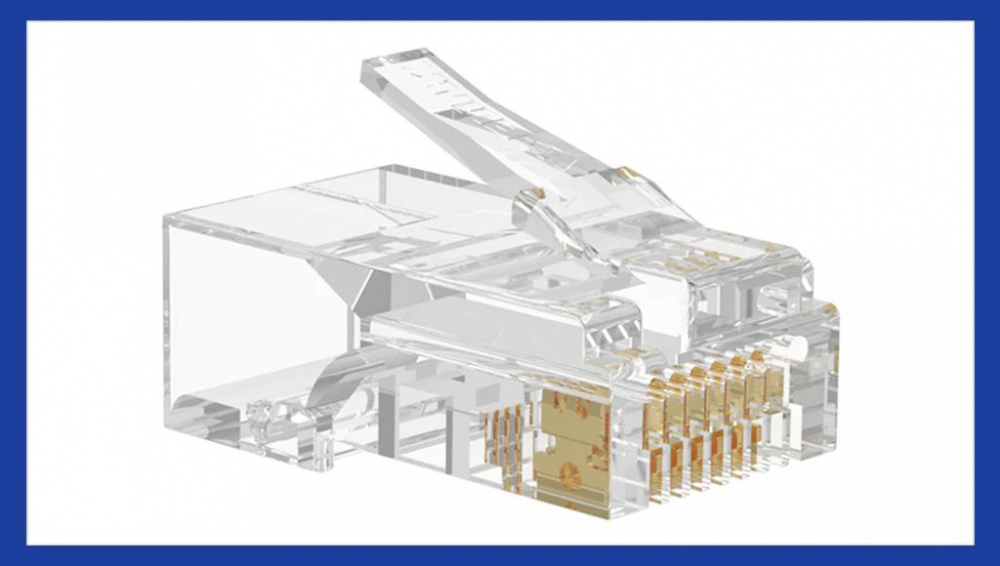
Again - the network cable should NOT just fall out. You're right to be suspicious of a problem. And I hope my description may help you toward a solution - which, hopefully, may be as simple as a new cable, or an adjustment of the latch.
Best wishes for enjoyment of the new-to-you setup!
0 -
I haven;t figured out how to post a pic here but the female RJ-45 on the Maestro seems to be missing the locking tab. The connector on the 6400 has the locking tab. It is definitely not a cable problem.
Clint0


Leave a Comment
Categories
- All Categories
- 401 Community Topics
- 2.2K New Ideas
- 689 The Flea Market
- 8.6K Software
- 196 SmartSDR+
- 6.6K SmartSDR for Windows
- 200 SmartSDR for Maestro and M models
- 460 SmartSDR for Mac
- 279 SmartSDR for iOS
- 268 SmartSDR CAT
- 220 DAX
- 395 SmartSDR API
- 9.6K Radios and Accessories
- 109 Aurora
- 348 FLEX-8000 Signature Series
- 7.2K FLEX-6000 Signature Series
- 999 Maestro
- 58 FlexControl
- 872 FLEX Series (Legacy) Radios
- 975 Genius Products
- 482 Power Genius XL Amplifier
- 358 Tuner Genius XL
- 135 Antenna Genius
- 321 Shack Infrastructure
- 226 Networking
- 483 Remote Operation (SmartLink)
- 145 Contesting
- 847 Peripherals & Station Integration
- 147 Amateur Radio Interests
- 1.1K Third-Party Software