SmartSDR v4.1.5 | SmartSDR v4.1.5 Release Notes
SmartSDR v3.10.15 | SmartSDR v3.10.15 Release Notes
The latest 4O3A Genius Product Software:
The latest 4O3A Genius Product Software and Firmware
If you are needing assistance with FlexRadio products, please refer to the product documentation or check the Help Center for known solutions. Need technical support from FlexRadio? It's as simple as creating a HelpDesk ticket.
WSJT-X not tracking 8600 Frequency

New 8600 here. When I load a global profile, say 10M FT8, the frequency displayed in WSJT-X does not change. The radio changes frequency as expected. I do see the 10M signals in WSJT-X but the frequency displayed is the previous one.
If I select a band/frequency in WSJT-X the radio changes to that frequency.
This worked with the previous 6400
What am I missing.
Answers
-
Apologies… I forgot to mention that I had Stacks open. I failed to connect Stacks to the radio.
Not sure if I understand the connection, but it appears to work now.
0 -
FRStack doesn't normally communicate with WSJT at all, so I doubt that is part of your issue.
It sounds like you do not have WSJT configured correctly under the Radio settings. It needs to connect to the CAT port you defined in CAT.
Or, if you use SliceMaster, you can bypass those settings as it does the interface differently.
73
0 -
Hi Mike,
I tested the CAT and PTT buttons in WSJT and both were successful.
I did not have SliceMaster open.
So at this time it will remain a mystery.
Other than that blip, everything went smoothly integrating the 8600 into the rest of the system.
0 -
OK, so I'm still having problems. The radio is using Slice A, it looks to me that the ports are set correctly. What am I missing? WSJT will decode the signals on the 8600 frequency but the frequency displayed in WSJT is not the same as the 8600. The CAT test button in WSJT turns green when clicked. I tried the loopback address as well as the actual IP address with no difference.
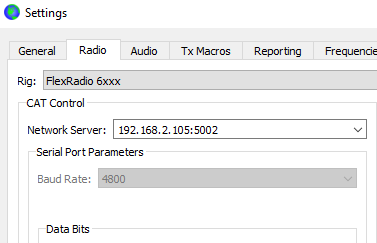
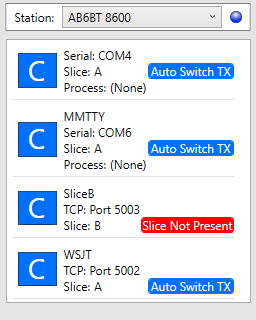
Thanks…
0 -
Hi Geoff, try this address in the Network Server box:
127.0.0.1:5002
0 -
Hi Len,
As I mentioned, I initially had the loopbak address.
0 -
Windows Firewall?
0 -
Nope, It works if I swap the 8600 for my 6400. So some other thing?
0 -
You might want to use SliceMaster to open WSJT or JTDX, etc. It will handle the radio communications and then it makes it easy to run multiple copies of each if you wish.
0 -
Hi Mike, well That doesn't resolve the issue. I've never had a problem in the past getting WSJT to work with either a 6400 or 6600.
I'd really like to get to the bottom of this so I understand what is not configured properly.
What else could be causing this?
Thanks.
0 -
Just as an experiment: download the latest JTDX
Install, configure (same as in WSJTx). Do not run it yet…probably ok to do so but better to update HamLib first from within JTDX
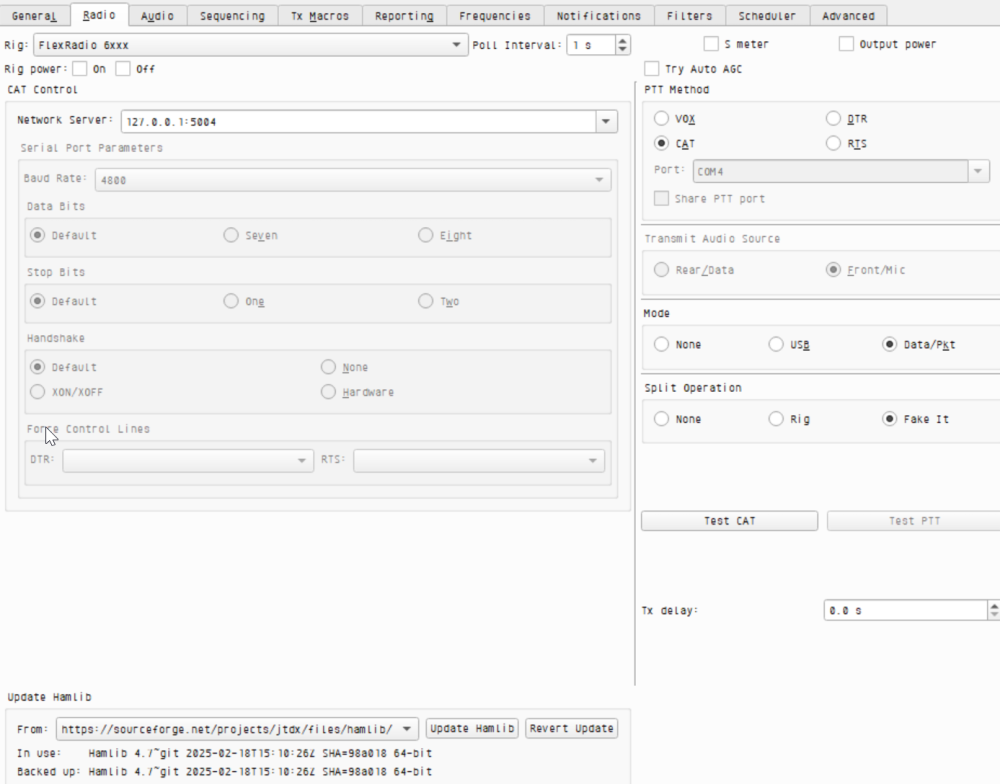
Your port is 5002 and not as above.
After the update, restart JTDX.
Does it track the radio?
0 -
Erik…Thanks, I will give that a shot.
I may try reinstalling WSJT-X as well. I have not tried that yet.
0 -
If you don't mind, can you summarize the problem again and what is the expectation with the Global Profile?
If this is all on the same machine, always use the loopback address.
Using the loopback IP address (127.0.0.1) enhances security by ensuring that the service is only accessible from the same machine. This prevents any external system from connecting to the service, effectively isolating it from the network. In contrast, binding to the machine's actual IP address could unintentionally expose the service to other devices on the network, increasing the risk of unauthorized access or attacks.
Also, are you sure you don't have any port conflicts? Every instance of WSJT will have to use a different port number. In Windows (and all operating systems), every application that listens for incoming network connections must use a unique combination of IP address and port number because the operating system uses this combination to route traffic correctly.
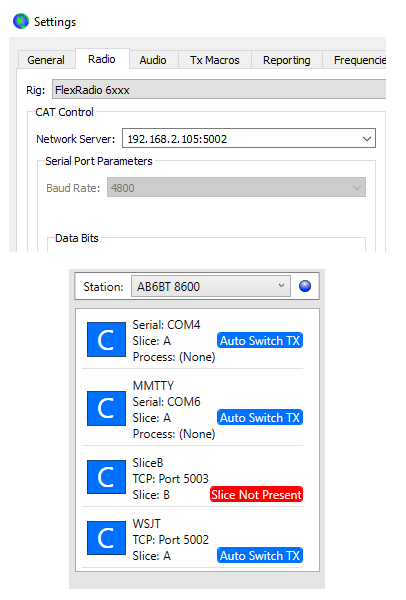
When I use SliceMaster, this is what the radio setup looks like.
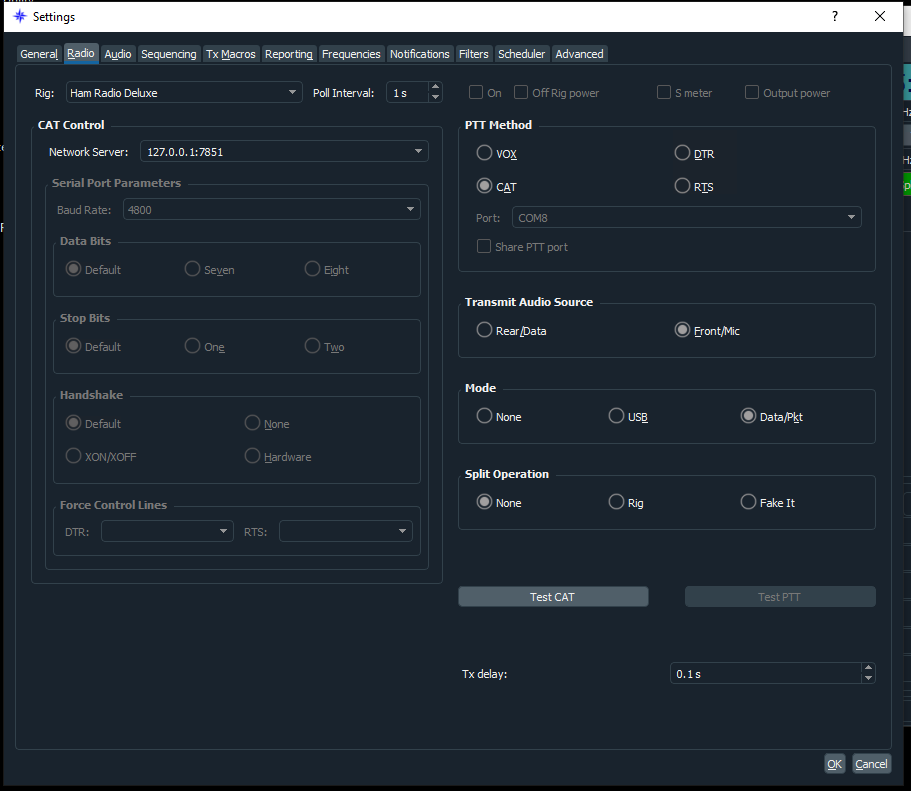 0
0 -
Hi Mike,
As I stated in my post, I initially used the loopback address and it always worked for me. The actual IP address was a desperation move to see if it made any difference.
Thanks for the suggestion.
I don't know if it is important but when I change the frequency in WSJT the radio follows. Just not in the other direction.
0 -
I have the 6400 and I am having the exact same problem. But never had it before. All of a sudden if I switch frequency from WSJT the radio changes to the frequency. If I change the frequency at the radio the freq does not change on WSJT. Did something happen with a windows update?
0 -
OK, well here's the PICNIC error. In WSJT-X I needed to have the IP Address of the radio, not the loopback address or the IP Address of the PC.
Chalk one up…😫
0 -
How it works is that WSJT only communicates with SmartSDR CAT. This can either be via a Virtual Serial Port or via an IP Address:Port protocol. SmartSDR CAT that takes the Kenwood CAT formatted message and sends it to the radio. It is the only way WSJT, JTDX, FLDigi, etc. work on a FlexRadio and that is reason we have SmartSDR CAT.
I know you send if you use the IP address of the radio it worked, but I think you might have your addresses confused as that just isn't possible. They talk totally different protocols.
This configuration you posted is 100% correct except we always recommend using 127.0.0.1 to eliminate any firewall issues. Also, make 100% sure that nothing else is using port 5002. For fun, change it to 15002 on both WSJT and CAT and see if the problem goes away. The number isn't critical at all. It just has to be the same on both ends. Windows might be messing up the IP stack.
I just heard today that we have some people having an issue. However, we have been unable to recreate it in a lab environment.
What I need you to do is open a support ticket regarding this with it failing. In the ticket, I need you to include the CAT log. Do this after you have tested with a different port number.
- Highlight the CAT port (5002)
- Click LOG at the bottom of the CAT window
- Test with it failing and keep track of what you did so we can try to follow it
- High light all the text in the log and send it in with your support ticket.
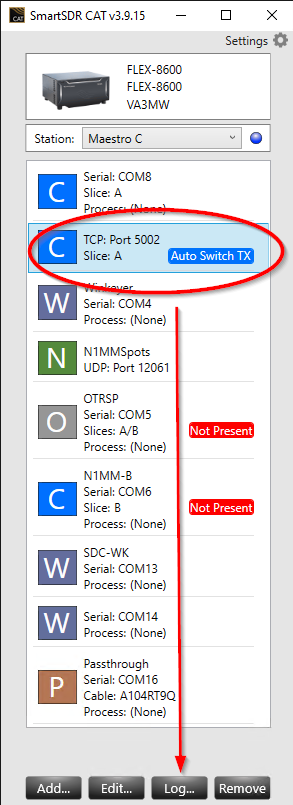
The log is very helpful and shows all the command moving back in forth. Keep track of the timestamps so we know where to look and at what time. It is very important if you did something in WSJT but nothing showed up in the log.
The support team is 'way' backed up, so it might be a few days before you hear back.
0 -
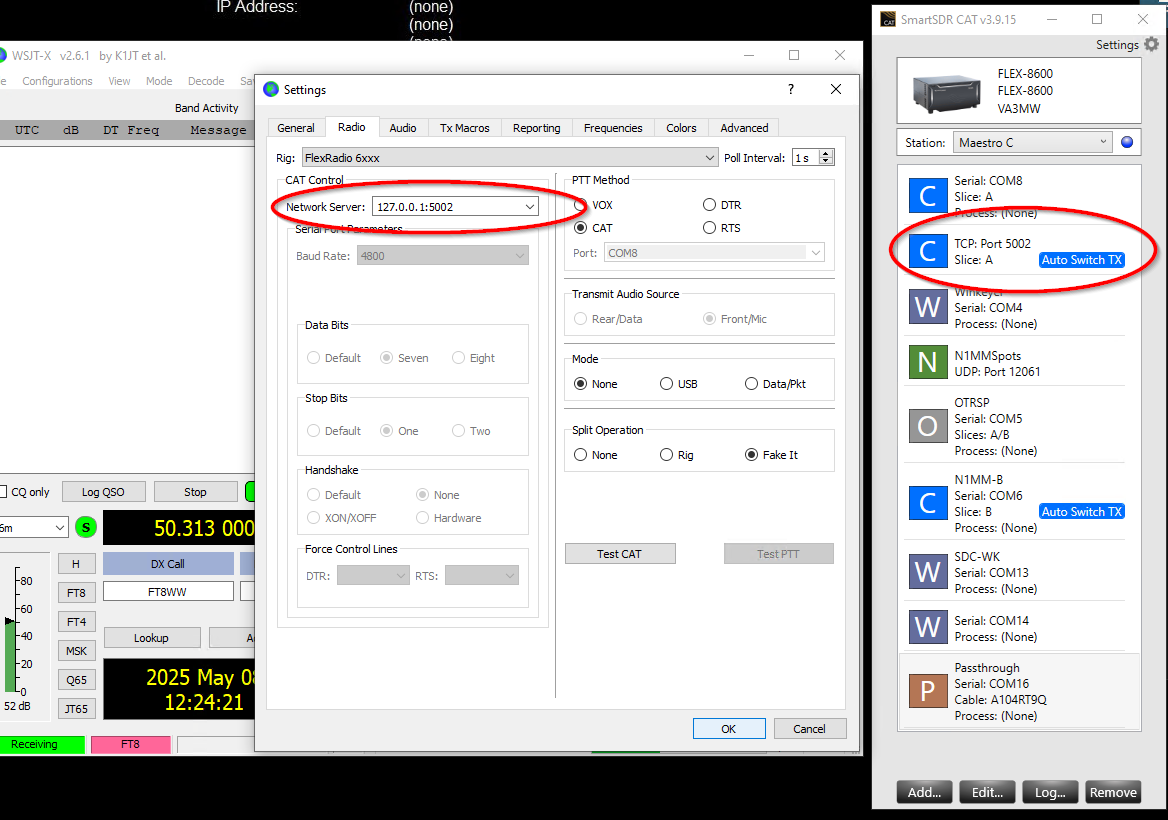
This morning, I set up my 8000 exactly the way yours is set up. This is a FLEX-8600.
I could not recreate your problem at all. I was able to change frequency from both the radio and WSJTx v2.6.1 without issue. Is there any chance some other application is using port 5002 at the same time?
You might want to try a different computer. Installed SmartSDR on another computer as a test and see if you can recreate the issue.
 0
0 -
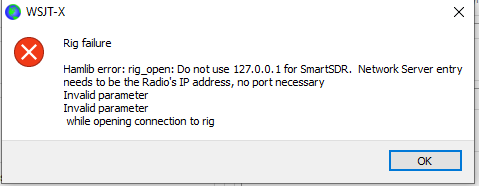
Mike this is what I see if I use the loopback address:
 0
0 -
Well… that is interesting. News to me and it clearly does say 'rig'.
What version of WSJT is that? And, are there notes anywhere that elaborate on that connection?
Due to Hamvention, I can dig into this anymore today, but this is interesting.
0 -
Here is the version:
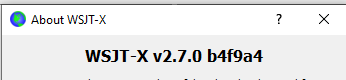
Carry on and thanks for your assistance.
0 -
I have not seen that error but I couldn't get my laptop to connect to the 8600 radio either but connected to my 6700, I'm sure you have already done so but I downloaded the NEWEST version of HAMLib and the newest version of WXJT-X made sure both my CAT ports where the same but NOT the default (5002) documented ports in both CAT and WSJT-X and it started working using the 127.0.0.1:50012 Address and Port. Not sure if this will help you but it works for me
73
Bret WX7Y
0 -
Mike
I am having a similar problem with my SSDRCAT on new 8600.My sdrCAT is TCP:Port 60010 on slice A. SSDR and WSJT only.
Starting SSDR with sdrCAT & sdrDAX set to Auto Start. When WSJT first starts it will change to what ever frequency SSDR is set at. Selecting at different SSDR profile or frequency WSJT will not change to that frequency. If I change WSJT to new Band SSDR follows, but WSJT will not with a new profile or frequency change.I have the same problem with fldigi 4.1.20 using Serial Comm 13 Slice A. Will not follow SSDR profile or frequency changes.
What I found
If I start sdrCAT & sdrDAX first or have sdrCAT & sdrDAX not Auto Start. Starting SSDR and then connecting both sdrCAT & sdrDAX manually. WSJT follows all profile or frequency changes correctly. I tried just sdrCAT not Auto Starting but the problem still occurred. Both have to be no Auto Start.Also when the problem occurs, I close both sdrCAT & sdrDAX and manually start each WSJT and SSDR work correctly.
I do have a srdCAT Log if needed when failure occurs.
Win !! pro 24H2
SSDR v3.8.23
WSJT v2.7.0Hope this helps
**** KC9YRA
1 -
Bret…When I click the update HAMlib botton in WSJT-X I get a TLS error and the update fails.
Did you download HAMlib outside of WSJT-X?
Thanks.
0 -
I'll need you to follow up with support please so that the log information is correctly collected.
0 -
I went to the HAMLIB site and Downloaded the latest version and installed it then I installed the Latest 64K version of WSJT-X from their WEB site, Most of the Programs that I have the update 3rd party software I run here DON'T work right and I have to manually maintain update these which I would rather do anyway.
0 -
Bret…Thanks, I'll give it a try later today
0 -
We are having some internal discussions on this with some of our hams on staff not having an issue. In order to pursue this further we ask that you:
- Be using the latest version of WSJTx or JTdx
- HamLib is up to date. This is critical
- Check for port conflicts - don't guess
- SmartSDR 3.8.23 (or 3.9 when it comes out in the next few weeks)
If you are having an issue, then in your posting clearly explain how you are configured.
FlexRadio support will not help you configure your system. However, they will help if, once it is confirmed your configuration is correct, to report it if the radio does not do as expected.
Personally, my configuration is using SliceMaster to launch WSJTx, JTdx, etc and it 'just works'. Other in house hams are using the TCP connection using 127.0.0.1 to SmartSDR CAT and between the bunch of them they are not having an issue with either the 6000 or 8000.
thanks
0 -
Thanks Mike,
I'll be able to get to this later today. It could well be that HamLib is the problem.
One thing I noticd with the most current WSJT-X version is that it lists FlexRadio by slices instead of just one FlexRadio selection.
Thanks.
0 -
That would make sense. Each slice should be treated as a unique radio/receiver.
0








Leave a Comment
Categories
- All Categories
- 389 Community Topics
- 2.2K New Ideas
- 659 The Flea Market
- 8.4K Software
- 157 SmartSDR+
- 6.5K SmartSDR for Windows
- 186 SmartSDR for Maestro and M models
- 439 SmartSDR for Mac
- 275 SmartSDR for iOS
- 265 SmartSDR CAT
- 204 DAX
- 386 SmartSDR API
- 9.4K Radios and Accessories
- 53 Aurora
- 297 FLEX-8000 Signature Series
- 7.2K FLEX-6000 Signature Series
- 971 Maestro
- 58 FlexControl
- 867 FLEX Series (Legacy) Radios
- 945 Genius Products
- 472 Power Genius XL Amplifier
- 347 Tuner Genius XL
- 126 Antenna Genius
- 307 Shack Infrastructure
- 215 Networking
- 468 Remote Operation (SmartLink)
- 142 Contesting
- 813 Peripherals & Station Integration
- 144 Amateur Radio Interests
- 1.1K Third-Party Software