SmartSDR v4.2.20 | SmartSDR v4.2.20 Release Notes
SmartSDR v3.10.15 | SmartSDR v3.10.15 Release Notes
The latest 4O3A Genius Product Software:
The latest 4O3A Genius Product Software and Firmware
If you are needing assistance with FlexRadio products, please refer to the product documentation or check the Help Center for known solutions. Need technical support from FlexRadio? It's as simple as creating a HelpDesk ticket.
FRStack's SteppIR/SDA-100 not tracking frequency
I'm running a 6500, SteppIR SDA 100 with FRStack. I have the SDA 100 connected to FRStack, all "buttons" on FRS's SteppIR window DO work, but Antenna Frequency does not follow the Slice Frequency whether I select Autotrack or not.
SDA 100 "Transceiver Setup" is set to Kenwood, 9600 and I'm using the Data Out port. Windows 10 Device Manager shows my COM port also at 9600.
FRS Stack - "Radio" is connected with menu options selected for "Follow Radio Active Slice" and "Active Slice Enable TX". I have functional band stacking. My SPE amp is connected and all "buttons" work, but for some reason, the SDA 100 won't follow the frequency.
Seems like it's something simple I may be missing?
Mike KF9AF
Comments
-
Mike
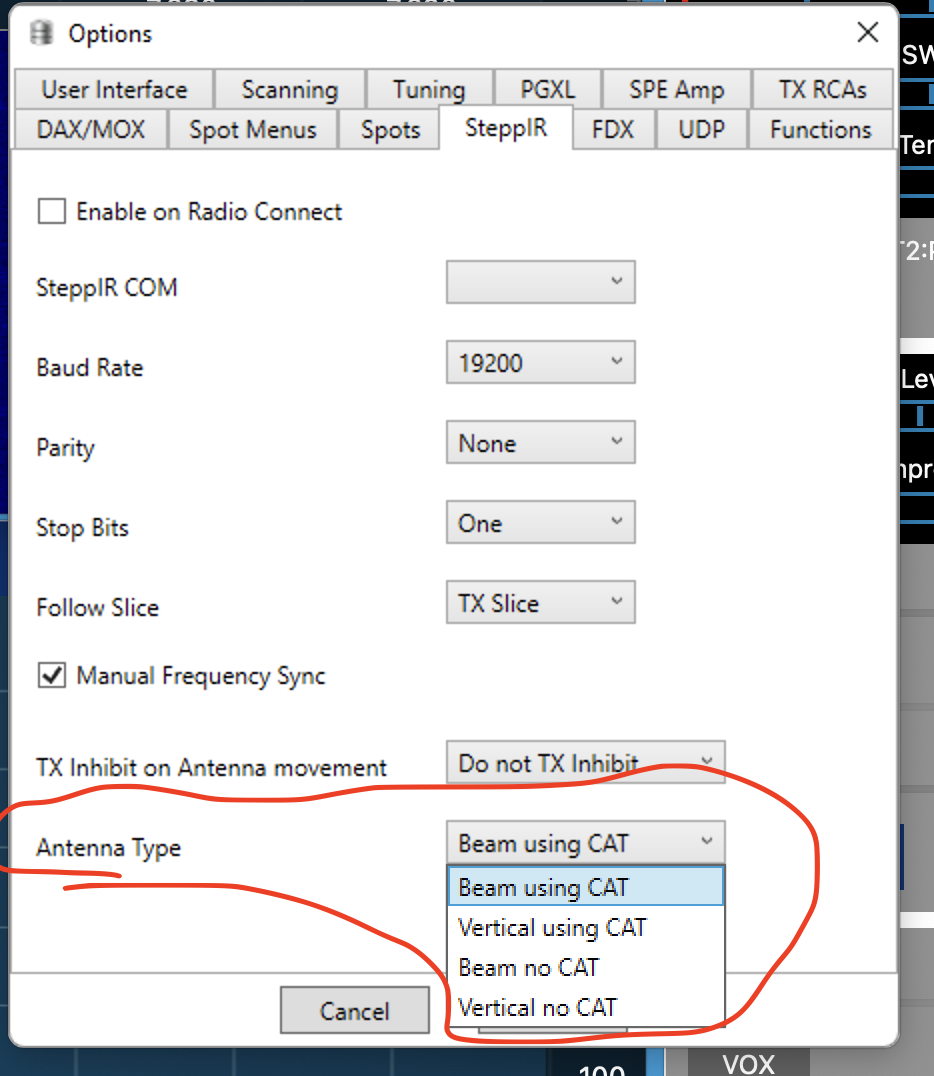
You did not mention how you have the SteppIR Options set up for "Antenna Type" and for "Manual Frequency Synch".
If you want to control the SDA100 frequency from FRStack, be sure to select the "no CAT" option for your antenna type. The "CAT" option, is used when the transceiver is directly connected to the upper DB9 of the SDA100.
If you want, or not to control the SteppIR Antenna from moving with a VFO freque3ncy change, select the check box for "Manual Frequency Synch.
Alan. WA9WUD
 1
1 -
Alan,
You specifically noted the one setting that made the SDA 100 track frequency. I had "Beam using CAT" selected. Changed that to "Beam no CAT" and it is now tracking.
This Community is AWESOME!
Thank you!
Mike KF9AF
0


Leave a Comment
Categories
- All Categories
- 398 Community Topics
- 2.2K New Ideas
- 678 The Flea Market
- 8.6K Software
- 191 SmartSDR+
- 6.6K SmartSDR for Windows
- 196 SmartSDR for Maestro and M models
- 456 SmartSDR for Mac
- 278 SmartSDR for iOS
- 267 SmartSDR CAT
- 218 DAX
- 392 SmartSDR API
- 9.6K Radios and Accessories
- 91 Aurora
- 335 FLEX-8000 Signature Series
- 7.2K FLEX-6000 Signature Series
- 988 Maestro
- 58 FlexControl
- 872 FLEX Series (Legacy) Radios
- 962 Genius Products
- 478 Power Genius XL Amplifier
- 352 Tuner Genius XL
- 132 Antenna Genius
- 317 Shack Infrastructure
- 222 Networking
- 480 Remote Operation (SmartLink)
- 143 Contesting
- 845 Peripherals & Station Integration
- 147 Amateur Radio Interests
- 1.1K Third-Party Software