SmartSDR v4.2.20 | SmartSDR v4.2.20 Release Notes
SmartSDR v3.10.15 | SmartSDR v3.10.15 Release Notes
The latest 4O3A Genius Product Software:
The latest 4O3A Genius Product Software and Firmware
If you are needing assistance with FlexRadio products, please refer to the product documentation or check the Help Center for known solutions. Need technical support from FlexRadio? It's as simple as creating a HelpDesk ticket.
Interfacing LOG40M without SliceMaster?

Is it possible to integrate LOG40M with a flex 6xxx series without using SliceMaster? the User Guide from Log40m only talks about using Slicemaster and Hamlib. Slicemaster is nice, but I don't really need it.
If others are using Log40M without S/M, I'd really like to hear how they have the settings in Log40M and Flex set up.
Thanks.
Comments
-
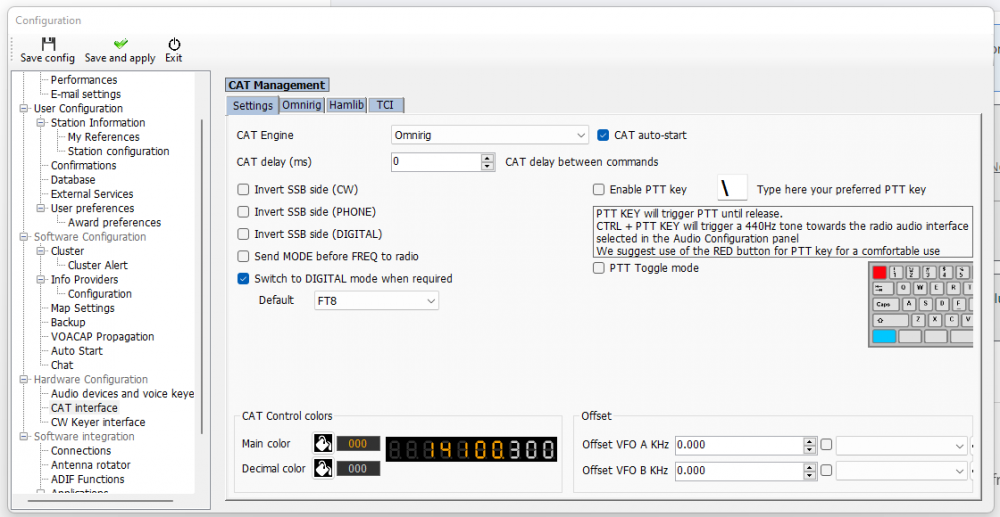
I use Log4OM and don't have Slicemaster. Here are settings I use on Log4OM and Flex/CAT:


 0
0 -
Thanks jlyonmn....this is great. Much appreciated.
Did you have to install omnirig separately from Log4om?
0 -
If I remember right (it was over a year ago), there were two versions of Omnirig - a newer and an older version. You need to install the old version. DX Atlas: Amateur Radio software
I had quite a slog getting these programs to talk to each other but hopefully you should have an easier time of it. If you get stuck, I would be happy to connect with you via Zoom or Teams for some screen-sharing.
Jeff
0 -
Thanks Jeff, much appreciated! I now have it working.
As you said, v2.1 of Omnirig doesn't want to work with Log40M. With your link, I found v1.2 and installed it.
I'm not doing FT8, so I didn't bother with the sound settings in Log40M.
Also, for others, the steps are:
a) Run OmniRig. Make sure the parameters are as shown above (except select the appropriate COM port from SmartCat. DON'T click OK at the bottom. -- that will shut off OmniRig and then SmartCAT won't connect to it. Just leave the screen up.
b) Run SmartSDR. Make sure you have selected to have SmartCAT initiate automatically. If you want, you can check that OmniRig is connected by looking at the SmartCAT screen. Under the COM port, it should show 'omnirig'
c) Run Log40M and everything should be connected.
0 -
Congratulations Don!
The Log4OM user forum is a very good source for information about the "how to" questions re. Log4OM. Although the guy who runs it seems more than a bit crabby most of the time. He will usually refer users to the operating manual.
Jeff
0


Leave a Comment
Categories
- All Categories
- 395 Community Topics
- 2.2K New Ideas
- 674 The Flea Market
- 8.5K Software
- 187 SmartSDR+
- 6.5K SmartSDR for Windows
- 192 SmartSDR for Maestro and M models
- 454 SmartSDR for Mac
- 276 SmartSDR for iOS
- 267 SmartSDR CAT
- 216 DAX
- 389 SmartSDR API
- 9.5K Radios and Accessories
- 87 Aurora
- 325 FLEX-8000 Signature Series
- 7.2K FLEX-6000 Signature Series
- 983 Maestro
- 58 FlexControl
- 869 FLEX Series (Legacy) Radios
- 959 Genius Products
- 477 Power Genius XL Amplifier
- 351 Tuner Genius XL
- 131 Antenna Genius
- 313 Shack Infrastructure
- 218 Networking
- 476 Remote Operation (SmartLink)
- 143 Contesting
- 836 Peripherals & Station Integration
- 146 Amateur Radio Interests
- 1.1K Third-Party Software