SmartSDR v4.1.5 | SmartSDR v4.1.5 Release Notes
SmartSDR v3.10.15 | SmartSDR v3.10.15 Release Notes
The latest 4O3A Genius Product Software:
The latest 4O3A Genius Product Software and Firmware
If you are needing assistance with FlexRadio products, please refer to the product documentation or check the Help Center for known solutions. Need technical support from FlexRadio? It's as simple as creating a HelpDesk ticket.
API Command For Multiplex PTT Client Selection


Answers
-
I think what you're looking for is in the SmartSDR v3.x Migration Guide. If not, let me know specifically what you're wanting to do and I'll see what I can do to help. You can also reach out via email to devhelp@flexradio.com for things like this. Best wishes and Happy Holidays.
1 -
Thanks for posting this Eric, I really appreciate it. I think the API Wiki is getting a bit out of date, and this fills in the holes for the client commands.
0 -
Erik
I want to command the "local_ptt" to change. Same as shown in my original message, Smart SDR above, when you push the "enable" button.
I found this in the Flex.Lib, but it does not work, when sent from my Non-GUI Client:
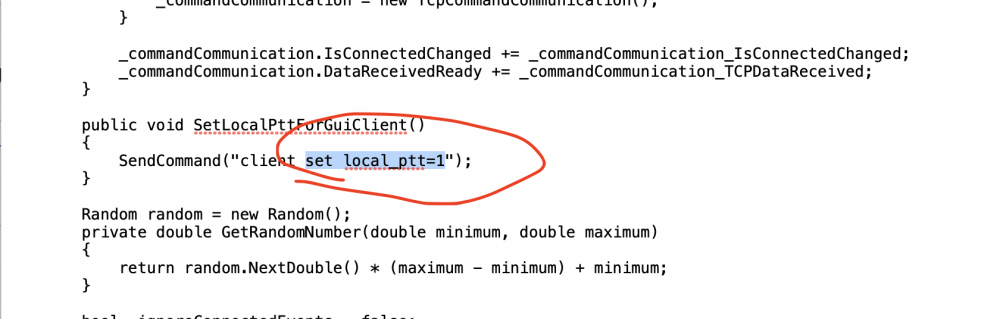
I also tried Wire Shark from my Smart SDR GUI Client, but, no command is seen on WireShark, but I do see the GUI status change response:

Alan. WA9WUD
0 -
Hi Alan, did you bind your non-GUI client to a GUI client first? I am guessing that you did, but thought I would ask, just in case ...
I wonder if you need to specify the client id or client handle in the command. Unfortunately, I can't experiment with it at the moment, or I would try some things out.
0 -
Len
Thanks for checking. I also had to check myself...and yes, the Non-GUI Client was bound to the GUI Client.
Although....when you want to move the PTT client, using the GUI Client, you go to settings>multiplex, and if the GUI Client is not the PTT_Client, the "Enable" button is shown. Clicking on the button moves the PTT_Client to that GUI Client. Otherwise, if the GUI Client is already the PTT_Client, the "Enable" button is not shown. So....this indicates to me, that normal non-GUI binding to a GUI Client", may not be how this ("client set local ptt=0/1") is done.
Alan
0 -
Interesting... It may be that this command is only intended for a GUI client to execute. I wonder if (contrary to the documentation), use of a Client_Id in the command will have the desired effect. A long shot, I know, but maybe worth the time to try.
If that is not it, Eric's offer to help may be the way to go.
0 -
Erik and others.
I want to add a button to my Node-Red dashboard, to change the "Local PTT Client".
Both the Flex.lib and the Multiplex Transition guide point to using this command to change the Client PTT:
"client set local_ptt=<0/1>"
However, after I bind the Non-GUI Client to a GUI-Client (not sure this is necessary), when I send the above local_ptt, command from the Non-GUI Client, I get the following command response:
"Invalid command for this client type (SSL vs TCP or GUI vs NON-GUI)"
Also, strange, as I mentioned earlier, when I WireSharked the TCP packets, from my Smart SDR (GUI Client) to the Flex Server, when I pushed the "Enable Button" on the "settings>multiplex" panel, I do not see any TCP commands, but do see the TCP Flex Response? (See Screenshots, below, for the button I pushed and Wire Shark TCP follow).
Help, there must be more to the "client set local_ptt=..." command then what is apparent??
Alan. WA9WUD

Wire Shark TCP Follow:
 -1
-1 -
Did anyone ever figure this out? I am looking for the command also.
0 -
Hi Gary
The command A,an posted above needs to be sent from the GUI client. Node Red for example is bound to a client and cannot send the command to the radio. It needs to originate from the Actual client (Maestro, PC running SmartSDR, etc).
Dave wo2x
0 -
Hi Dave,
Thanks for the explanation. That makes sense, though unfortunate.
Gary
0 -
Maybe someone from Flex can chime in if there is either a way or maybe in a future API update.
I guess the reason is to ensure no one can “hijack” your client. Just a guess.
Dave wo2x
0





Leave a Comment
Categories
- All Categories
- 390 Community Topics
- 2.2K New Ideas
- 662 The Flea Market
- 8.4K Software
- 157 SmartSDR+
- 6.5K SmartSDR for Windows
- 186 SmartSDR for Maestro and M models
- 440 SmartSDR for Mac
- 275 SmartSDR for iOS
- 265 SmartSDR CAT
- 204 DAX
- 386 SmartSDR API
- 9.4K Radios and Accessories
- 55 Aurora
- 297 FLEX-8000 Signature Series
- 7.2K FLEX-6000 Signature Series
- 971 Maestro
- 58 FlexControl
- 867 FLEX Series (Legacy) Radios
- 945 Genius Products
- 472 Power Genius XL Amplifier
- 347 Tuner Genius XL
- 126 Antenna Genius
- 308 Shack Infrastructure
- 216 Networking
- 468 Remote Operation (SmartLink)
- 142 Contesting
- 814 Peripherals & Station Integration
- 144 Amateur Radio Interests
- 1.1K Third-Party Software