SmartSDR v4.1.5 | SmartSDR v4.1.5 Release Notes
SmartSDR v3.10.15 | SmartSDR v3.10.15 Release Notes
The latest 4O3A Genius Product Software:
The latest 4O3A Genius Product Software and Firmware
If you are needing assistance with FlexRadio products, please refer to the product documentation or check the Help Center for known solutions. Need technical support from FlexRadio? It's as simple as creating a HelpDesk ticket.
SmartLink failure with Suddenlink

Recently, I have not been able to make SmartLink work with either my PC or Maestro at home or remote. I am using the same router as before, an Asus RT-AC1750. It appears that the Port Forwarding works as the port numbers are entered into the router's page. However, it tests bad on SmartSDR. When remote as I am now on a Windows 10 laptop, the radio appears on the sign-in window but does not connect (fails and locks). I have tried to get into my Altice cable modem, which is new and may be part of the problem. That is currently blocked. I'm running SmartSDR 3.2.39. I'd sure like to see this work. thanks and 73, Bruce K6ZB
Best Answer
-
Hi Bruce,
Look at the WAN IP address in your Asus router. If it is a 10.x.x.x, 192.168.x.x, or 172.16.x.x then your ISP is doing commercial grade NAT, meaning they are doing one public IP to many customers. You can also check www.what’s yip.org and compare to your router’s WAN IP. If it is different then they are doing NAT.
Two ways to try and get it fixed.
First, see if they will assign you a public IP. Then you should be able to manage any port forwarding.
Second, ask them to do the port forwarding to your IP of the network side of the ports you opened.
You can open a Help Desk ticket with Flex but since the staff is busy these suggestions may get you going quicker.
73
Dave wo2x
1

Answers
-
Hi Dave, thank you for clear recommendations. I'll give that one a go. 73, Bruce K6ZB
0 -
That link is https://www.whatsmyip.org/
1 -
Thanks John.
**** spell check. :-/
Dave wo2x
0 -
Thank you gents. I had until I got home to try this out. Hopefully, there will be joy because otherwise, I have not need for a Flex. 73, Bruce K6ZB
0 -
Dave, I just got around to testing this. According to Whatsmyip, my external IP address is currently 47.221.146.70. How do I use that to accomplish port forwarding? Thanks. Bruce K6ZB
0 -
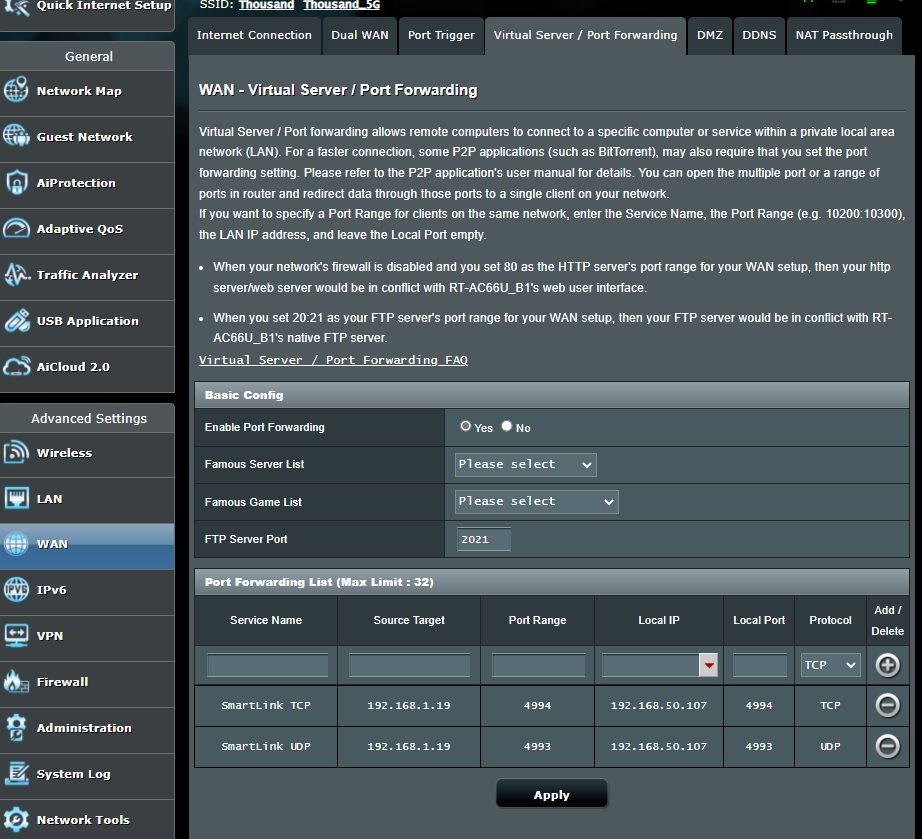
I'm in need of help getting SmartLink working. Still testing red. I've gotten into the SuddenLink modem by way of their website. The first pic is the configuration i created for Port Forwarding. The next pic is the Asus router config I did for Port Forwarding. And lastly is the config page from Smart SDR SmartLink. Can someone please review these and tell me where I'm going wrong? Hopefully, it's simple cockpit errors. Thanks and 73, Bruce K6ZB

 0
0 -
Not familiar with those products, but is portforwarding turned on, or does that switch refer to auto port forwarding?
0 -
Hi John, thanks for answering. I tried it both ways and still no result.
I would appreciate any other thoughts. Perhaps this is suitable for a trouble ticket. 73, Bruce K6ZB
0 -
Hi Bruce, Yes, I would submit a helpdesk ticket.
0 -
Len, I've created the ticket. Thanks. Bruce K6ZB
0



Leave a Comment
Categories
- All Categories
- 388 Community Topics
- 2.2K New Ideas
- 658 The Flea Market
- 8.4K Software
- 156 SmartSDR+
- 6.5K SmartSDR for Windows
- 186 SmartSDR for Maestro and M models
- 439 SmartSDR for Mac
- 275 SmartSDR for iOS
- 265 SmartSDR CAT
- 204 DAX
- 386 SmartSDR API
- 9.4K Radios and Accessories
- 53 Aurora
- 297 FLEX-8000 Signature Series
- 7.2K FLEX-6000 Signature Series
- 970 Maestro
- 58 FlexControl
- 866 FLEX Series (Legacy) Radios
- 944 Genius Products
- 471 Power Genius XL Amplifier
- 347 Tuner Genius XL
- 126 Antenna Genius
- 306 Shack Infrastructure
- 215 Networking
- 468 Remote Operation (SmartLink)
- 142 Contesting
- 811 Peripherals & Station Integration
- 144 Amateur Radio Interests
- 1.1K Third-Party Software