Welcome to the FlexRadio Community! Please review the new Community Rules and other important new Community information on the Message Board.
The latest SmartSDR Software:
SmartSDR v4.2.20 | SmartSDR v4.2.20 Release Notes
SmartSDR v3.10.15 | SmartSDR v3.10.15 Release Notes
The latest 4O3A Genius Product Software:
The latest 4O3A Genius Product Software and Firmware
SmartSDR v4.2.20 | SmartSDR v4.2.20 Release Notes
SmartSDR v3.10.15 | SmartSDR v3.10.15 Release Notes
The latest 4O3A Genius Product Software:
The latest 4O3A Genius Product Software and Firmware
How to Receive Technical Support::
If you are needing assistance with FlexRadio products, please refer to the product documentation or check the Help Center for known solutions. Need technical support from FlexRadio? It's as simple as creating a HelpDesk ticket.
If you are needing assistance with FlexRadio products, please refer to the product documentation or check the Help Center for known solutions. Need technical support from FlexRadio? It's as simple as creating a HelpDesk ticket.
Dashboard items missing on W11

Grant VK4JAZ
Member ✭✭
I am using Windows 11(having upgraded from Windows 10) and SmartSDR v 3.2.37. I have noticed that my dashboard is now missing the apps down the right hand side of the page that allow me to tune the antenna, etc. I think there were about 5 or 6 apps (that's what I am calling them but they are probably just little windows/functions). I can't find how to get them back.
I realize this could be because I am still using v3.2.37 and not the latest 3.2.39, but my club's Flex 6400 is still using that older version. They are due to upgrade shortly, so do I have to wait for the upgrade to put things right or is there a way I can reclaim the missing functions in the meantime?
I realize this could be because I am still using v3.2.37 and not the latest 3.2.39, but my club's Flex 6400 is still using that older version. They are due to upgrade shortly, so do I have to wait for the upgrade to put things right or is there a way I can reclaim the missing functions in the meantime?
0
Best Answer
-
Glad to help Grant!
0

Answers
-
Hi Grant, Do you at least have this little arrow? If so, just click it and the functions will reappear.

Also, check to be sure that your SmartSDR window is not just moved left slightly taking the functions out of your view.
0 -
Hi Len, Yes I have that little arrow etc but that only brings into view the items that normally reside on the left of the dashboard. My issue is how to get the items that normally reside on the right of the page back. Now it's possible they aren't needed but if that's the case how do I tune the antenna or want to activate VOX?0
-
Hi Grant, Sorry, I misunderstood. Try this icon in the lower left. It turns on and off the control panel.
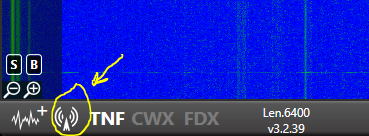 1
1 -
Thanks Len, I'll give that a try.
0 -
Hi Len, Tried what you suggested - works perfectly now. Thanks a ton.
0


Leave a Comment
Categories
- All Categories
- 398 Community Topics
- 2.2K New Ideas
- 678 The Flea Market
- 8.6K Software
- 191 SmartSDR+
- 6.6K SmartSDR for Windows
- 196 SmartSDR for Maestro and M models
- 456 SmartSDR for Mac
- 278 SmartSDR for iOS
- 268 SmartSDR CAT
- 218 DAX
- 392 SmartSDR API
- 9.6K Radios and Accessories
- 93 Aurora
- 335 FLEX-8000 Signature Series
- 7.2K FLEX-6000 Signature Series
- 988 Maestro
- 58 FlexControl
- 872 FLEX Series (Legacy) Radios
- 962 Genius Products
- 478 Power Genius XL Amplifier
- 352 Tuner Genius XL
- 132 Antenna Genius
- 317 Shack Infrastructure
- 222 Networking
- 480 Remote Operation (SmartLink)
- 143 Contesting
- 845 Peripherals & Station Integration
- 147 Amateur Radio Interests
- 1.1K Third-Party Software