SmartSDR v4.1.5 | SmartSDR v4.1.5 Release Notes
SmartSDR v3.10.15 | SmartSDR v3.10.15 Release Notes
The latest 4O3A Genius Product Software:
The latest 4O3A Genius Product Software and Firmware
If you are needing assistance with FlexRadio products, please refer to the product documentation or check the Help Center for known solutions. Need technical support from FlexRadio? It's as simple as creating a HelpDesk ticket.
Kingston HyperX Headset - Microphone Settings?

I have a HyperX headset that I'd like to try with my 6400. I have a breakout cable that takes the headset TRRS down to two TRS plugs. I can use these as inputs to my computer and confirm that the microphone and headphones both work as expected. However, connecting to the 6400 directly results in only the headphones working. Playing with bias and the 20 dB buttons result in exactly nothing.
It must be something simple, but I'm not seeing it...
Answers
-
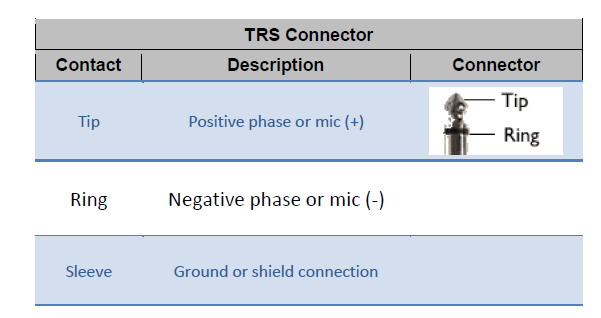
You may have to compare the MIC pin settings on the Headset to the Mic Pin settings on the radio. Sadly, there is no standard. It sounds like your headset might have the Mic element on the Tip and Ring and no Sleeve connection. You should be able to figure it out with an ohm meter.
 0
0 -
Thanks Mike! I will investigate with a meter. It just seemed odd that the TRS works on the sound card input, but does exactly nothing in the Flex.
I'll dig deeper and post my findings here for posterity...
0 -
OK, I put a meter on the microphone plug. What I found is, the tip and ring on the plug are shorted together somewhere in the cable - 0 ohms. I'm assuming this is intentional. I see this whether the headset is plugged in to the other end or not. Reminder that the mic works on a computer sound card mic input.
Negative meter lead on the sleeve and positive on the ring or tip gives 1260 ohms
Positive meter lead on the sleeve and negative on the ring or tip gives 960 ohms...
I suspect that resistance difference is not relevant. But it also suggests there is no capacitor in the circuit.
Looking at the explanation you posted, I see the tip is where the +3 is supplied. Ring is the negative side of the mic. On my cable, I'm essentially shorting those two together. Luckily there's that resistor in line to keep from cooking things when I plugged in (I assume).
Given my plug works in the computer mic input, I'm thinking my tip/ring is one side of the mic (with +'ve voltage) and the sleeve is the other side of the mic.
If this is the case, could I take the tip/ring from my plug and feed it to the tip of a new plug... and take the sleeve of my plug and put it to the ring of the new plug?
The balanced input makes me wonder if there's enough of a potential voltage differential between chassis ground and the ground at the A/D converter to cause trouble/noise. Maybe I'd need to short the sleeve and ring on the new plug to reduce this?
Any guesses as to whether this would work? I'm pretty sure it wouldn't cook anything by trying...(?)
0 -
6400, unlike the 6600, has only a “pseudo balanced” mic jack.
0



Leave a Comment
Categories
- All Categories
- 388 Community Topics
- 2.2K New Ideas
- 658 The Flea Market
- 8.4K Software
- 156 SmartSDR+
- 6.5K SmartSDR for Windows
- 186 SmartSDR for Maestro and M models
- 439 SmartSDR for Mac
- 275 SmartSDR for iOS
- 265 SmartSDR CAT
- 204 DAX
- 386 SmartSDR API
- 9.4K Radios and Accessories
- 52 Aurora
- 297 FLEX-8000 Signature Series
- 7.2K FLEX-6000 Signature Series
- 970 Maestro
- 58 FlexControl
- 866 FLEX Series (Legacy) Radios
- 944 Genius Products
- 471 Power Genius XL Amplifier
- 347 Tuner Genius XL
- 126 Antenna Genius
- 306 Shack Infrastructure
- 215 Networking
- 468 Remote Operation (SmartLink)
- 142 Contesting
- 811 Peripherals & Station Integration
- 144 Amateur Radio Interests
- 1.1K Third-Party Software