SmartSDR v4.2.18 | SmartSDR v4.2.18 Release Notes
SmartSDR v3.10.15 | SmartSDR v3.10.15 Release Notes
The latest 4O3A Genius Product Software:
The latest 4O3A Genius Product Software and Firmware
If you are needing assistance with FlexRadio products, please refer to the product documentation or check the Help Center for known solutions. Need technical support from FlexRadio? It's as simple as creating a HelpDesk ticket.
I need instructions on how to connect an external cw keyer to a Flex6600M

Best Answer
-
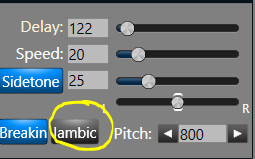
Hi Rodney, just connect a 1/8 inch plug from the paddles or an external keyer to the key jack on the back of the rig. If it is paddles, select Iambic, if it is a keyer, turn Iambic off.
This screen is from SmartSDR, so you will have to look in the manual to find the corresponding control for your 6600M if you want to use the front panel. Note that you need to be in CW mode to change this parameter.
 0
0


Answers
-
From Sec 20.5 of the 6400M/6600M User Guide (“How to connect an external keyer using the accessory connector”):
In CW mode, the Key input on the FLEX-6000 rear panel accessory connector (pin 4) can be used as a straight key input. This is useful if you wish to attach an external keyer, such as a K1EL WinKeyer, microHAM microKEYER, or another contest-oriented interface. This input is always active and is not affected by internal keyer settings. It’s therefore possible to use both the external keyer and the internal keyer at the same time.
0 -
Thanks for all responses to this question, I will try implementing the accessory jack solution as this lets me still use the built in keyer in 6600M.0

Leave a Comment
Categories
- All Categories
- 393 Community Topics
- 2.2K New Ideas
- 668 The Flea Market
- 8.5K Software
- 174 SmartSDR+
- 6.5K SmartSDR for Windows
- 191 SmartSDR for Maestro and M models
- 450 SmartSDR for Mac
- 276 SmartSDR for iOS
- 266 SmartSDR CAT
- 215 DAX
- 389 SmartSDR API
- 9.5K Radios and Accessories
- 70 Aurora
- 317 FLEX-8000 Signature Series
- 7.2K FLEX-6000 Signature Series
- 981 Maestro
- 58 FlexControl
- 869 FLEX Series (Legacy) Radios
- 952 Genius Products
- 474 Power Genius XL Amplifier
- 349 Tuner Genius XL
- 129 Antenna Genius
- 311 Shack Infrastructure
- 217 Networking
- 474 Remote Operation (SmartLink)
- 143 Contesting
- 833 Peripherals & Station Integration
- 146 Amateur Radio Interests
- 1.1K Third-Party Software