SmartSDR v4.1.5 | SmartSDR v4.1.5 Release Notes
SmartSDR v3.10.15 | SmartSDR v3.10.15 Release Notes
The latest 4O3A Genius Product Software:
The latest 4O3A Genius Product Software and Firmware
If you are needing assistance with FlexRadio products, please refer to the product documentation or check the Help Center for known solutions. Need technical support from FlexRadio? It's as simple as creating a HelpDesk ticket.
SATPC32

I am trying to get my 6700 to follow the doppler tracking from SATPC32, When I select CAT within the software and pick the frequency set I want the radio will change to those frequencies but will not continue to adjust as the frequency in SATPC32 changes. I have two CAT ports created in SMARTSDR CAT and have them configured as radio 1 and radio 2 in SATPC32 but no continous tracking, any suggestions?


Answers
-
Hi Larry, do you need to check the Satellite Mode box (Radio Setup panel) for tracking?
73,
Len, KD0RC
0 -
I have tried all those settings, no differance.
0 -
I have it working properly with the Satellites, I was trying to make it track with ISS and it will not for what ever reason.
0 -
Your rig control settings look good.
Since Satellites track and the ARISS does not, I would suspect your "DivOptions.sqf" file, line 2 is set to (-) for no CAT control if the satellite is below the horizon and the ARISS is below the horizon ( or caused by your Keppler File not being updated and SATPC32 has the incorrect actual position).
Here is a screenshot of the DivOptions.sqf file, line 2. Default is (-) to not CAT track below the horizon. Change to (+) for CAT tracking always active.

Next, look at your "Satellites" tab, look for which Keppler file you are using for ARISS, highlight the file and update that file, restart SatPC32:
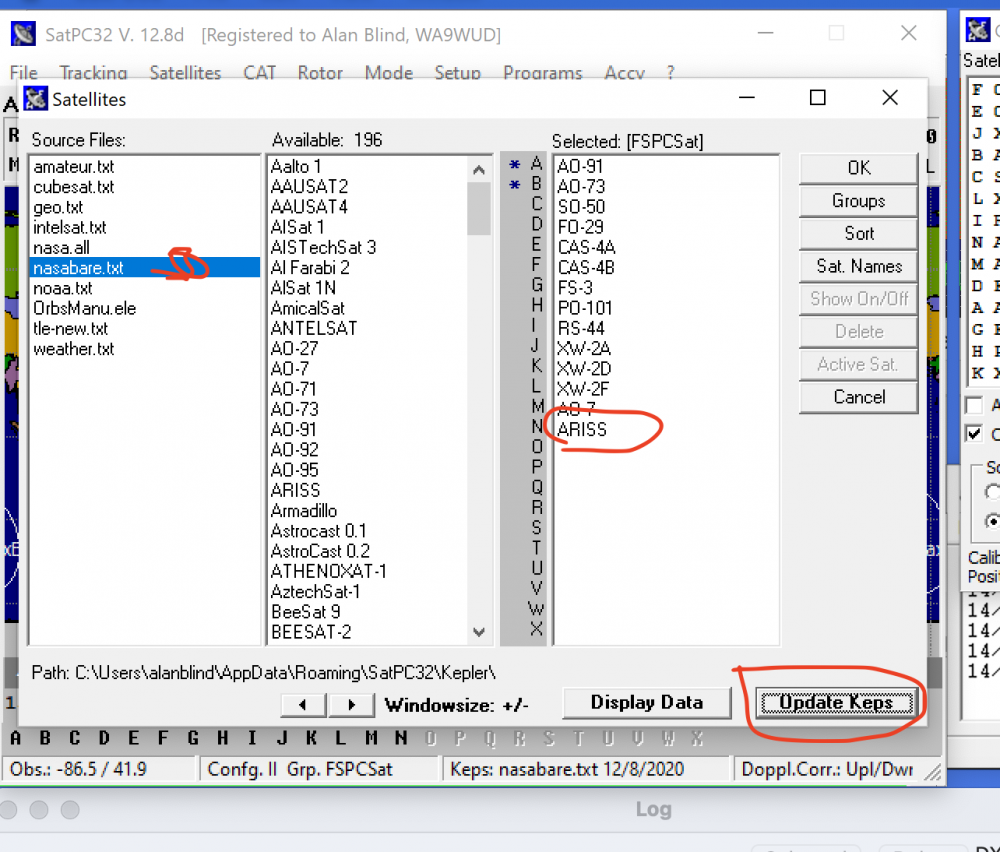
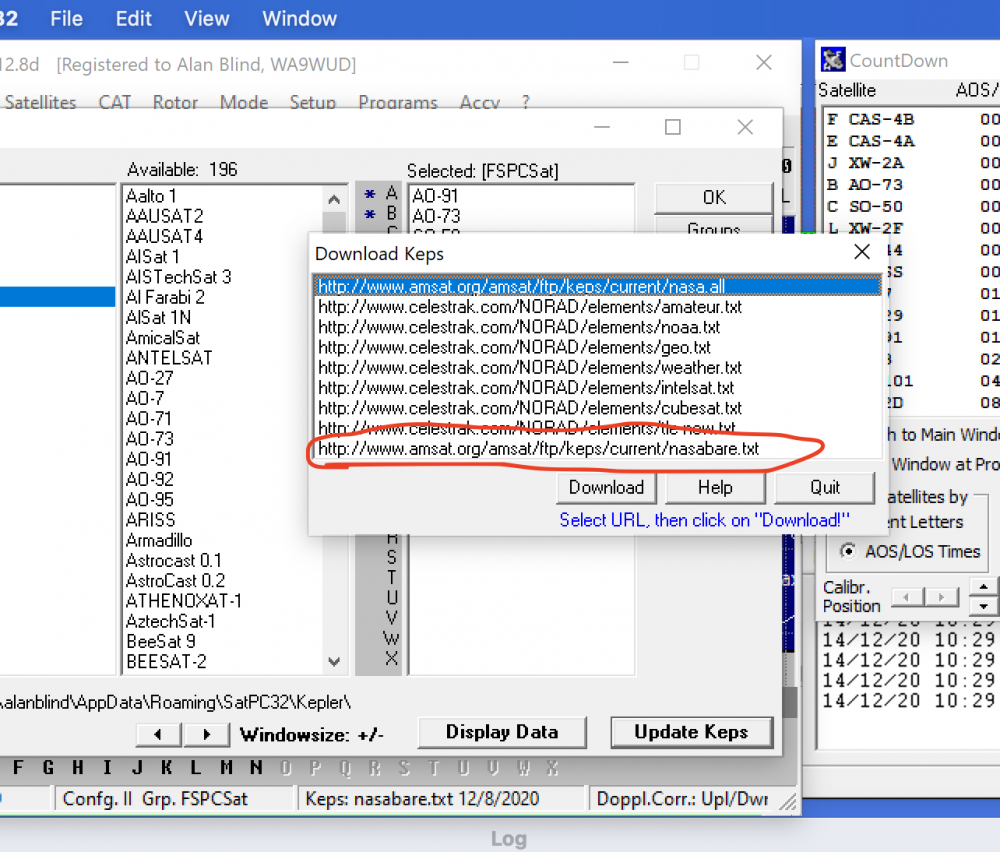
Alan. WA9WUD
1 -
Good info, I am stuck on the fact that my nasabare.txt does not include ARISS, I am new to satellites so I don't know the differance between ARISS and ISS if there is one. I have the current file from http://www.amsat.org/amsat/ftp/keps/current/nasabare.txt
When I try to download keps from the satellites menu this path doesn't exsist but I manually retrieved it from AMSAT and placed it in the C:\Users\homeconnect\AppData\Roaming\SatPC32\kepler folder.
 0
0 -
It is working with the ISS, Even with line 2 in the DivOptions.sqf file set to + the radio would only start to track when the ISS is in range.
0 -
Did you shutdown and restart SatPC32? Necessary to put the new settings into affect.
0 -
In NASAbare.txt it's ISS, not ARISS.
To make satellite operation with a FlexRadio much, much easier, you should contact W0DHB about his FlexSatPC software. It has been written up a couple of times in the AMSAT Journal, although I couldn't find the exact issue in my quick search.
0 -
I have flexsatpc but the installation instructions are not so clear for me.
1



Leave a Comment
Categories
- All Categories
- 388 Community Topics
- 2.2K New Ideas
- 658 The Flea Market
- 8.4K Software
- 156 SmartSDR+
- 6.5K SmartSDR for Windows
- 186 SmartSDR for Maestro and M models
- 439 SmartSDR for Mac
- 275 SmartSDR for iOS
- 265 SmartSDR CAT
- 204 DAX
- 386 SmartSDR API
- 9.4K Radios and Accessories
- 52 Aurora
- 297 FLEX-8000 Signature Series
- 7.2K FLEX-6000 Signature Series
- 970 Maestro
- 58 FlexControl
- 866 FLEX Series (Legacy) Radios
- 944 Genius Products
- 471 Power Genius XL Amplifier
- 347 Tuner Genius XL
- 126 Antenna Genius
- 306 Shack Infrastructure
- 215 Networking
- 468 Remote Operation (SmartLink)
- 142 Contesting
- 811 Peripherals & Station Integration
- 144 Amateur Radio Interests
- 1.1K Third-Party Software