Welcome to the FlexRadio Community! Please review the new Community Rules and other important new Community information on the Message Board.
The latest SmartSDR Software:
SmartSDR v4.1.5 | SmartSDR v4.1.5 Release Notes
SmartSDR v3.10.15 | SmartSDR v3.10.15 Release Notes
The latest 4O3A Genius Product Software:
The latest 4O3A Genius Product Software and Firmware
SmartSDR v4.1.5 | SmartSDR v4.1.5 Release Notes
SmartSDR v3.10.15 | SmartSDR v3.10.15 Release Notes
The latest 4O3A Genius Product Software:
The latest 4O3A Genius Product Software and Firmware
How to Receive Technical Support::
If you are needing assistance with FlexRadio products, please refer to the product documentation or check the Help Center for known solutions. Need technical support from FlexRadio? It's as simple as creating a HelpDesk ticket.
If you are needing assistance with FlexRadio products, please refer to the product documentation or check the Help Center for known solutions. Need technical support from FlexRadio? It's as simple as creating a HelpDesk ticket.
Setting up SmartLink

NigelG
Member ✭✭
Hi. I have recently got a 6600M and have managed to get it up on my LAN ok with no issues, in fact it was much easier than I ever imagined, including setting up data modes etc. My problem is getting smartlink to work outside my LAN. Just cant get the test button to go green. I know this is to do with port forwarding etc, but I feel im in WAY over my head with that stuff. Wondering if some kind person could walk me through this (gently hi).
I have looked in my router and UPnP is turned on and I think I need to be looking in "virtual servers", there is no menu for "port forwarding". Just getting so confused with port numbers, ip adresses etc. Noticed that the ip address of the radio changes everytime i turn it on, so need to make that static. Really in over my head, HELP!!!
73 de Nigel (G0CQZ)
I have looked in my router and UPnP is turned on and I think I need to be looking in "virtual servers", there is no menu for "port forwarding". Just getting so confused with port numbers, ip adresses etc. Noticed that the ip address of the radio changes everytime i turn it on, so need to make that static. Really in over my head, HELP!!!
73 de Nigel (G0CQZ)
0
Best Answer
-
Nigel,
Read this article. It should walk you through setting up port forwarding.
Ed KA9EES
5

Answers
-
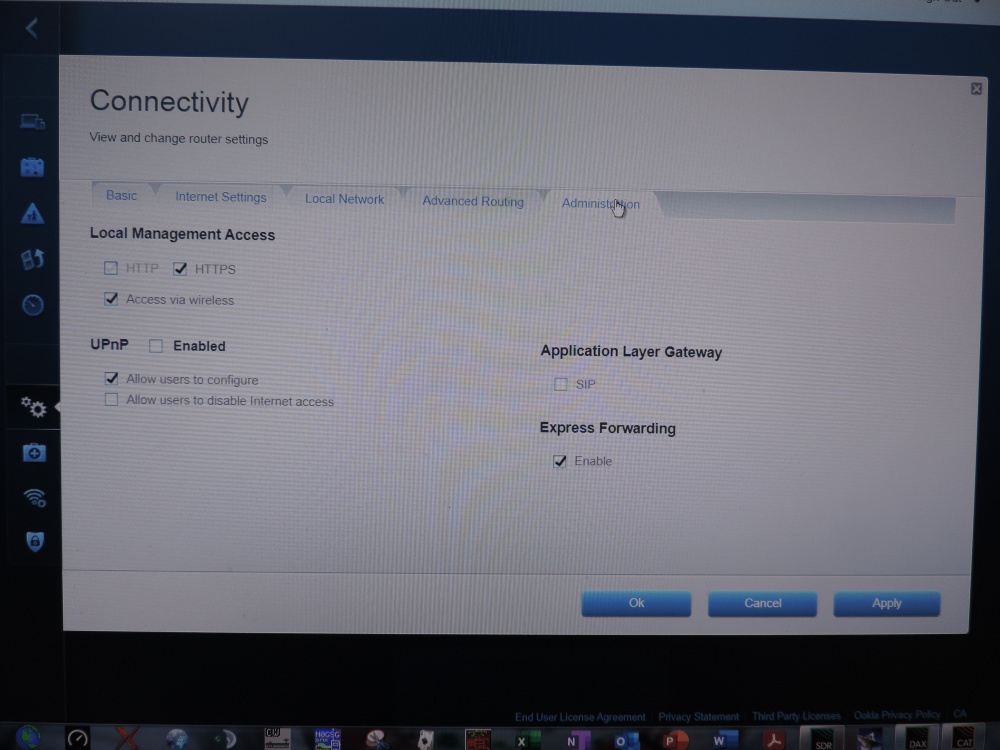
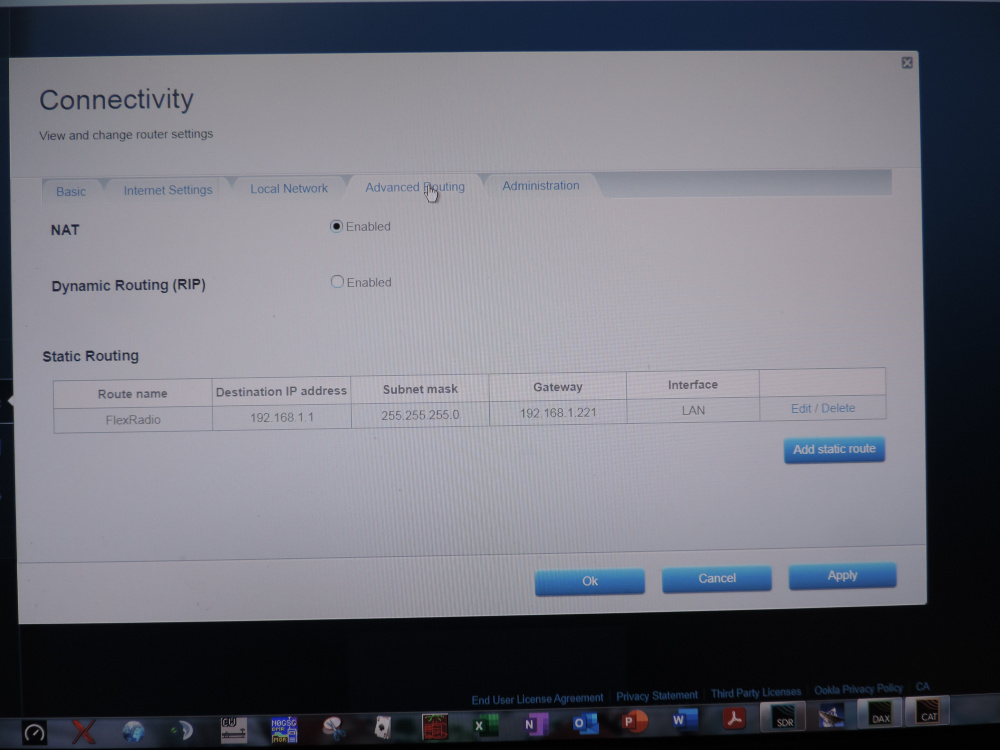
I'd love to help. I got mine setup. But like you, I needed a little help. I had to set my router to as you said to manual port forwarding. If you look at how I have the rig set. TCP is 21000 and UDP is 22000. You will set these right here in the rigs front panel. If you notice it's telling me to forward the ports in my router. It's also showing me what the IP address is for the rig. Look over the photos I have attached. I have a Linksys Velop Mesh WIFI router, but the rig is wired to it via a Cisco 8 port switch. Take note of the tabs for my router. You should have something very similar. Notice uPnP is not enabled.
73,
Ed KA9EES


 0
0 -
Hi Ed, thanks for the response and the pictures. Where do you get the port numbers 21000 and 22000 from? Is this from the radio or is it just a number to use? Those boxes on the radio have shown me -1. anyway, I thank you again for your time and effort. I will try again tomorrow and let you know how I get on. 730
-
Think im going to have to open a ticket with FR. been through this time and again to the letter of the manuals, reset the radio and the router on advice of someone on the Facebook group. Comparing to your pictures above Ed, where yours says 21000 and 22000 mines says -1. Frustrating to the extreme, deffinately not plug and play, for me anyway.0
-
Ed, thank you very much for your help and input. I have got it all up and running now. The issue was with my router. Sought the advice of a local ham who is an IT guy and he walked me through it. 73 de Nigel0


Leave a Comment
Categories
- All Categories
- 389 Community Topics
- 2.2K New Ideas
- 658 The Flea Market
- 8.4K Software
- 157 SmartSDR+
- 6.5K SmartSDR for Windows
- 186 SmartSDR for Maestro and M models
- 439 SmartSDR for Mac
- 275 SmartSDR for iOS
- 265 SmartSDR CAT
- 204 DAX
- 386 SmartSDR API
- 9.4K Radios and Accessories
- 53 Aurora
- 297 FLEX-8000 Signature Series
- 7.2K FLEX-6000 Signature Series
- 971 Maestro
- 58 FlexControl
- 866 FLEX Series (Legacy) Radios
- 945 Genius Products
- 472 Power Genius XL Amplifier
- 347 Tuner Genius XL
- 126 Antenna Genius
- 307 Shack Infrastructure
- 215 Networking
- 468 Remote Operation (SmartLink)
- 142 Contesting
- 811 Peripherals & Station Integration
- 144 Amateur Radio Interests
- 1.1K Third-Party Software