Welcome to the FlexRadio Community! Please review the new Community Rules and other important new Community information on the Message Board.
The latest SmartSDR Software:
SmartSDR v4.1.5 | SmartSDR v4.1.5 Release Notes
SmartSDR v3.10.15 | SmartSDR v3.10.15 Release Notes
The latest 4O3A Genius Product Software:
The latest 4O3A Genius Product Software and Firmware
SmartSDR v4.1.5 | SmartSDR v4.1.5 Release Notes
SmartSDR v3.10.15 | SmartSDR v3.10.15 Release Notes
The latest 4O3A Genius Product Software:
The latest 4O3A Genius Product Software and Firmware
How to Receive Technical Support::
If you are needing assistance with FlexRadio products, please refer to the product documentation or check the Help Center for known solutions. Need technical support from FlexRadio? It's as simple as creating a HelpDesk ticket.
If you are needing assistance with FlexRadio products, please refer to the product documentation or check the Help Center for known solutions. Need technical support from FlexRadio? It's as simple as creating a HelpDesk ticket.
WSJT, FT8, stations not showing up in Band Activity window, How to fix

David Sturm
Member ✭✭
Hello all, I looked at the other answers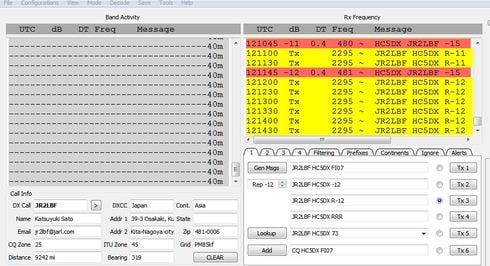 and none has worked for me.
I will be including a photo of a screen shot. My DAX is on channel 1, I have stopped and started DAX and still the same. Annoying to say the least.
Any suggestions would be greatly appreciated.
Thx
David
WB4OZM/HC5DX
and none has worked for me.I will be including a photo of a screen shot. My DAX is on channel 1, I have stopped and started DAX and still the same. Annoying to say the least.
Any suggestions would be greatly appreciated.
Thx
David
WB4OZM/HC5DX
0
Answers
-
Which version of WSJT are you running?0
-
Has it ever worked? Can you decode any other modes, try WSPR. Is your clock set correctly? Current version is 2.2.0
Good luck Vidas0 -
I had to reinstall WSJT once because of an odd problem like this. Also if you use Slicemaster, you need to let it load all of its connections first, before activating WSJT. Also double check your receive level and make sure the gain structure is not off and distorting the decoding. Good luck!
Pat
1 -
I had this happen, and then I downloaded and installed the latest version of WSJT-X and that solved the problem.
1 -
The lastest
0 -
Hola , Yes, when I first installed the program it worked like a charm. I have the current version.
0 -
I'll try and remove the program and re-install it. My NetTime clock is working too.'
Maybe there is a setting in the program that I may have un clicked?
0 -
are you seeing signals in the waterfall?
Can you post an image of your radio and audio settings?0 -
Nice thing about Slicemaster is it takes care of the settings in WSJT by itself. Also are you running any other programs that might interfere with WSJT?
0


Leave a Comment
Categories
- All Categories
- 389 Community Topics
- 2.2K New Ideas
- 658 The Flea Market
- 8.4K Software
- 157 SmartSDR+
- 6.5K SmartSDR for Windows
- 186 SmartSDR for Maestro and M models
- 439 SmartSDR for Mac
- 275 SmartSDR for iOS
- 265 SmartSDR CAT
- 204 DAX
- 386 SmartSDR API
- 9.4K Radios and Accessories
- 53 Aurora
- 297 FLEX-8000 Signature Series
- 7.2K FLEX-6000 Signature Series
- 971 Maestro
- 58 FlexControl
- 866 FLEX Series (Legacy) Radios
- 945 Genius Products
- 472 Power Genius XL Amplifier
- 347 Tuner Genius XL
- 126 Antenna Genius
- 307 Shack Infrastructure
- 215 Networking
- 468 Remote Operation (SmartLink)
- 142 Contesting
- 811 Peripherals & Station Integration
- 144 Amateur Radio Interests
- 1.1K Third-Party Software