Welcome to the FlexRadio Community! Please review the new Community Rules and other important new Community information on the Message Board.
The latest SmartSDR Software:
SmartSDR v4.2.20 | SmartSDR v4.2.20 Release Notes
SmartSDR v3.10.15 | SmartSDR v3.10.15 Release Notes
The latest 4O3A Genius Product Software:
The latest 4O3A Genius Product Software and Firmware
SmartSDR v4.2.20 | SmartSDR v4.2.20 Release Notes
SmartSDR v3.10.15 | SmartSDR v3.10.15 Release Notes
The latest 4O3A Genius Product Software:
The latest 4O3A Genius Product Software and Firmware
How to Receive Technical Support::
If you are needing assistance with FlexRadio products, please refer to the product documentation or check the Help Center for known solutions. Need technical support from FlexRadio? It's as simple as creating a HelpDesk ticket.
If you are needing assistance with FlexRadio products, please refer to the product documentation or check the Help Center for known solutions. Need technical support from FlexRadio? It's as simple as creating a HelpDesk ticket.
3.1.8 upgrade issues

Al Peterson
Member ✭✭
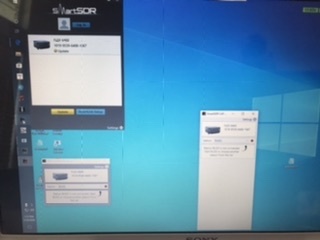
Every time I either start up SmartSDSR (v 3.1.11) or my Maestro, I have to wait for the upgrade on my 6400 to complete. I’ve done a factory reset. Once the radio comes up, everything is fine until I go to the other interface. 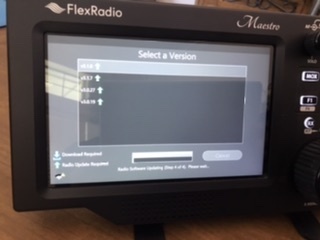
0
Comments
-
What do you mean by 'other interface' and what is going wrong? The images provided are hard to make out the details of the issue.
Have you upgraded all clients to the 3.1.11 release?
Make sure you starting the 3.1.11 client. It does not uninstall the older clients so it is easy to start an older version which would prompt to downgrade the radio and you want to avoid that with this release from what the notes indicate.
0 -
Yes, make sure both the radio and Maestro are on the same version. And hide you old icons so you can only use the new one.0
-
Or uninstall the old versions to avoid problems.
0 -
It is handy to keep old versions on the radio, to go back to if we need to. Other than making a mistake on icon selection there is no reason to uninstall any old versions0
-
Though on the 3.1.11 the notes suggest it is not advised to revert back due to the changes on the SD image. Also, I find removing the old is safer long term. If you have to roll back you can download from the site or you can save the installer locally. Everyone has their preferred practice.2
-
I don't know how else to describe this - when I turn on either the Maestro or start up SmartSDR, I'm prompted to update. It is like the update doesn't complete properly and register the new version. I'll remove the older versions when the update properly completes and is an option at startup.0
-
Al, the most likely scenario is the one others have already suggested -- that you are loading different versions with Maestro and SmartSDR for Windows. This results in the need to upgrade/downgrade any time you switch.
The solution is to use the same version on both clients. The version for SmartSDR for Windows can be found in the desktop icon shortcut. In Maestro, after choosing the radio, pick the same exact version. Let us know if you continue to have trouble. We'll help you get it figured out.0 -
Internal network had no route to internet. Issue resolved.1
-
Al,
Make sure you are really starting up 3.1.11. I use a stream deck and was having the same problem. My stream deck had a short cut pointing to the 3.1.8 directory. I fixed that to point to the new 3.1.11 directory and all is well.
Harold
1 -
Harold I hadn't thought of using my Stream Deck to start the different radio apps like SSDR instead of with the mouse. Thanks for the idea.0


Leave a Comment
Categories
- All Categories
- 398 Community Topics
- 2.2K New Ideas
- 678 The Flea Market
- 8.6K Software
- 191 SmartSDR+
- 6.6K SmartSDR for Windows
- 196 SmartSDR for Maestro and M models
- 456 SmartSDR for Mac
- 278 SmartSDR for iOS
- 268 SmartSDR CAT
- 218 DAX
- 392 SmartSDR API
- 9.6K Radios and Accessories
- 93 Aurora
- 335 FLEX-8000 Signature Series
- 7.2K FLEX-6000 Signature Series
- 988 Maestro
- 58 FlexControl
- 872 FLEX Series (Legacy) Radios
- 962 Genius Products
- 478 Power Genius XL Amplifier
- 352 Tuner Genius XL
- 132 Antenna Genius
- 317 Shack Infrastructure
- 222 Networking
- 480 Remote Operation (SmartLink)
- 143 Contesting
- 845 Peripherals & Station Integration
- 147 Amateur Radio Interests
- 1.1K Third-Party Software