Welcome to the FlexRadio Community! Please review the new Community Rules and other important new Community information on the Message Board.
The latest SmartSDR Software:
SmartSDR v4.1.5 | SmartSDR v4.1.5 Release Notes
SmartSDR v3.10.15 | SmartSDR v3.10.15 Release Notes
The latest 4O3A Genius Product Software:
The latest 4O3A Genius Product Software and Firmware
SmartSDR v4.1.5 | SmartSDR v4.1.5 Release Notes
SmartSDR v3.10.15 | SmartSDR v3.10.15 Release Notes
The latest 4O3A Genius Product Software:
The latest 4O3A Genius Product Software and Firmware
How to Receive Technical Support::
If you are needing assistance with FlexRadio products, please refer to the product documentation or check the Help Center for known solutions. Need technical support from FlexRadio? It's as simple as creating a HelpDesk ticket.
If you are needing assistance with FlexRadio products, please refer to the product documentation or check the Help Center for known solutions. Need technical support from FlexRadio? It's as simple as creating a HelpDesk ticket.
New install of SSDR ERROR
N8AUM
Member ✭✭
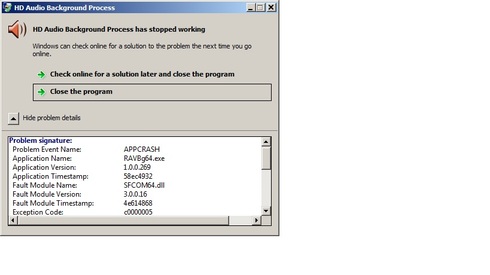
I installed SSDR 3.1.8 on an old ASUS X44H i3 laptop with only 4M of ram that my friend just threw away. Running win7 Home Edition. Much to my surprise everything seems to work except every time I boot up I get this error:
TNX in advance, N8AUM Vidas
TNX in advance, N8AUM Vidas
0
Answers
-
Try plugging in an audio headset into the PC. Not that you are going to use it, just that the PC needs to see something. This fixed a similar issue I had with my PC.0
-
TNX for that suggestion Mark but makes no difference if I boot with headset plugged in or not. Problem started AFTER ssdr was installed0
-
N8AUM
That error message is caused by RAVBG64.exe, which is your Realtek audio driver control software. I've seen that occur before too. What i had to do to fix it was reinstall my Realtek audio drivers, it has nothing to do with SmartSDR, or Flexradio. it's either an audio/soundcard driver problem, or a Windows problem, and very easily solvable. Reinstalling or updating your Windows audio drivers, is your next step.73, Jay - NO5J
0 -
TNX Jay, will give that a try 731


Leave a Comment
Categories
- All Categories
- 389 Community Topics
- 2.2K New Ideas
- 658 The Flea Market
- 8.4K Software
- 157 SmartSDR+
- 6.5K SmartSDR for Windows
- 186 SmartSDR for Maestro and M models
- 439 SmartSDR for Mac
- 275 SmartSDR for iOS
- 265 SmartSDR CAT
- 204 DAX
- 386 SmartSDR API
- 9.4K Radios and Accessories
- 53 Aurora
- 297 FLEX-8000 Signature Series
- 7.2K FLEX-6000 Signature Series
- 971 Maestro
- 58 FlexControl
- 867 FLEX Series (Legacy) Radios
- 945 Genius Products
- 472 Power Genius XL Amplifier
- 347 Tuner Genius XL
- 126 Antenna Genius
- 307 Shack Infrastructure
- 215 Networking
- 468 Remote Operation (SmartLink)
- 142 Contesting
- 811 Peripherals & Station Integration
- 144 Amateur Radio Interests
- 1.1K Third-Party Software