Welcome to the FlexRadio Community! Please review the new Community Rules and other important new Community information on the Message Board.
The latest SmartSDR Software:
SmartSDR v4.1.5 | SmartSDR v4.1.5 Release Notes
SmartSDR v3.10.15 | SmartSDR v3.10.15 Release Notes
The latest 4O3A Genius Product Software:
The latest 4O3A Genius Product Software and Firmware
SmartSDR v4.1.5 | SmartSDR v4.1.5 Release Notes
SmartSDR v3.10.15 | SmartSDR v3.10.15 Release Notes
The latest 4O3A Genius Product Software:
The latest 4O3A Genius Product Software and Firmware
How to Receive Technical Support::
If you are needing assistance with FlexRadio products, please refer to the product documentation or check the Help Center for known solutions. Need technical support from FlexRadio? It's as simple as creating a HelpDesk ticket.
If you are needing assistance with FlexRadio products, please refer to the product documentation or check the Help Center for known solutions. Need technical support from FlexRadio? It's as simple as creating a HelpDesk ticket.
Slice-Master Set Up: HRD Logbook and CW Skimmer DAXIQ

Alan
Member ✭✭✭✭
Two questions for setting up Slice-Master 6000. Any help to resolve would be appreciated:
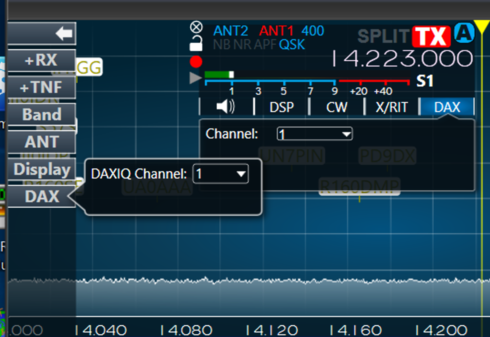
1- When attempting to start up CW Skimmer using Slice-Master, I get the error message, "DAXIQ Channel is not enabled". I have DAXIQ setup to channel 1 on the panadapter, but continue to get the error message.

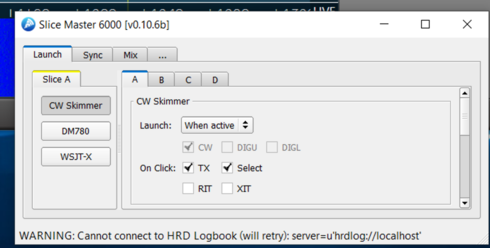
2- Slice-Mater will not connect to HRD Logbook. The message, "Cannot Connect to HRD Logbook" displays on the bottom of Slice-Master.
1- When attempting to start up CW Skimmer using Slice-Master, I get the error message, "DAXIQ Channel is not enabled". I have DAXIQ setup to channel 1 on the panadapter, but continue to get the error message.
2- Slice-Mater will not connect to HRD Logbook. The message, "Cannot Connect to HRD Logbook" displays on the bottom of Slice-Master.
0
Answers
-
Hi Alan,
Take a look in the DAX Control panel to make sure that DAXIQ channel 1 is enabled there.
For HRD Logbook, make sure that it is running and is listening for connections on port 7825. From Logbook's main menu bar, select Tools/Configure/Network Server
If you'd like your CW Skimmer spots to show up in HRD Logbook, you probably want to create a cluster entry for Slice Master's aggregation server.
But there are a half dozen other ways to make this happen too.
--Don
0 -
Do you have CAT open?
0 -
Slice Master doesnt use CAT.0
-
Try closing and starting DAX only. A couple times it got the CW Skimmer running. 73 Bill W9JJB0
-
Thanks Don
Both "problems" resolved with your help. On the DAXIQ, found channel 1 was not working. Switched to channel 4 and enabled per your note. Worked just fine.
Help ticket issued for help returning channel 1 to service. Pop up says DAXIQ cannot find the driver or the channel is in use.
0 -
k1bo I have been having some problems with slice master, wondering if you could give me some suggestions0


Leave a Comment
Categories
- All Categories
- 388 Community Topics
- 2.2K New Ideas
- 658 The Flea Market
- 8.4K Software
- 156 SmartSDR+
- 6.5K SmartSDR for Windows
- 186 SmartSDR for Maestro and M models
- 439 SmartSDR for Mac
- 275 SmartSDR for iOS
- 265 SmartSDR CAT
- 204 DAX
- 386 SmartSDR API
- 9.4K Radios and Accessories
- 52 Aurora
- 297 FLEX-8000 Signature Series
- 7.2K FLEX-6000 Signature Series
- 970 Maestro
- 58 FlexControl
- 866 FLEX Series (Legacy) Radios
- 944 Genius Products
- 471 Power Genius XL Amplifier
- 347 Tuner Genius XL
- 126 Antenna Genius
- 306 Shack Infrastructure
- 215 Networking
- 468 Remote Operation (SmartLink)
- 142 Contesting
- 811 Peripherals & Station Integration
- 144 Amateur Radio Interests
- 1.1K Third-Party Software