Welcome to the FlexRadio Community! Please review the new Community Rules and other important new Community information on the Message Board.
The latest SmartSDR Software:
SmartSDR v4.1.5 | SmartSDR v4.1.5 Release Notes
SmartSDR v3.10.15 | SmartSDR v3.10.15 Release Notes
The latest 4O3A Genius Product Software:
The latest 4O3A Genius Product Software and Firmware
SmartSDR v4.1.5 | SmartSDR v4.1.5 Release Notes
SmartSDR v3.10.15 | SmartSDR v3.10.15 Release Notes
The latest 4O3A Genius Product Software:
The latest 4O3A Genius Product Software and Firmware
How to Receive Technical Support::
If you are needing assistance with FlexRadio products, please refer to the product documentation or check the Help Center for known solutions. Need technical support from FlexRadio? It's as simple as creating a HelpDesk ticket.
If you are needing assistance with FlexRadio products, please refer to the product documentation or check the Help Center for known solutions. Need technical support from FlexRadio? It's as simple as creating a HelpDesk ticket.
Multiple WSJT-X working but band indicator is RED

Wim
Member ✭✭
I have multiple WSJT-X instances running on my 6600 like I did on my 6500 before.
I use the WSJT version provided from WO2X with the hamlib changes to support the new radio models.
I'm using the TCP port numbers different per-slice.
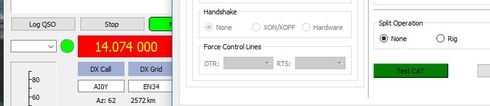
First instance completely works fine, second and third instance work fine to read the frequency of the slice, transmit and receive audio but the band indicator is shown in red and the drop-down button to set the band is empty ..
Has anyone seen this, and what might be the issue ?
Clicking testCAT or testPTT also works fine.
I use the WSJT version provided from WO2X with the hamlib changes to support the new radio models.
I'm using the TCP port numbers different per-slice.
First instance completely works fine, second and third instance work fine to read the frequency of the slice, transmit and receive audio but the band indicator is shown in red and the drop-down button to set the band is empty ..
Has anyone seen this, and what might be the issue ?
Clicking testCAT or testPTT also works fine.
0
Answers
-
Check you have Frequencies saved in settings
0 -
Interesting .. the two other instanes have those frequencies list in settings empty
for some reason... the first instance has 120 entries there... will see if there's an
easy way to copy them over...
But that seems to be the issue indeed, thanks for pointing that out1 -
In the instances with missing frequencies, go to Settings / Frequencies, and right-click on the frequency list. You will see a "Reset". Clicking on that reset will repopulate the frequency list for you.0
-
ok, that's probably the easiest repair... maybe my INI file got corrupt and that list disappeared.. a bit weird .. but up and running again now. thanks for the help0
-
There was a release candidate or two of wsjt-x that lost the frequency settings some time ago. The same technique was recommended to fix that problem, so this carries over to running multiple instances quite nicely. Also gives you a way of reverting the the "standard" setting for frequencies if you have been experimenting.0
-
I'm Glad you're Back in Business
Cheers!
0


Leave a Comment
Categories
- All Categories
- 390 Community Topics
- 2.2K New Ideas
- 662 The Flea Market
- 8.4K Software
- 157 SmartSDR+
- 6.5K SmartSDR for Windows
- 186 SmartSDR for Maestro and M models
- 440 SmartSDR for Mac
- 275 SmartSDR for iOS
- 265 SmartSDR CAT
- 204 DAX
- 386 SmartSDR API
- 9.4K Radios and Accessories
- 55 Aurora
- 297 FLEX-8000 Signature Series
- 7.2K FLEX-6000 Signature Series
- 971 Maestro
- 58 FlexControl
- 867 FLEX Series (Legacy) Radios
- 945 Genius Products
- 472 Power Genius XL Amplifier
- 347 Tuner Genius XL
- 126 Antenna Genius
- 308 Shack Infrastructure
- 216 Networking
- 468 Remote Operation (SmartLink)
- 142 Contesting
- 814 Peripherals & Station Integration
- 144 Amateur Radio Interests
- 1.1K Third-Party Software