Welcome to the FlexRadio Community! Please review the new Community Rules and other important new Community information on the Message Board.
Need the latest SmartSDR or 4O3A Genius Product Software?
SmartSDR v4.1.5 | SmartSDR v4.1.5 Release Notes
SmartSDR v3.10.15 | SmartSDR v3.10.15 Release Notes
The latest 4O3A Genius Product Software and Firmware
SmartSDR v4.1.5 | SmartSDR v4.1.5 Release Notes
SmartSDR v3.10.15 | SmartSDR v3.10.15 Release Notes
The latest 4O3A Genius Product Software and Firmware
If you are having a problem, please refer to the product documentation or check the Help Center for known solutions.
Need technical support from FlexRadio? It's as simple as Creating a HelpDesk ticket.
Need technical support from FlexRadio? It's as simple as Creating a HelpDesk ticket.
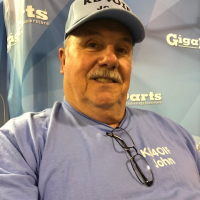
I just got my 6400M

Rick WN2C
Member ✭✭
I just got my 6400 M today and set it up with out reading the manual. It is easy if have owned a Flex before. I love it and not having to connect it to a computer is great.
Now the only thing I need is an HDMI cable for the BIG monitor!!
Thanks Flex!!!
Now the only thing I need is an HDMI cable for the BIG monitor!!
Thanks Flex!!!
6
Comments
-
Congrats, Rick. Still no word on mine. How'd you hook up the Heil Classic? 73 Bob
0 -
Well, Flex sent me the wrong cable. I was supposed to get the the 8 pin Foster to use with my PR 781. It just so happened that I had the Heil Classic. It is probably a good thing they sent the wrong cable by mistake as I did not have a 4 pin XLR cable for the radio. Now I have choices for a microphone, A PR 781 (as soon as Flex send the cable) the Heil Classic and the Heil Pro set with the HC6. Oh, and the hand mike.0
-
Outstanding! Tell us how things are working in the days ahead.
0 -
Boy is this fun...taking a new radio out of the box!

3 -
I got to touch a 6400M yesterday at the hamcation. Bigger than I thought. Could not stop drooling. My first Flex so the learning curve is steep from what I have read and heard. Hope my 71 yr old brain survives. Come on April.
0 -
Rick, you look like a kid at Christmas. OK, so is it control by knob only or can you still use a mouse? Any keyboard control? 73, Jim0
-
The M model and the non-M using a Maestro allow button, knob and touch screen operation without need of a PC.
You can use a PC running SmartSDR with keyboard and mouse instead if you desire.
At this time only one client can be connected to the radio at a time. The front panel, Maestro, SmartSDR, Dogpark Software for MAC, and SmartSDR for IOS are all clients.
If you are running the front panel or Maestro you can still ise a PC with SmartSDR CAT and DAX for interfacing to third party software (logging, digital modes, etc) and hardware (auto tuners, amp).
Dave wo2x0 -
Thank you, Dave. One of the reasons I ask is for frequency control. These radios do not have a keypad for direct digital entry of frequency in the manner of my FT-2000 for example. On my Flex 6500, I need to click on a frequency with the mouse or highlight the frequency in the flag and then enter it in the keyboard. On my FT-2000, I hit enter, key in a frequency and hit enter again....a very easy operation.
Best 73, Jim0 -
If you tap on the frequency on the display it should pop up a screen allowing direct frequency entry.
Dave wo2x
1 -
Looks like the cat who ate the cannery.
0 -
Way cool, Dave. Sounds like they put some thought into this. Jim KD1I0
-
I don't think you have to worry about the learning curve. the signature series radios are very much plug and play. the also don't require a lot of computer savvy like the Flex 5000. Can't decide which new radio I'll get... but I will. Currently have a 6300 and honestly, find it way more than satisfactory.
0






Leave a Comment
Categories
- All Categories
- 384 Community Topics
- 2.1K New Ideas
- 642 The Flea Market
- 8.3K Software
- 148 SmartSDR+
- 6.4K SmartSDR for Windows
- 188 SmartSDR for Maestro and M models
- 436 SmartSDR for Mac
- 274 SmartSDR for iOS
- 262 SmartSDR CAT
- 202 DAX
- 383 SmartSDR API
- 9.4K Radios and Accessories
- 47 Aurora
- 284 FLEX-8000 Signature Series
- 7.2K FLEX-6000 Signature Series
- 961 Maestro
- 58 FlexControl
- 866 FLEX Series (Legacy) Radios
- 935 Genius Products
- 466 Power Genius XL Amplifier
- 343 Tuner Genius XL
- 126 Antenna Genius
- 306 Shack Infrastructure
- 215 Networking
- 465 Remote Operation (SmartLink)
- 144 Contesting
- 799 Peripherals & Station Integration
- 142 Amateur Radio Interests
- 1K Third-Party Software