Welcome to the FlexRadio Community! Please review the new Community Rules and other important new Community information on the Message Board.
The latest SmartSDR Software:
SmartSDR v4.2.18 | SmartSDR v4.2.18 Release Notes
SmartSDR v3.10.15 | SmartSDR v3.10.15 Release Notes
The latest 4O3A Genius Product Software:
The latest 4O3A Genius Product Software and Firmware
SmartSDR v4.2.18 | SmartSDR v4.2.18 Release Notes
SmartSDR v3.10.15 | SmartSDR v3.10.15 Release Notes
The latest 4O3A Genius Product Software:
The latest 4O3A Genius Product Software and Firmware
How to Receive Technical Support::
If you are needing assistance with FlexRadio products, please refer to the product documentation or check the Help Center for known solutions. Need technical support from FlexRadio? It's as simple as creating a HelpDesk ticket.
If you are needing assistance with FlexRadio products, please refer to the product documentation or check the Help Center for known solutions. Need technical support from FlexRadio? It's as simple as creating a HelpDesk ticket.
Connecting a 6500 to a Yaesu VL-1000 amp does not work

N0AZZ
Member ✭✭
yaesu vl-1000 connecting 6500 series as #2 input on amp an FTDX-5000 is connected to radio 1 and it uses a band data cable for it and works fine. But when I connect the 6500 using a coax from radio with a PTT cable from radio to amp nothing happens the amp sees nothing other than the power meter on the amp shows 100w of drive. I have used this amp connected to several other radios and it worked fine with them reading pwr, band switch reading radio freq with a 1k output. and ant tuner works fine also.
0
Answers
-
Maybe your PTT cable is not PTT'ing. Have an Ohm
meter handy?
0 -
I assume you have the PTT cable connected to the TX1 jack on the 6500. Make sure that TX1 is enabled in the radio setup menu TX Tab as described in section 33.6 of the SmartSDR manual.
73,
Craig, KØCF
0 -
Yes connected to the #1 TX and enabled in the menu.
73,
Fred/N0AZZ
0 -
I had the same setup Quadra and 6500 and it worked fine. You have to make sure the appropriate TX is enabled. Go to Settings, Radio Setup, TX. Depending on which RCA TX line you connected the Quadra to, you will need to enable it.
At the time there was no USB cables for 6xxx so I used DDUtil and a parallel port card on the PC to send band data to the Quadra. Now, you just get the proper USB to parallel cable and set it up. I've since upgraded to the 6700 and using my winter time amp Alpha 87A as it warms up the shack a bit. I have not done this yet but I'm this is the procedure to follow, it should work: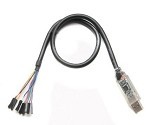
The USB to parallel adapter I used was:
https://www.amazon.com/gp/product/B00HKK4SCO/ref=oh_aui_detailpage_o00_s00?ie=UTF8&psc=1
but Flex also has one you can buy, http://cart.flexradio.com/USB-to-Parallel-adapter-for-the-FLEX-6000-series_p_1001.html
Plug in the cable to one of the USB ports on your 6500, select USB Cables in the SmartSDR Settings menu, you should see the new cable, make these changes:- Name: Quadra
- Cable Type: BCD
- Source: TX Slice
- Type: HF-BCD
- Polarity: Active High (default)
- brown (BIT4) on USB adapter to pin 7 on DB-15 connector
- green (BIT3) on USB adapter to pin 6 on DB-15 connector
- yellow (BIT2) on USB adapter to pin 5 on DB-15 connector
- orange (BIT1) on USB adapter to pin 4 on DB-15 connector
- black (ground) on USB adapter to pin 3 on DB-15 connector

4 -
Mike thanks for the details in your post, I will try this next week. Thanks to the others who replied also, now I have new things to try.
Thanks again 73,
Fred/N0AZZ
1



Leave a Comment
Categories
- All Categories
- 391 Community Topics
- 2.2K New Ideas
- 665 The Flea Market
- 8.5K Software
- 170 SmartSDR+
- 6.5K SmartSDR for Windows
- 190 SmartSDR for Maestro and M models
- 446 SmartSDR for Mac
- 275 SmartSDR for iOS
- 265 SmartSDR CAT
- 209 DAX
- 387 SmartSDR API
- 9.5K Radios and Accessories
- 66 Aurora
- 307 FLEX-8000 Signature Series
- 7.2K FLEX-6000 Signature Series
- 978 Maestro
- 58 FlexControl
- 869 FLEX Series (Legacy) Radios
- 951 Genius Products
- 474 Power Genius XL Amplifier
- 348 Tuner Genius XL
- 129 Antenna Genius
- 310 Shack Infrastructure
- 217 Networking
- 472 Remote Operation (SmartLink)
- 143 Contesting
- 829 Peripherals & Station Integration
- 145 Amateur Radio Interests
- 1.1K Third-Party Software