SmartSDR v4.1.5 | SmartSDR v4.1.5 Release Notes
SmartSDR v3.10.15 | SmartSDR v3.10.15 Release Notes
The latest 4O3A Genius Product Software and Firmware
Need technical support from FlexRadio? It's as simple as Creating a HelpDesk ticket.
Problem accessing radio after 2.0 upgrade

Last night I successfully upgraded my Flex 6300 to SmartSDR 2.0, and was able to access radio locally after upgrade.
I registered the radio for SmartLink, registered to my "ken@n2vip.org" email address successfully last night also.
Well, today is a new day, and I can't access the radio either locally or via smartlink.
The progression during login is as follows - I start SmartSDR 2.0:

That shows the radio available and registered for SmartLink.
Then, a moment later, the screen changes to this:
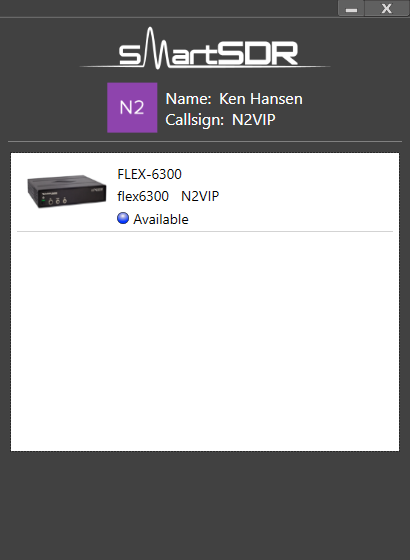
Where did SmartLink go?
Then I click on the Flex-6300, and I get this:

But when I click on "SmartLink Setup" I get this:
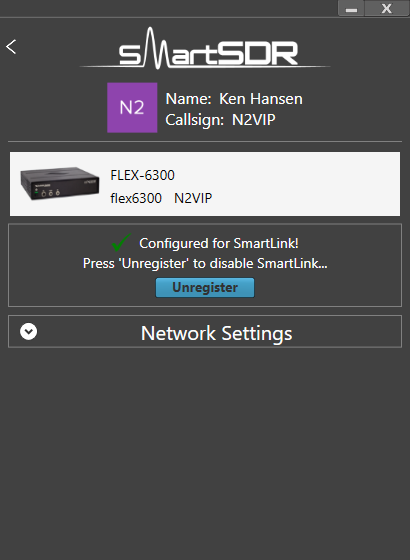
Oh look, my radio IS registered for SmartLink!
If I click on "connect" on the previous screen, after highlighting the Flex-6300, the software just appears to hang, never connecting.
Any thoughts? I'm hoping to use my radio remotely this weekend, any help you can provide is greatly appreciated.
Ken, N2VIP
Comments
-
When it fails to connect to the radio, this is the timeout message I see:
 0
0 -
Have you done a cold reboot of the rig?
Shut if off, remove power for about 30 seconds, return power, and start the rig up again.
While that is happening, reboot your computer, too.
Then try again, locally at first, and see if it connects.
If so, then try via your remote connection.
BTW> If you go to the network settings tab in your SmartLink setup, what does it say?
Are you using the "Automatic" UPnP, or have you manually forwarded ports?
If you hit the "test" button, do you get the green indicator?
Ken - NM9P1 -
Assuming all of this is happening on your LAN, you shouldn't see your radio listed as being available via SmartLink. This suggests something unusual is happening in your LAN.
1 -
I have converted this topic to a support HelpDesk ticket (http://helpdesk.flexradio.com) for expedited issue resolution. Please respond using the HelpDesk ticket for issue resolution.
1 -
Yes, all on home lan0
-
Working backwards: Yes, greenbuttonfrom'test' Using manual port forwarding 4993 --> 4993, 4994 -->4994 The laptop has been rebooted, the radio has not The laptop found the 2.0 updated radio on local LAN right after update, radiohas not been powered down since update. Thanks, Ken, N2VIP0
-
Thanks all, got a chance to test it today, after power-cycling the radio, and all is well. I was able to access the radio on my local LAN (where I did not see the SmartLink tag next to the radio entry), but when I went to a bookstore to test remote access from my laptop the radio appeared, with the SmartLink tag next to it, and I was able to control it just fine.
I will update the helpdesk ticket momentarily, but I wanted to add the resolution here - the power-cycle on the radio appears to be needed, or at least very, very helpful. ;^)
0



Leave a Comment
Categories
- All Categories
- 386 Community Topics
- 2.2K New Ideas
- 656 The Flea Market
- 8.4K Software
- 155 SmartSDR+
- 6.5K SmartSDR for Windows
- 185 SmartSDR for Maestro and M models
- 438 SmartSDR for Mac
- 275 SmartSDR for iOS
- 264 SmartSDR CAT
- 202 DAX
- 385 SmartSDR API
- 9.4K Radios and Accessories
- 52 Aurora
- 294 FLEX-8000 Signature Series
- 7.2K FLEX-6000 Signature Series
- 969 Maestro
- 58 FlexControl
- 866 FLEX Series (Legacy) Radios
- 941 Genius Products
- 470 Power Genius XL Amplifier
- 345 Tuner Genius XL
- 126 Antenna Genius
- 306 Shack Infrastructure
- 215 Networking
- 466 Remote Operation (SmartLink)
- 142 Contesting
- 808 Peripherals & Station Integration
- 143 Amateur Radio Interests
- 1K Third-Party Software