Welcome to the FlexRadio Community! Please review the new Community Rules and other important new Community information on the Message Board.
The latest SmartSDR Software:
SmartSDR v4.1.5 | SmartSDR v4.1.5 Release Notes
SmartSDR v3.10.15 | SmartSDR v3.10.15 Release Notes
The latest 4O3A Genius Product Software:
The latest 4O3A Genius Product Software and Firmware
SmartSDR v4.1.5 | SmartSDR v4.1.5 Release Notes
SmartSDR v3.10.15 | SmartSDR v3.10.15 Release Notes
The latest 4O3A Genius Product Software:
The latest 4O3A Genius Product Software and Firmware
How to Receive Technical Support::
If you are needing assistance with FlexRadio products, please refer to the product documentation or check the Help Center for known solutions. Need technical support from FlexRadio? It's as simple as creating a HelpDesk ticket.
If you are needing assistance with FlexRadio products, please refer to the product documentation or check the Help Center for known solutions. Need technical support from FlexRadio? It's as simple as creating a HelpDesk ticket.
how do I remove the CAT com ports?

ON5AM
Member ✭✭
Hi,
That's very simple. I have ghost COM ports, when I chose a new port com, I can't how to go back and take my port Com 4, 5 etc ... I am now at COM port 23 and the more I advance the number go up. I deleted all my COM ports but they come back when I reset the PC.
What to I do. Have you a solution?
Tks for help me
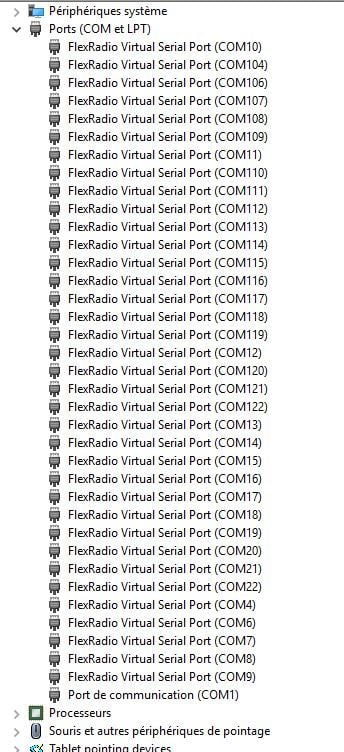

That's very simple. I have ghost COM ports, when I chose a new port com, I can't how to go back and take my port Com 4, 5 etc ... I am now at COM port 23 and the more I advance the number go up. I deleted all my COM ports but they come back when I reset the PC.
What to I do. Have you a solution?
Tks for help me
1
Answers
-
https://helpdesk.flexradio.com/hc/en-us/articles/200883925?mobile_site=true This should help Dave wo2x1
-
Thanks Dave for the info, I needed that....Rick, kd4dra
0 -
First thanks.
David, unfortunately I applied this method but the result at home did not bring anything. After some time I have all my COM port just like pictures.
I don't know what I do now ?
0 -
You can try try using a program Tim recommends called Com Name Arbiter Setter
http://www.uwe-sieber.de/misc_tools_e.html#arbiter
This will allow you to clear com ports that are incorrectly set to reserved in the Windows Registry.
Dave wo2x0 -
I will try and keep you informed
Thanks
0 -
Hi,
Now everything is good and I'm happy :-)
I delete all COM port in Device Management after I uninstall the FlexRadio System FlexVSP oh yes...uninstall
I Restart 2 times and after will be OK.
Now I have the Ghost COM port 4, 5, ...
Thanks for your help.
Al
0 -
There is a MUCH easier way. Open SmartSDR CAT, right click on the Remove button and select the option "Reset FlexVSP ports".1
-
Thanks you Tim
0 -
Tim, I'm sorry but i don't see "reset FlexVSP ports". I have V1.9.13
Can you help me ?
0 -
Upgrade to the latest version of SmartSDR, 1.10.16.0
-
Thanks, right click on Remove works but is non-obvious to find. Could you add 'Right-click for removal options' to the hint text for the button ?0
-
It's obvious if you read the CAT documentation ;-)
We'll take your suggestion under consideration.1 -
"this may take a while " means ???
0





Leave a Comment
Categories
- All Categories
- 388 Community Topics
- 2.2K New Ideas
- 658 The Flea Market
- 8.4K Software
- 156 SmartSDR+
- 6.5K SmartSDR for Windows
- 186 SmartSDR for Maestro and M models
- 439 SmartSDR for Mac
- 275 SmartSDR for iOS
- 265 SmartSDR CAT
- 204 DAX
- 386 SmartSDR API
- 9.4K Radios and Accessories
- 53 Aurora
- 297 FLEX-8000 Signature Series
- 7.2K FLEX-6000 Signature Series
- 970 Maestro
- 58 FlexControl
- 866 FLEX Series (Legacy) Radios
- 944 Genius Products
- 471 Power Genius XL Amplifier
- 347 Tuner Genius XL
- 126 Antenna Genius
- 306 Shack Infrastructure
- 215 Networking
- 468 Remote Operation (SmartLink)
- 142 Contesting
- 811 Peripherals & Station Integration
- 144 Amateur Radio Interests
- 1.1K Third-Party Software