Welcome to the FlexRadio Community! Please review the new Community Rules and other important new Community information on the Message Board.
Need the latest SmartSDR or 4O3A Genius Product Software?
SmartSDR v4.1.5 | SmartSDR v4.1.5 Release Notes
SmartSDR v3.10.15 | SmartSDR v3.10.15 Release Notes
The latest 4O3A Genius Product Software and Firmware
SmartSDR v4.1.5 | SmartSDR v4.1.5 Release Notes
SmartSDR v3.10.15 | SmartSDR v3.10.15 Release Notes
The latest 4O3A Genius Product Software and Firmware
If you are having a problem, please refer to the product documentation or check the Help Center for known solutions.
Need technical support from FlexRadio? It's as simple as Creating a HelpDesk ticket.
Need technical support from FlexRadio? It's as simple as Creating a HelpDesk ticket.
Receiving cw signals affected by "clicks"

Anto IZ8XQC
Member
Hi there. I recentely got a new pc with win 10. So I moved the Ssdr and 6300 to this new pc, but I'm having a strange issue, mostly in cw, that I cannot solve.
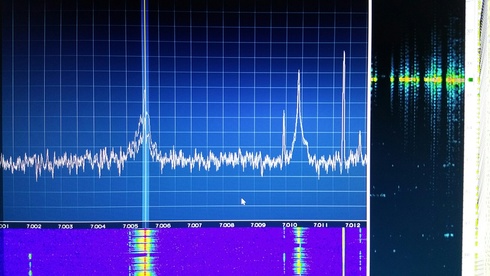
Looking at the waterfall all cw signals seem to be very wide and affected by "clicks". Listening at them there is no sound issue or strange noise. This behaviour affects also cwskimmer because the so wide signal are not well decoded.

I moved the 6300 to the old pc and all works fine,
Any idea?
Tnx es 73.
Anto
Looking at the waterfall all cw signals seem to be very wide and affected by "clicks". Listening at them there is no sound issue or strange noise. This behaviour affects also cwskimmer because the so wide signal are not well decoded.
I moved the 6300 to the old pc and all works fine,
Any idea?
Tnx es 73.
Anto
0
Comments
-
Are you using I/Q to power your skimmer or just audio? If just audio have you tried reducing the audio gain on your RX stream?0
-
Hi, I'm using I/Q stream and even reducing levels on dax channel doesn't minimize the problem.
Also tried a cold boot and factory restore, but didn't change...
0 -
Those are some mighty grungy CW signals. How does it do on weaker signals that aren't so ratty?0
-
1) DAX occasionally experiences a sort of buffer overload that introduces a little distortion into the stream. If you close DAX and restart it, it will often clear it up. 2) Your computer may have experienced the occasional problem caused by a Windows 10 update, which leaves "Phantom" or "ghost" ports -- duplicate Dax or com ports. Go to Windows' "device manager" and examine your audio ports with the "view hidden" option. See if you have any duplicates. 3) You may have a corrupt installation of the DAX drivers. You might try uninstalling SSDR with the option of removing DAX, and installing g it again.0
-
Tnx Elmer, checked one by one all your points but didn't fix the problem.
No dupe/ghost ports found on the computer's system nor DAX drivers corrupted...
By the way thanks by heart for your help.
HNY
0



Leave a Comment
Categories
- All Categories
- 386 Community Topics
- 2.2K New Ideas
- 657 The Flea Market
- 8.4K Software
- 155 SmartSDR+
- 6.5K SmartSDR for Windows
- 185 SmartSDR for Maestro and M models
- 438 SmartSDR for Mac
- 275 SmartSDR for iOS
- 264 SmartSDR CAT
- 202 DAX
- 385 SmartSDR API
- 9.4K Radios and Accessories
- 52 Aurora
- 295 FLEX-8000 Signature Series
- 7.2K FLEX-6000 Signature Series
- 969 Maestro
- 58 FlexControl
- 866 FLEX Series (Legacy) Radios
- 944 Genius Products
- 471 Power Genius XL Amplifier
- 347 Tuner Genius XL
- 126 Antenna Genius
- 306 Shack Infrastructure
- 215 Networking
- 467 Remote Operation (SmartLink)
- 142 Contesting
- 808 Peripherals & Station Integration
- 144 Amateur Radio Interests
- 1.1K Third-Party Software