Welcome to the FlexRadio Community! Please review the new Community Rules and other important new Community information on the Message Board.
The latest SmartSDR Software:
SmartSDR v4.2.18 | SmartSDR v4.2.18 Release Notes
SmartSDR v3.10.15 | SmartSDR v3.10.15 Release Notes
The latest 4O3A Genius Product Software:
The latest 4O3A Genius Product Software and Firmware
SmartSDR v4.2.18 | SmartSDR v4.2.18 Release Notes
SmartSDR v3.10.15 | SmartSDR v3.10.15 Release Notes
The latest 4O3A Genius Product Software:
The latest 4O3A Genius Product Software and Firmware
How to Receive Technical Support::
If you are needing assistance with FlexRadio products, please refer to the product documentation or check the Help Center for known solutions. Need technical support from FlexRadio? It's as simple as creating a HelpDesk ticket.
If you are needing assistance with FlexRadio products, please refer to the product documentation or check the Help Center for known solutions. Need technical support from FlexRadio? It's as simple as creating a HelpDesk ticket.
Maestro Startup Sequence Required after turning off the Maestro

K7NXT
Member
Just wondered if anyone else has this problem.
When trying to connect the Maestro to my 6500 using WiFi, it seems to work the first time.
Then, I found that this sequence is required if I ever turn off the Maestro.
If I am connected via WiFi and I turn off the Maestro, it will not find my 6500 when I turn it back on (see first picture below).
However, these steps seem to work every time:
1. Leave the Maestro turned off
2. Cycle power on the 6500
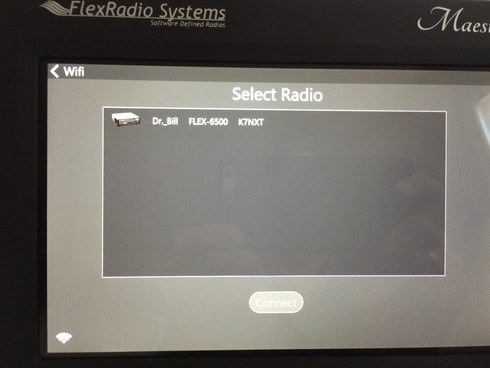
3. Turn the Maestro back on (second picture below)
When the Maestro has been turned off - then it powers up straight into this screen
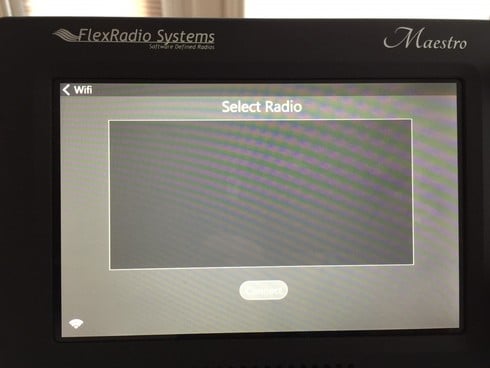
However, if I follow the sequence above, it will power up into this screen.
Like others have mentioned, my WiFi strength seems to be all over the map without apparent cause, but that is an issue for another day.
73s
When trying to connect the Maestro to my 6500 using WiFi, it seems to work the first time.
Then, I found that this sequence is required if I ever turn off the Maestro.
If I am connected via WiFi and I turn off the Maestro, it will not find my 6500 when I turn it back on (see first picture below).
However, these steps seem to work every time:
1. Leave the Maestro turned off
2. Cycle power on the 6500
3. Turn the Maestro back on (second picture below)
When the Maestro has been turned off - then it powers up straight into this screen
However, if I follow the sequence above, it will power up into this screen.
Like others have mentioned, my WiFi strength seems to be all over the map without apparent cause, but that is an issue for another day.
73s
0
Comments
-
Sounds like another instance of a bug in the acquisition of an ip address. Id check the maestro to see if its acquired a proper address. Imfeel,that this is a companion bug in the flex software that acquires an i- address. I have to power cycle my flex 6700 twice before it acquires a correct ip address. Bug, bug, bug flex emploees.0
-
The Wifi indicator in Maestro and SSDR does not report signal strength but signal quality which can be degraded by things other than ignal strenght ( channel conjestion, wifi configuration, etc.) If you look at network stats in SSDR or Maestro, you may find that you have a high dropped packet rate.
Do you have a different wifi router to try? most wifi router support multi modes ( a/g/n ). If you your router has the option, try running with wireless mode n only.
AL, K0VM
0 -
Thank you Al. Over the next week or two, I will do some thorough and systematic testing - and then report on the results.
Without knowing how the software works, - it seems that the Maestro only looks for the connection at startup, because once the blank "select radio" screen appears (picture 1 above), I have not seen the Radio Selection (picture 2 above) show up without a power cycle to the Maestro.
0 -
From the blank radio select screen, you may be able to recover by going into the Wifi select screen and tring a reconnect to you network.. Just a thought.
AL, K0VM
0 -
Al, thanks for the suggestion - When I go into the WiFi screen it shows that I am connected. Several times, I have tried "forgetting" the link, and then reconnecting. That has not worked so far.0
-
This is NOT just a Maestro issue, I have to cycle the radio once in a while when I try to connect with my laptop either by a wireless connection on the same router or VPN after my desktop has been connected and disconnected and I have the same results with the Maestro.
I think it is in the Radio firmware itself NOT releasing the connection to one device and waiting for another device to connect and right now being a ONE device connection radio it has a bug that should go away when version 2 comes out or at least I hope so, This has been this way from the start of the 6000 series as I remember and not something new to any particular version of SmartSDR, It does seems worse when DAX and CAT are left running on the unused machine but this creates another problem in that some of us NEED the CAT left on the desktop to control things with DDUTIL and the home station.
SO for a test try turning off the radio then shut down your main radio computer and restart the Radio (leave the computer off) and just make a bunch of connections / disconnection with the Maestro and see if you still loose contact with the radio in the connection list.
I may be up in the night but this is what I have found.
Your milage may vary
73's
Bret
WX7Y
0


Leave a Comment
Categories
- All Categories
- 392 Community Topics
- 2.2K New Ideas
- 665 The Flea Market
- 8.5K Software
- 171 SmartSDR+
- 6.5K SmartSDR for Windows
- 190 SmartSDR for Maestro and M models
- 446 SmartSDR for Mac
- 275 SmartSDR for iOS
- 266 SmartSDR CAT
- 210 DAX
- 387 SmartSDR API
- 9.5K Radios and Accessories
- 66 Aurora
- 310 FLEX-8000 Signature Series
- 7.2K FLEX-6000 Signature Series
- 979 Maestro
- 58 FlexControl
- 869 FLEX Series (Legacy) Radios
- 952 Genius Products
- 474 Power Genius XL Amplifier
- 349 Tuner Genius XL
- 129 Antenna Genius
- 310 Shack Infrastructure
- 217 Networking
- 473 Remote Operation (SmartLink)
- 143 Contesting
- 829 Peripherals & Station Integration
- 145 Amateur Radio Interests
- 1.1K Third-Party Software