Welcome to the FlexRadio Community! Please review the new Community Rules and other important new Community information on the Message Board.
The latest SmartSDR Software:
SmartSDR v4.2.20 | SmartSDR v4.2.20 Release Notes
SmartSDR v3.10.15 | SmartSDR v3.10.15 Release Notes
The latest 4O3A Genius Product Software:
The latest 4O3A Genius Product Software and Firmware
SmartSDR v4.2.20 | SmartSDR v4.2.20 Release Notes
SmartSDR v3.10.15 | SmartSDR v3.10.15 Release Notes
The latest 4O3A Genius Product Software:
The latest 4O3A Genius Product Software and Firmware
How to Receive Technical Support::
If you are needing assistance with FlexRadio products, please refer to the product documentation or check the Help Center for known solutions. Need technical support from FlexRadio? It's as simple as creating a HelpDesk ticket.
If you are needing assistance with FlexRadio products, please refer to the product documentation or check the Help Center for known solutions. Need technical support from FlexRadio? It's as simple as creating a HelpDesk ticket.
Grey out CWX indicator, if CWX panel is not open
Options

I just saw that the CWX indicator is bright, even if the panel is deactivated (yes, I know, the CWX function is usable even with a closed panel). A switchable function of a button should be capable of being differentiated visually.
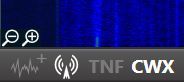
Please make inactive Panadapter/TX Panel/TNF/CWX indicator grey.
Please make inactive Panadapter/TX Panel/TNF/CWX indicator grey.
1
Comments
-
I agree with you about graying it out when it is inactive.
Although, it is very obvious when it is in use or not.
0 -
To me, grey out means " not available for selection". It is obvious by observation if it is selected.
Just my opinion.
AL, K0VM
0 -
Al,
in my snapshot, posted above, the panadapter and TNF would be " not available for selection" following your argument.
That is the initial point that irritates me.- Panadapter grey: not selectable / bright: selectable
- TX Panel bright: selected / bright: not selected
- TNF grey: global TNF unselected / bright: selected
- CWX: bright: not selected / bright: selected
What you mention is 100% right - obvious by observation - but there are a few tricks in GUI design, that differentiate a high-usability-GUI from a usable GUI.
In my opinion, Flex tries to deliver the best possible software and to convince with great features, not only concerning Amateur Radio hard-facts. I just talk about the soft-facts that could by implemented by changing a hex-number and a value.
SMOP
VY 73
Tom
DK1EY0 -
Many thanks tor FRS for "#649 CWX: CWX icon is now grayed out when not open, lit up when opened" in 1.3.8. VY73 Tom DK1EY1


Leave a Comment
Categories
- All Categories
- 401 Community Topics
- 2.2K New Ideas
- 689 The Flea Market
- 8.6K Software
- 197 SmartSDR+
- 6.6K SmartSDR for Windows
- 200 SmartSDR for Maestro and M models
- 460 SmartSDR for Mac
- 279 SmartSDR for iOS
- 268 SmartSDR CAT
- 220 DAX
- 395 SmartSDR API
- 9.6K Radios and Accessories
- 110 Aurora
- 348 FLEX-8000 Signature Series
- 7.2K FLEX-6000 Signature Series
- 999 Maestro
- 58 FlexControl
- 872 FLEX Series (Legacy) Radios
- 975 Genius Products
- 482 Power Genius XL Amplifier
- 358 Tuner Genius XL
- 135 Antenna Genius
- 322 Shack Infrastructure
- 227 Networking
- 483 Remote Operation (SmartLink)
- 147 Contesting
- 847 Peripherals & Station Integration
- 147 Amateur Radio Interests
- 1.1K Third-Party Software