SmartSDR v4.2.20 | SmartSDR v4.2.20 Release Notes
SmartSDR v3.10.15 | SmartSDR v3.10.15 Release Notes
The latest 4O3A Genius Product Software:
The latest 4O3A Genius Product Software and Firmware
If you are needing assistance with FlexRadio products, please refer to the product documentation or check the Help Center for known solutions. Need technical support from FlexRadio? It's as simple as creating a HelpDesk ticket.
How do I get the DAX audio inputs and outputs to show in Device Manager on a remote NUC?

I am working on a remote club station:
- FLex 6400 V 4.2.20
- NUC computer at radio site
- Remote Desktop to control the NUC
- ZeroTier VPN
My home station shows all the DAX inputs and outputs like this:

The NUC at the club station only shows Remote Audio. No DAX is available.

Is there something special that I need to do on the NUC? Is Remote Desktop the problem?
I have removed and reinstalled 4.2.20 on the NUC. I can start DAX, and it looks normal, but nothing happens because Windows doesn't see the DAX entries. I have tried this on a Win 10 NUC as well as on a Win 11 NUC. I have tried starting SmartSDR on the operator machine and the NUC at the radio site with identical results.
Best Answer
-
Problem solved!! Thanks to Simon, NV0E for remembering something about the Remote Desktop setup:
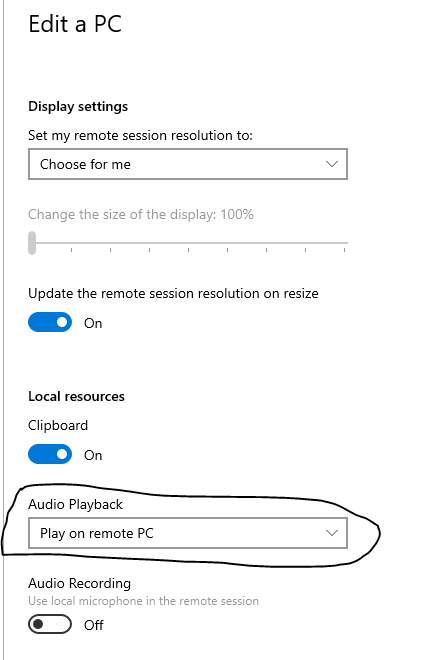
If Play on remote PC is not selected in the Remote Desktop settings, the remote (radio site) PC will only show an audio device of Remote Audio. Selecting Play on remote PC allows all of the DAX virtual devices to appear.
It is very important for our club to be able to run WSJT-X and DAX on the remote PC because it is a very rural location with a WISP connection that just doesn't support that much bi-directional data. Simon and I discovered that once we were transmitting via DAX from the operator site, the network latency went wildly high,and fluctuated by huge amounts. This caused the power output to cut in and out, making it look like a crazy RFI problem. The issue was exacerbated by using a cellphone hotspot to get to the WAN for testing.
I hope this little tidbit is helpful to someone else!
1

Answers
-
Hi Len. You are the expert, how can anyone else know hi hi.
On the NUC ensure 'allow apps to access your microphone settings' is turned on.
RDP can disable DAX as I found at my Club station but I don't know enough to say that might be a reason here. But have you tried an alternative such as AnyDesk?
2

Leave a Comment
Categories
- All Categories
- 401 Community Topics
- 2.2K New Ideas
- 691 The Flea Market
- 8.6K Software
- 197 SmartSDR+
- 6.6K SmartSDR for Windows
- 200 SmartSDR for Maestro and M models
- 462 SmartSDR for Mac
- 280 SmartSDR for iOS
- 268 SmartSDR CAT
- 220 DAX
- 395 SmartSDR API
- 9.6K Radios and Accessories
- 113 Aurora
- 352 FLEX-8000 Signature Series
- 7.2K FLEX-6000 Signature Series
- 999 Maestro
- 58 FlexControl
- 872 FLEX Series (Legacy) Radios
- 978 Genius Products
- 484 Power Genius XL Amplifier
- 358 Tuner Genius XL
- 136 Antenna Genius
- 323 Shack Infrastructure
- 228 Networking
- 485 Remote Operation (SmartLink)
- 147 Contesting
- 847 Peripherals & Station Integration
- 148 Amateur Radio Interests
- 1.1K Third-Party Software