Welcome to the FlexRadio Community! Please review the new Community Rules and other important new Community information on the Message Board.
The latest SmartSDR Software:
SmartSDR v4.2.20 | SmartSDR v4.2.20 Release Notes
SmartSDR v3.10.15 | SmartSDR v3.10.15 Release Notes
The latest 4O3A Genius Product Software:
The latest 4O3A Genius Product Software and Firmware
SmartSDR v4.2.20 | SmartSDR v4.2.20 Release Notes
SmartSDR v3.10.15 | SmartSDR v3.10.15 Release Notes
The latest 4O3A Genius Product Software:
The latest 4O3A Genius Product Software and Firmware
How to Receive Technical Support::
If you are needing assistance with FlexRadio products, please refer to the product documentation or check the Help Center for known solutions. Need technical support from FlexRadio? It's as simple as creating a HelpDesk ticket.
If you are needing assistance with FlexRadio products, please refer to the product documentation or check the Help Center for known solutions. Need technical support from FlexRadio? It's as simple as creating a HelpDesk ticket.
Edit Band plan
Options

Comments
-
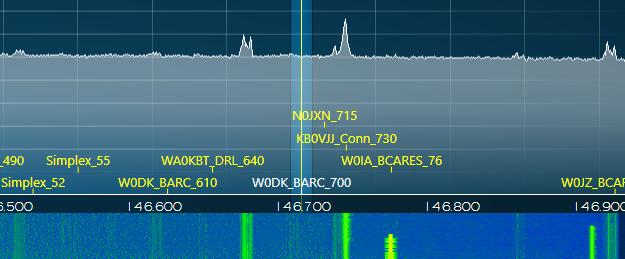
I have a utility that might meet your needs. It is called Flex Repeater Spots.
I originally built it to put repeaters on my SmartSDR screen. As the utility matured, I found it useful for HF nets, band edges and that kind of thing.
Here is a sample of some repeaters on my 2 meter transverter:
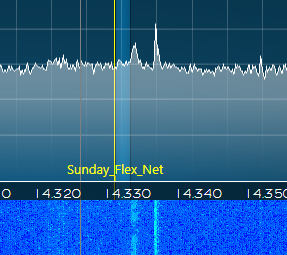
Here is one of the nets that I flag:
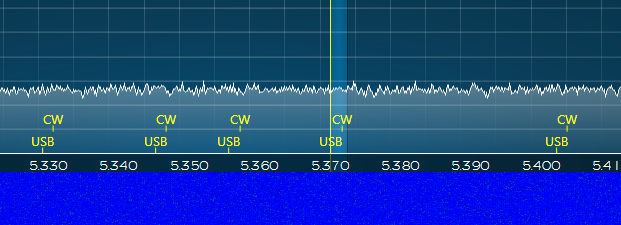
Here is how I keep my sanity if I want to operate on 60 meters:
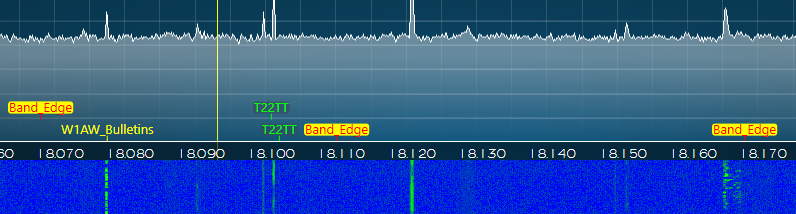
Here is an example of band edges and how I like to ID beacons and W1AW. I am always attracted to that great CW signal, then realize that it is W1AW…
If you decide to give it a try, let me know how it works for you.
0



Leave a Comment
Categories
- All Categories
- 401 Community Topics
- 2.2K New Ideas
- 691 The Flea Market
- 8.6K Software
- 197 SmartSDR+
- 6.6K SmartSDR for Windows
- 200 SmartSDR for Maestro and M models
- 462 SmartSDR for Mac
- 280 SmartSDR for iOS
- 268 SmartSDR CAT
- 220 DAX
- 395 SmartSDR API
- 9.6K Radios and Accessories
- 113 Aurora
- 352 FLEX-8000 Signature Series
- 7.2K FLEX-6000 Signature Series
- 999 Maestro
- 58 FlexControl
- 872 FLEX Series (Legacy) Radios
- 978 Genius Products
- 484 Power Genius XL Amplifier
- 358 Tuner Genius XL
- 136 Antenna Genius
- 323 Shack Infrastructure
- 228 Networking
- 485 Remote Operation (SmartLink)
- 147 Contesting
- 847 Peripherals & Station Integration
- 148 Amateur Radio Interests
- 1.1K Third-Party Software