SmartSDR v4.2.20 | SmartSDR v4.2.20 Release Notes
SmartSDR v3.10.15 | SmartSDR v3.10.15 Release Notes
The latest 4O3A Genius Product Software:
The latest 4O3A Genius Product Software and Firmware
If you are needing assistance with FlexRadio products, please refer to the product documentation or check the Help Center for known solutions. Need technical support from FlexRadio? It's as simple as creating a HelpDesk ticket.
WSJT-X Not Receiving Signal

I configured WSJT-X according to the YouTube video showing Flex + WSJT-X setup and even tho I configured it exactly as in the video I still don't receive any signal whatsoever. Inside of Windows Sounds panel (mmsys.cpl) the green audio bar jumps on DAX RX1 indicating that it's working, but even tho this works, there is still no signal coming out of WSJT-X. Also there''s a weird thing that when mmsys.cpl is opened the Mic Stream and RX Stream 1 inside of SmartSDR DAX turns green, but the moment mmsys.cpl is closed, it goes back to blue.
Could anyone help me on how to finally make the WSJT-X work with FLEX 8600-M?
Best Answer
-
Everything is working fine. Thank you for your support.
Slawomir
0
Answers
-
A good clue is mmsys.cpl makes DAX turn green. This is normal because it is only when DAX receives a connection does it turn green. Therefore, that it goes to blue after mmsys.cpl is closed shows that WSJTX is not connected and that might mean that in WSJTX settings>audio you do not actually have "DAX RX 1 (FlexRadio DAX)" for the input. So first off, check to see if this what has been selected and nothing else - it must be exactly as printed.
The output selection should be DAX TX (FlexRadio DAX), by the way.
If you already have these settings, report back. Note that the Community appreciate screen shots to make it easier to help you.
0 -
Slawomir,
After verifying that DAX RX 1 is selected in WSJT…..
If mmsys.cpl is showing received signals and wsjt is not, close and restart WSJT..
( or click the OK button in WSJT>File>Settings tab. )
In general, WSJT must be started AFTER SSDR DAX is running.
AL, K0VM
0 -
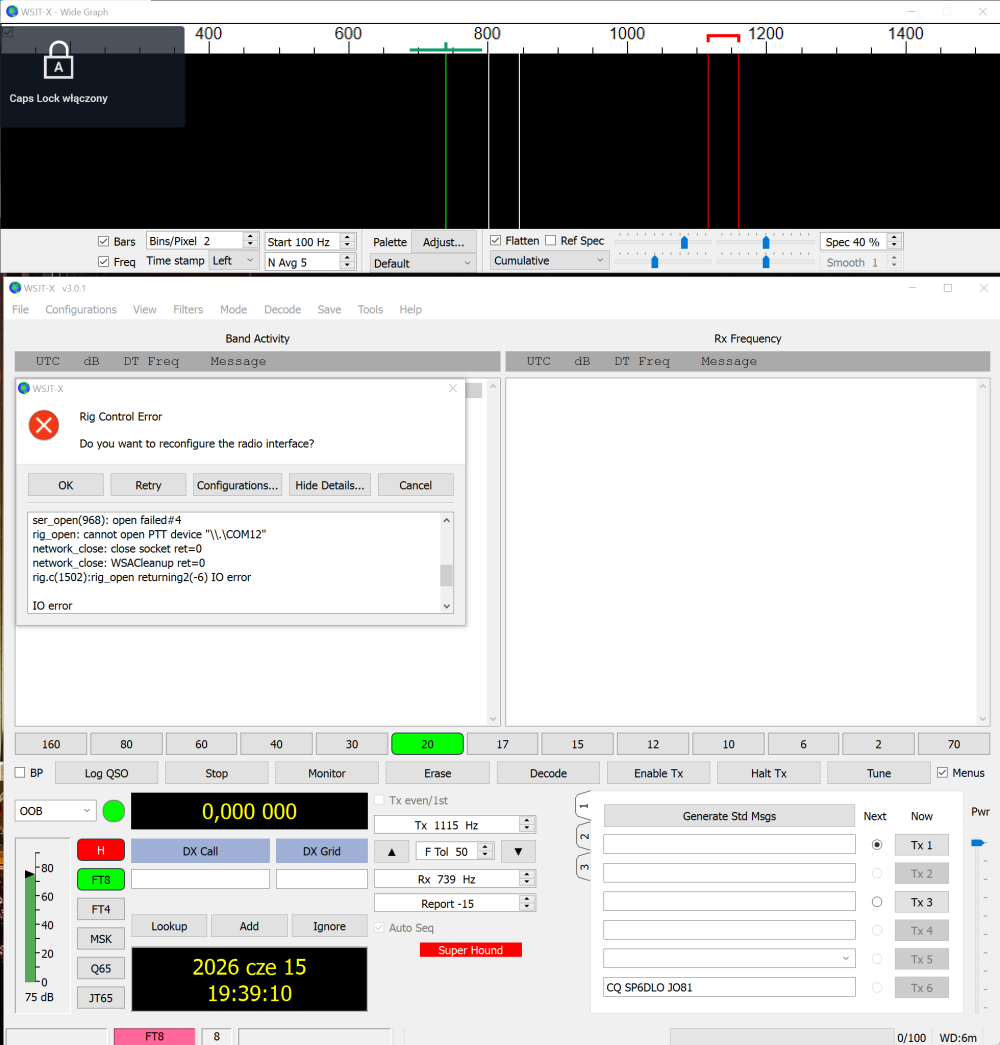
Now it finally works with receiving the signal, thanks to EI4KF. Must've eyeballed the settings before. Now the issue is different (as in attached image), the signal is received, but it shows an "Rig Connection Error" and doesn't read the frequencies.
 0
0



Leave a Comment
Categories
- All Categories
- 401 Community Topics
- 2.2K New Ideas
- 691 The Flea Market
- 8.6K Software
- 197 SmartSDR+
- 6.6K SmartSDR for Windows
- 200 SmartSDR for Maestro and M models
- 462 SmartSDR for Mac
- 280 SmartSDR for iOS
- 268 SmartSDR CAT
- 220 DAX
- 395 SmartSDR API
- 9.6K Radios and Accessories
- 113 Aurora
- 352 FLEX-8000 Signature Series
- 7.2K FLEX-6000 Signature Series
- 999 Maestro
- 58 FlexControl
- 872 FLEX Series (Legacy) Radios
- 978 Genius Products
- 484 Power Genius XL Amplifier
- 358 Tuner Genius XL
- 136 Antenna Genius
- 323 Shack Infrastructure
- 228 Networking
- 485 Remote Operation (SmartLink)
- 147 Contesting
- 847 Peripherals & Station Integration
- 148 Amateur Radio Interests
- 1.1K Third-Party Software