SmartSDR v4.2.20 | SmartSDR v4.2.20 Release Notes
SmartSDR v3.10.15 | SmartSDR v3.10.15 Release Notes
The latest 4O3A Genius Product Software:
The latest 4O3A Genius Product Software and Firmware
If you are needing assistance with FlexRadio products, please refer to the product documentation or check the Help Center for known solutions. Need technical support from FlexRadio? It's as simple as creating a HelpDesk ticket.
CW keying while operating in SSB mode

Feature Request: CW keying while operating in SSB mode
Description:
Please add an option to allow CW keying (straight key, paddle, Winkeyer) while the radio remains in USB/LSB mode. Many operators need to send short CW bursts or CW ID’s during SSB operation without switching modes.
Use cases:
- CW ID during SSB
- Quick CW replies in SSB QSO
- VHF/UHF mixed‑mode operation
- Beacon operation (SSB monitoring + CW ID)
- Remote operation where mode switching is slow or undesirable
Requested behavior:
A SmartSDR option such as:“Enable CW keying in SSB mode”
When enabled, CW tone is injected into the SSB TX audio chain while staying in USB/LSB.
Benefits:
- Faster operation
- Matches behavior of many legacy radios
- Very useful for contesters, VHF operators, beacons
- Minimal DSP impact (CW tone generation already exists)
Impact:
Low. Only requires routing the existing CW tone generator into the SSB transmit path.
Comments
-
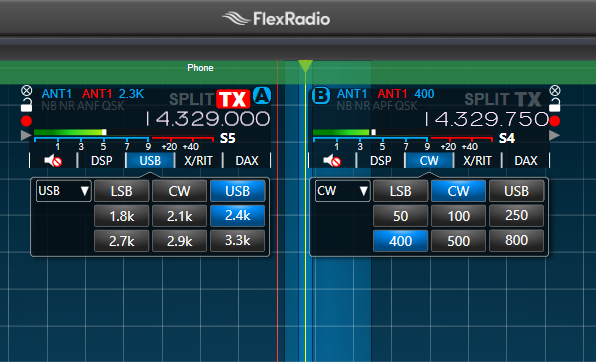
Hi Jaap, my work around for this is to open a CW slice and place it in the passband of the USB slice at the tone freq that I want (750 Hz in the example below). Mute the CW slice. I do have to remember to click the TX indicator for the CW slice, then back to the SSB slice, but it does work.
You might want to resubmit this post as an idea so that people can vote on it.
0


Leave a Comment
Categories
- All Categories
- 401 Community Topics
- 2.2K New Ideas
- 691 The Flea Market
- 8.6K Software
- 197 SmartSDR+
- 6.6K SmartSDR for Windows
- 200 SmartSDR for Maestro and M models
- 462 SmartSDR for Mac
- 280 SmartSDR for iOS
- 268 SmartSDR CAT
- 220 DAX
- 395 SmartSDR API
- 9.6K Radios and Accessories
- 113 Aurora
- 352 FLEX-8000 Signature Series
- 7.2K FLEX-6000 Signature Series
- 999 Maestro
- 58 FlexControl
- 872 FLEX Series (Legacy) Radios
- 978 Genius Products
- 484 Power Genius XL Amplifier
- 358 Tuner Genius XL
- 136 Antenna Genius
- 323 Shack Infrastructure
- 228 Networking
- 485 Remote Operation (SmartLink)
- 147 Contesting
- 847 Peripherals & Station Integration
- 148 Amateur Radio Interests
- 1.1K Third-Party Software