SmartSDR v4.2.20 | SmartSDR v4.2.20 Release Notes
SmartSDR v3.10.15 | SmartSDR v3.10.15 Release Notes
The latest 4O3A Genius Product Software:
The latest 4O3A Genius Product Software and Firmware
If you are needing assistance with FlexRadio products, please refer to the product documentation or check the Help Center for known solutions. Need technical support from FlexRadio? It's as simple as creating a HelpDesk ticket.
Recording all of audio for contest

Hi every one, right now I have a issue about how to record all of audio from PC MIC, DAX TX, DAX RX these three streams from SmartSDR DAX inside the DXLog software on my WIN11 computer. It would be great if you knew and could help me. Thanks in advance.
Best Answer
-
I don't think you can do this if you have the microphone (or CW key) connected to the radio. Flex radio's don't offer an "audit" audio stream that lets you record both transmit and receive audio in one stream.
You have to route the TX audio to the recording device outside of the Flex radio, so you have do something like connect your microphone and CW key to the PC which then records transmit alongside the RX audio.
For those of us that use SDC contest software, this lack of audit recording was one of the reasons Yuri developed the SDC RigAudio module, so that contest compliant recordings could be made (including support for multiple slices), but that means you have to connect microphone and CW key to the PC running SDC. I suspect similar solutions may exist for N1MM and DXlog.
73, Jonathan G4IVV
0

Answers
-
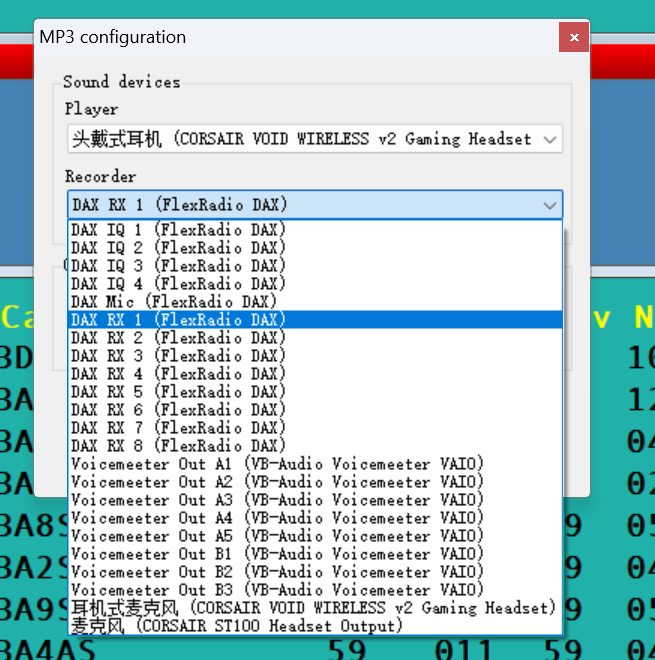
I can only select the one of recorder sound cards as following screenshot. If it's a stuation like this, It seems to only record DAX RX of my contest audio(unable to contain PC MIC and DAX TX). I will not be able to record PC MIC, DAX TX, DAX RX at the same time.
 0
0 -
Who knows, please!!!😂
0

Leave a Comment
Categories
- All Categories
- 401 Community Topics
- 2.2K New Ideas
- 685 The Flea Market
- 8.6K Software
- 195 SmartSDR+
- 6.6K SmartSDR for Windows
- 200 SmartSDR for Maestro and M models
- 456 SmartSDR for Mac
- 278 SmartSDR for iOS
- 268 SmartSDR CAT
- 220 DAX
- 395 SmartSDR API
- 9.6K Radios and Accessories
- 102 Aurora
- 348 FLEX-8000 Signature Series
- 7.2K FLEX-6000 Signature Series
- 994 Maestro
- 58 FlexControl
- 872 FLEX Series (Legacy) Radios
- 971 Genius Products
- 481 Power Genius XL Amplifier
- 357 Tuner Genius XL
- 133 Antenna Genius
- 321 Shack Infrastructure
- 226 Networking
- 482 Remote Operation (SmartLink)
- 144 Contesting
- 845 Peripherals & Station Integration
- 147 Amateur Radio Interests
- 1.1K Third-Party Software