Welcome to the FlexRadio Community! Please review the new Community Rules and other important updates on the Message Board.
The latest SmartSDR Software:
SmartSDR v4.3.16 | SmartSDR v4.3.16 Release Notes
SmartSDR v3.10.15 | SmartSDR v3.10.15 Release Notes
The latest 4O3A Genius Product Software: The latest 4O3A Genius Product Software and Firmware
How to Receive Technical Support: If you are needing assistance with FlexRadio products, please refer to the product documentation or check the Help Center for known solutions.
Need technical support from FlexRadio? It's as simple as creating a HelpDesk ticket.
FreeDV Docker container for 8000/Aurora series
Comments
-
FreeDV doesn't really have timing requirements in the way that WSJT-X does, so no worries there.
Anyway, we can always try to troubleshoot during a Zoom call too. My QRZ email is good if you're interested in doing that.
0 -
Yes thanks Bret re Clock I had downloaded it and am trying to set it up.
I had been using it on a Windows 10 PC previously.
73 John0 -
I second the use of Meinberg ntp program. Install it once and never do anything with it again. Keeps the PC within less than second.
0 -
Thank you Bret, I am now using Meinberg NTP and all is well
73 John0 -
I released version 2.4.0 of the Docker container today, which should fix various bugs reported by users since version 2.3.1 (thanks all!) More details about the exact changes can be found here:
and you can download the Docker container from here:
https://github.com/tmiw/freedv-integrations/releases/download/v2.4.0/freedv-waveform-2.4.0.tar.gz
Note that you will need to uninstall the previous version of the Docker container before you install this one. Let me know if you have any questions or run into issues!
1 -
With SmartSDR 4.3 and version 2.4.0 of the waveform, you can now update the "Message" field on FreeDV Reporter! You may have noticed a text box at the top of the Waveform window. Simply select the "freedv-flex" entry, type REPORTING_MESSAGE= followed by the message, then click Restart.
Example:
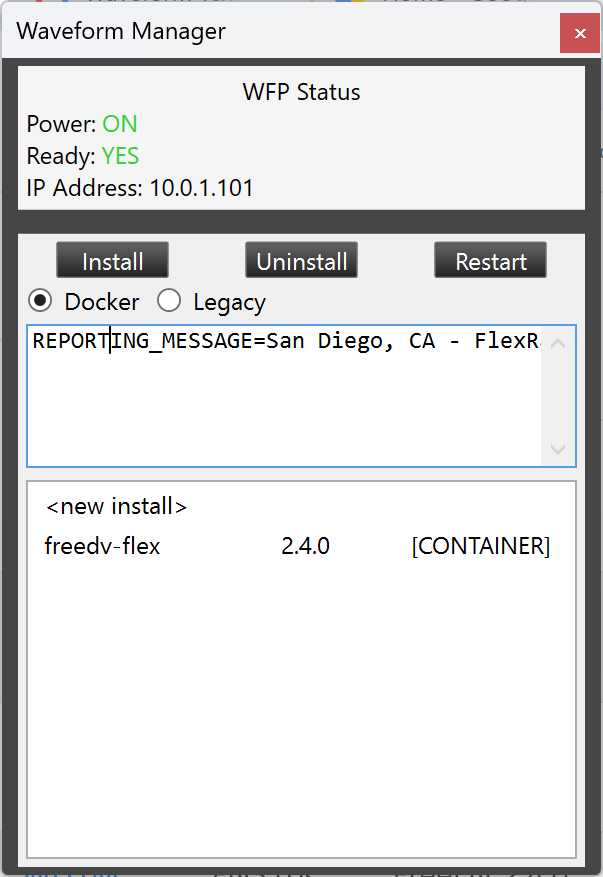
which results in this on FreeDV Reporter when choosing FDVU/FDVL:

Enjoy :)
0 -
Thanks Mooneer, I tried it this evening and it is working great! It is nice to have the message line working in the waveform version.
1 -
What do I need to do to use Free DV on a 8400M. Will I need a Windows 11 computer with Smart SDR loaded on it and download FreeDV? Don't have a Raspberry Pi and don't really want one or have to learn how to program one.
0 -
Rick: Since you have an 8400M, you should be able to download this file, go to File→Waveforms on the Windows version of SmartSDR and choose it after clicking on the Install button. No need to install the FreeDV application from freedv.org (though you can if you'd like).
0 -
Version 2.4.1 of the FreeDV waveform has been released: https://github.com/freedv/freedv-integrations/releases/download/v2.4.1/freedv-waveform-2.4.1.tar.gz
This is basically just bugfixes in the common code shared by it and the FreeDV application. For more information on the exact changes, you can view the changelog at .
1



Leave a Comment
Categories
- All Categories
- 417 Community Topics
- 2.2K New Ideas
- 716 The Flea Market
- 8.7K Software
- 225 SmartSDR+
- 6.6K SmartSDR for Windows
- 212 SmartSDR for Maestro and M models
- 472 SmartSDR for Mac
- 282 SmartSDR for iOS
- 270 SmartSDR CAT
- 225 DAX
- 397 SmartSDR API
- 9.7K Radios and Accessories
- 140 Aurora
- 387 FLEX-8000 Signature Series
- 7.3K FLEX-6000 Signature Series
- 1K Maestro
- 58 FlexControl
- 876 FLEX Series (Legacy) Radios
- 1K Genius Products
- 495 Power Genius XL Amplifier
- 366 Tuner Genius XL
- 139 Antenna Genius
- 333 Shack Infrastructure
- 237 Networking
- 500 Remote Operation (SmartLink)
- 150 Contesting
- 867 Peripherals & Station Integration
- 148 Amateur Radio Interests
- 1.2K Third-Party Software