Welcome to the FlexRadio Community! Please review the new Community Rules and other important new Community information on the Message Board.
The latest SmartSDR Software:
SmartSDR v4.2.20 | SmartSDR v4.2.20 Release Notes
SmartSDR v3.10.15 | SmartSDR v3.10.15 Release Notes
The latest 4O3A Genius Product Software:
The latest 4O3A Genius Product Software and Firmware
SmartSDR v4.2.20 | SmartSDR v4.2.20 Release Notes
SmartSDR v3.10.15 | SmartSDR v3.10.15 Release Notes
The latest 4O3A Genius Product Software:
The latest 4O3A Genius Product Software and Firmware
How to Receive Technical Support::
If you are needing assistance with FlexRadio products, please refer to the product documentation or check the Help Center for known solutions. Need technical support from FlexRadio? It's as simple as creating a HelpDesk ticket.
If you are needing assistance with FlexRadio products, please refer to the product documentation or check the Help Center for known solutions. Need technical support from FlexRadio? It's as simple as creating a HelpDesk ticket.
Help with 6M FM Repeater Settings
Options

Phil Fusilier
Member ✭
in Aurora
Phil Fusilier
May 20, 2026, 8:29 AM CDT
Trying to set up for local 6 Meter FM Repeater.
Have entered all the necessary info on ANT 1A Xmit, and ANT 1B for RX only.
SDR indicates NO TX bottom right corner.
Have watched several videos on proper set up for 6 Meter FM Narrow, but nothing has helped.
I suspect problem is simple, but cannot find it.
If you could, please TEXT 850-591-3478 with a date/time I could call in the afternoon. I am on EDT.
Thanks in advance.
73
KA5USN
Chief
May 20, 2026, 8:29 AM CDT
Trying to set up for local 6 Meter FM Repeater.
Have entered all the necessary info on ANT 1A Xmit, and ANT 1B for RX only.
SDR indicates NO TX bottom right corner.
Have watched several videos on proper set up for 6 Meter FM Narrow, but nothing has helped.
I suspect problem is simple, but cannot find it.
If you could, please TEXT 850-591-3478 with a date/time I could call in the afternoon. I am on EDT.
Thanks in advance.
73
KA5USN
Chief
0
Comments
-
Hi Phil, to use a repeater, you do not need two slices. Open the OPT dropdown and set your transmit tone (if any), your offset (the example below shows a 1 MHz offset, yours may be different) and the direction of the offset (most will be minus).
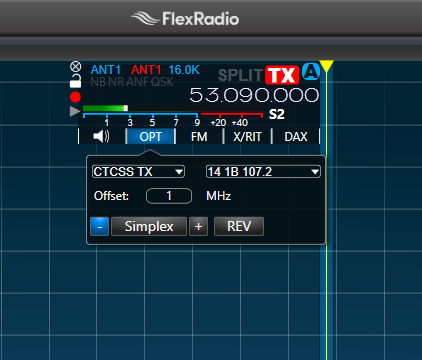
When you transmit, the frequency on the slice will not change to indicate the TX frequency, but if you make your panadapter wide enough to cover the TX and RX frequencies, you will see a spike in the panadapter where you are transmitting.
Give this a shot and if you have problems, post a screenshot of your SmartSDR screen.
0


Leave a Comment
Categories
- All Categories
- 401 Community Topics
- 2.2K New Ideas
- 689 The Flea Market
- 8.6K Software
- 196 SmartSDR+
- 6.6K SmartSDR for Windows
- 200 SmartSDR for Maestro and M models
- 460 SmartSDR for Mac
- 279 SmartSDR for iOS
- 268 SmartSDR CAT
- 220 DAX
- 395 SmartSDR API
- 9.6K Radios and Accessories
- 109 Aurora
- 348 FLEX-8000 Signature Series
- 7.2K FLEX-6000 Signature Series
- 999 Maestro
- 58 FlexControl
- 872 FLEX Series (Legacy) Radios
- 975 Genius Products
- 482 Power Genius XL Amplifier
- 358 Tuner Genius XL
- 135 Antenna Genius
- 321 Shack Infrastructure
- 226 Networking
- 483 Remote Operation (SmartLink)
- 145 Contesting
- 847 Peripherals & Station Integration
- 147 Amateur Radio Interests
- 1.1K Third-Party Software