SmartSDR v4.2.20 | SmartSDR v4.2.20 Release Notes
SmartSDR v3.10.15 | SmartSDR v3.10.15 Release Notes
The latest 4O3A Genius Product Software:
The latest 4O3A Genius Product Software and Firmware
If you are needing assistance with FlexRadio products, please refer to the product documentation or check the Help Center for known solutions. Need technical support from FlexRadio? It's as simple as creating a HelpDesk ticket.
Need help with Free DV waveform installation
After I downloaded the Freedv Waveform, I attempted to execute the program. All I get is a dialog box that says No FreeDV Slice. That is as far as the program goes.
I am using a Windows 11 PC which my Flex 8600 is connected to.
I would appreciate any suggestions.
Bob, KN4HH
Answers
-
Sorry, I forget to mention I am running SmartSDR Version 4.1.5
0 -
Hi Bob, the FreeDV waveform is not implemented. Check out FreeDV.org and download it from there. Here is a link:
FreeDV | Open Source HF Digital Voice for Amateur Radio
You run it on your computer and it communicates with your Flex without the waveform. Not as elegant as having a waveform, but just as usable.
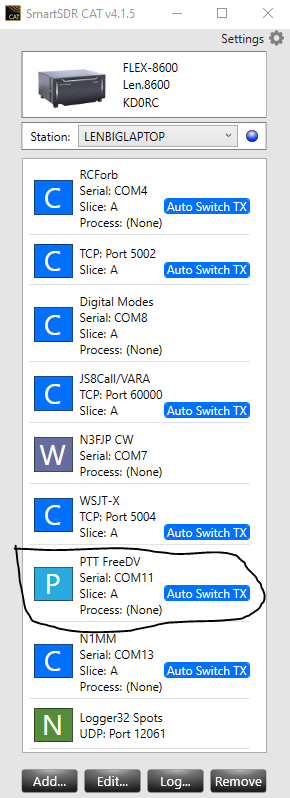
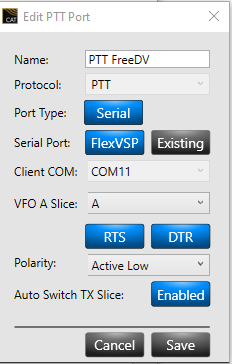
This is how I am set up. You use the mic on the computer, not the mic plugged into the radio.
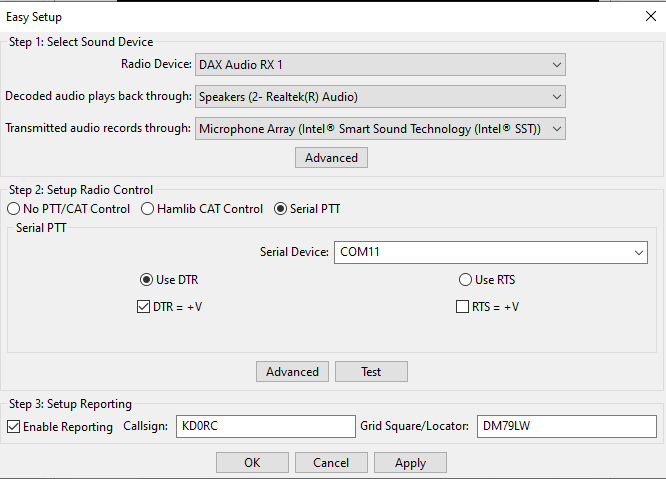
Set up a com port for PTT. Mine happens to be COM11.
 0
0 -
There is a FreeDV-Flex Radio Appimage that DOES work now, but you need to run it on a Raspberry Pi4 or 5, or a Linux Computer, Once it is on your network it gives your Radio FreeDV using the FDVU and FDVL that has actually been in the Radio Modes for over 10 Years since there was a FreeDV Wave form way back then and also one for D-Star.
That means weather your running a 6300 through 8600 Radio, Remote or portable, A Maestro, Tablet Linux, MAC or what ever you have using FreeDV if the software on those devices has the FDVL and FDVU Modes built in.
The "FreeDV-FlexRadio-2.2.1-aarch64.AppImage" works on ALL the 6000 and 8000 series radios today and I have ran it for several months, There is NO setup once it is up and running on a Pi or Linux Computer on your Network, No DAX, NO CAT and NO FreeDV Windows software to run. The FreeDV-FLEX Radio WaveForm Appimage is VERY small and does not use a lot of a Raspberry Pi4 or Pi5 resources so you can use the Pi / Computer for more than the AppImage.
Easy setup just Download the AppImage to your Pi / Linux Computer, change the Appimage to executable chmod +x FreeDV-FlexRadio.Appimage, and then just run it, You can also make it start on Boot up when you reboot the Pi or Computer so it is always ready to go,
Info WEB page
Pi Image= "aarch64"
Linux Image= "X86_64" for a PC Based Linux computer
Information Page: https://github.com/drowe67/freedv-gui/tree/master/src/integrations/flex
All Other Images: https://github.com/drowe67/freedv-gui/releases/tag/v2.2.1
Make sure you DOWNLOAD the proper Image and it Says "FreeDV-FlexRadio" in the release for your proper Hardware.
If you can compile software you can Make a Windows version but I have not tried that.
73's
Bret WX7Y
0 -
Is there a way to work with DV Reporter? I was able to set my grid in the freedv.conf file, but there is no msg parameter. The web interface seems to be view only. I noticed others using FreeDV-FlexRadio had their message set. I'm running the AppImage on an Ubuntu v24.04.4 PC, but running the radio from Win 11 SmartSDR. Otherwise, the app seem to be functioning correctly.
0 -
I think this is what you are looking for
You add the Data to the command line when you start the AppImage
To start the FreeDV-Flex AppImage from the command line while including your grid square (Maidenhead locator) and other reporting data, use the following command structure:
./FreeDV-Flex.AppImage --callsign YOURCALL --gridsquare YOURGRID --frequency 14.236
Command Line Arguments
--frequency: The operating frequency in MHz, which is required for reporting to servers like FreeDV Reporter or PSK Reporter.Good Luck 73
Bret WX7Y0 -
Chuck
Here is an example start command, with all the available arguments. You need to modify the path and name to our AppImage, and the desired argument values:
SSDR_RADIO_ADDRESS=192.168.70.150 /home/pi/FreeDV-FlexRadio-2.3.0-dev-c73f-aarch64.AppImage -m "Alan in Baroda Michigan Flex" -l "EN61SW" -r 8 -t 120'Address is the IP of the Flex Radio you desire to connect to
-m is the FDV recorder message
-l is your Grid Locator
-r is the AF level attenuation in Db
-t is the time for the Flex Spots to show, in seconds
Alan. WA9WUD
0 -
Thanks Alan & Brett. I think I have a handle on it now.
-73
0



Leave a Comment
Categories
- All Categories
- 401 Community Topics
- 2.2K New Ideas
- 689 The Flea Market
- 8.6K Software
- 196 SmartSDR+
- 6.6K SmartSDR for Windows
- 200 SmartSDR for Maestro and M models
- 460 SmartSDR for Mac
- 279 SmartSDR for iOS
- 268 SmartSDR CAT
- 220 DAX
- 395 SmartSDR API
- 9.6K Radios and Accessories
- 109 Aurora
- 348 FLEX-8000 Signature Series
- 7.2K FLEX-6000 Signature Series
- 999 Maestro
- 58 FlexControl
- 872 FLEX Series (Legacy) Radios
- 975 Genius Products
- 482 Power Genius XL Amplifier
- 358 Tuner Genius XL
- 135 Antenna Genius
- 321 Shack Infrastructure
- 226 Networking
- 483 Remote Operation (SmartLink)
- 145 Contesting
- 847 Peripherals & Station Integration
- 147 Amateur Radio Interests
- 1.1K Third-Party Software