SmartSDR v4.2.20 | SmartSDR v4.2.20 Release Notes
SmartSDR v3.10.15 | SmartSDR v3.10.15 Release Notes
The latest 4O3A Genius Product Software:
The latest 4O3A Genius Product Software and Firmware
If you are needing assistance with FlexRadio products, please refer to the product documentation or check the Help Center for known solutions. Need technical support from FlexRadio? It's as simple as creating a HelpDesk ticket.
SmartSdr tuning rate

I've been trying to change the tuning rate on SmartSdr. It's set up at .500KHz. This is faster than I'm comfortable with. This also affects the FlexControl. I've looked at the manual and found this:
Tune Step Size: The amount of frequency change caused by one tuning action on the FlexControl,mouse scroll wheel or by dragging is determined by the active slice Tune Step Size. Tune Step Size is mode group specific and can be set by the user using the Step Size adjustment on the active sliceWidget. The FlexControl utilizes an accelerated tuning feature that will tune larger frequency steps when the knob is rotated more quickly.
I do not see something in the sliceWidget that looks like Step Size Adjustment. Where is it?
Answers
-
Next to the filter width in the receiver box in the radio control panel. The rates can vary by mode. Pretty handy. Erika K0DD
0 -
Yes, that's it. For me, the problem is identifying which panel is being referred to. There's no pix of the panel I'm being directed to. (As a Microsoft .NET programmer, these visual devices are called panels.) So, I thought the widget was the visual device at the top of the panadapter. Is this also called a widget? It's confusing to a new user.
Thanks for responding so quickly.
0 -
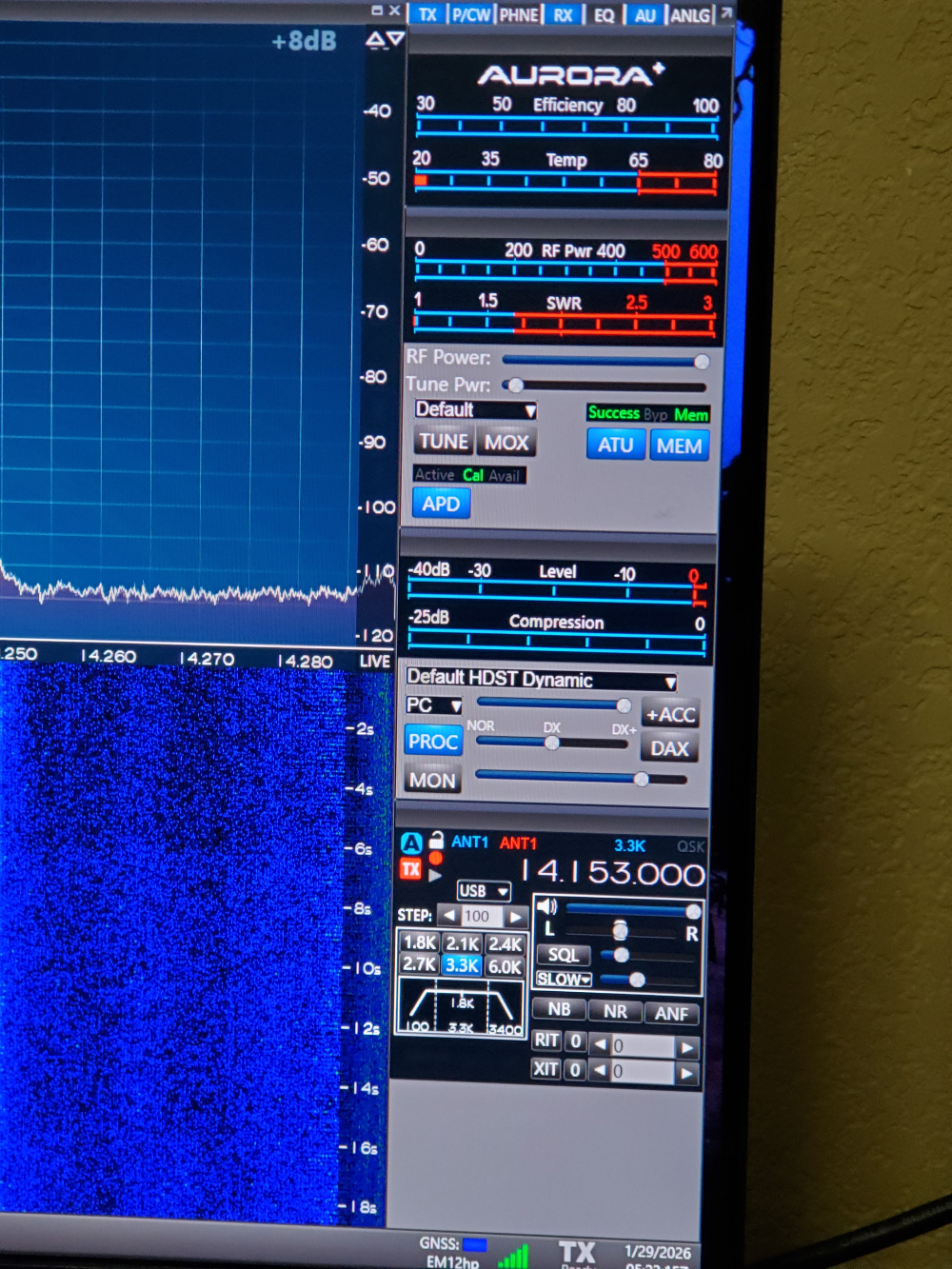
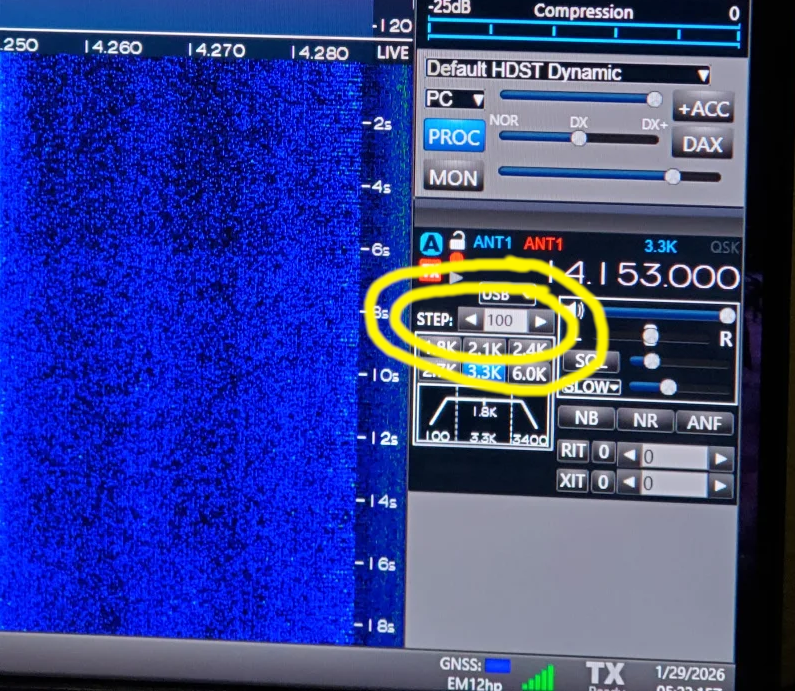
In the above photo, the Tuning step control is just above the Filter selection buttons. It has a left arrow and right arrow that you can click to increase or decrease the Tuning Step of the VFO.
James
WD5GWY
0 -
Adding a bit of focus to James' image:
 1
1 -
Great Doug i'm glad you found the correct panel i don't think I'd call it a widget as they can't be placed all over wherever you want. They stay in the radio main panel and the buttons on the top allow you to open only the items you need. What i like about it is you can break the radio control panel free from the panadaptor completely... i actually place mine on a separate monitor from the panadaptor. With DDUtil that while no longer being updated, it allows me decent control of my Alpha 9500 including power control and monitoring. Pretty handy. If you look on the K0DD qrz page you can see how i lay out my station ive had a couple 6500s only one now... but can fully control the station 160 through 2m from the op chair... glad i could help. Erika K0DD Small town NW Iowa.
0


Leave a Comment
Categories
- All Categories
- 401 Community Topics
- 2.2K New Ideas
- 689 The Flea Market
- 8.6K Software
- 196 SmartSDR+
- 6.6K SmartSDR for Windows
- 200 SmartSDR for Maestro and M models
- 460 SmartSDR for Mac
- 279 SmartSDR for iOS
- 268 SmartSDR CAT
- 220 DAX
- 395 SmartSDR API
- 9.6K Radios and Accessories
- 109 Aurora
- 348 FLEX-8000 Signature Series
- 7.2K FLEX-6000 Signature Series
- 999 Maestro
- 58 FlexControl
- 872 FLEX Series (Legacy) Radios
- 975 Genius Products
- 482 Power Genius XL Amplifier
- 358 Tuner Genius XL
- 135 Antenna Genius
- 322 Shack Infrastructure
- 227 Networking
- 483 Remote Operation (SmartLink)
- 145 Contesting
- 847 Peripherals & Station Integration
- 147 Amateur Radio Interests
- 1.1K Third-Party Software