SmartSDR v4.2.20 | SmartSDR v4.2.20 Release Notes
SmartSDR v3.10.15 | SmartSDR v3.10.15 Release Notes
The latest 4O3A Genius Product Software:
The latest 4O3A Genius Product Software and Firmware
If you are needing assistance with FlexRadio products, please refer to the product documentation or check the Help Center for known solutions. Need technical support from FlexRadio? It's as simple as creating a HelpDesk ticket.
can not get spots on 6400

I can not get spots to work on my 6400, attached are my setups. 6400 will not poll. i get spots in n3fjp logging but they don't come to 6400
Answers
-
Hi Don.. what are you using to interface the spots to the rig? The Flex will not pick up spots on it's own — you need something like SliceMaster (or something else — I use SliceMaster) to pick up the spots and send them along to the Flex.
0 -
From ChatGPT:
These programs connect to a DX Cluster (via telnet) and then broadcast spots over UDP or via the FlexSpot API so SmartSDR can display them:
- N1MM + (N1MM Logger-Plus)
Has built-in support to send spots to SmartSDR via a special N1MMSpot CAT port you configure in SmartSDR CAT and in N1MM. - DXLab Suite (Commander / DXView)
Classic Windows ham radio suite that supports spots and can feed them to Flex using the Flex Spots API. - FRStack (FRStack3)
A popular Flex-centric utility that not only feeds spots from cluster sources into SmartSDR but also provides other radio enhancements and utilities. - SliceMaster
A lightweight spot feeder and band map utility that pulls spots from a cluster and sends them to the radio. - Logger32
If set to broadcast DX spots via UDP, it can be connected to SmartSDR’s N1MMSpot port so the Flex panadapter displays them.
0 - N1MM + (N1MM Logger-Plus)
-
Hi Don (E), do you have Spots enabled in SmartSDR?
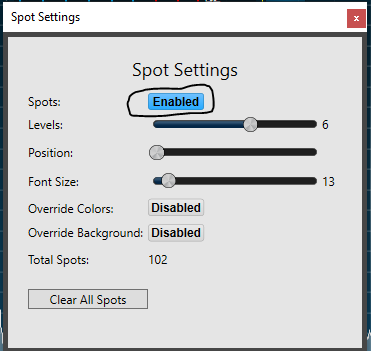
In ACLog, Rig Interface are you using the Flex API? I think it is required to get spots over to the radio.
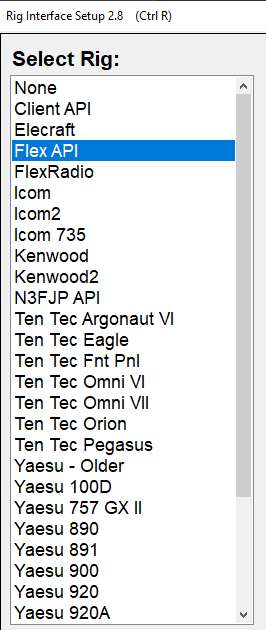
EDIT: Sorry, I see now that you are using the Flex API interface.
0 -
yes Len i have the spot enabled . and flex api interface i have used the spots before but have not for a long time but can't figure our what i got wrong
0 -
DonE…What is sending spots to the 6400?
0 -
Hi Don, everything looks right... Does the frequency show up in ACLog? I am wondering if ACLog is talking to the radio at all.
The radio and computer are on the same network segment, right? Do you have more than one radio on the network? Are you using SmartSDR for Windows?
Hi Geoff, Don is using the N3FJP ACLog logger to send the spots.
0 -
Len… Thanks I should know that as I use ACLog. Previously I was using Stacks or was it SliceMaster?.
Sorry for the confusion.
0 -
Len freq. shows in AClog, when i do a test polling shows freq. in the command read freq. it does not change when i do test I thought it should . I only have one radio run 4.1.5 ver. on a windows 10 computer i am getting spots in AClog but don't show in 6400
0 -
OK, so it sounds like there is a communication issue between ACLog and the radio. I would try a factory reset (after exporting profiles) to see if that fixes it.
If that does not help, try turning off any firewall or virus software to see if that might be blocking the TCP traffic. If that is still not it, I am kind of out of ideas…
0 -
Len did a factory reset did not change. turned off firewall did not help. Ken the problem is most likely with the logging program would you thinks so? what all do i need checked in the aclog rig interface read some where with flex api is all you need checked .
1 -
Do you have a filter set in ACLog so that you are just not seeing them?
0 -
Len i don't think so i am getting spots inAClog just not seeing them on 6400. Do you think a help ticket could help don't know if it is the flex or the logging program
0 -
len does this make sense to you?
To get N3FJP spots to appear on your Flex 6400 panadapter, you must enable the TCP API in SmartSDR, select "Flex API" in N3FJP, and enable "DX Spotting." Key steps: set TCP API to port 1100 in SmartSDR settings, ensure N3FJP's Rig Interface is set to "Flex API", and enable "DX Spotting" under the settings menu.Steps to Troubleshoot and Fix:Enable Flex API:In SmartSDR, go to Settings -> API and ensure the TCP API is active and listening on the default port (usually 1100).Configure N3FJP Rig Interface:In N3FJP, go toSettings > Rig Interface. SelectFlex APIas your radio type. Do not use generic CAT options if you want spots on the screen.Enable DX Spotting:In N3FJP, go toSettings > DX Spotting > Configure. Check "Enable DX Spotting".Firewall Settings:Ensure Windows Firewall or third-party antivirus is not blocking the connection between the N3FJP software and SmartSDR.Check API Status:When N3FJP connects, you should see a small message pop up in SmartSDR indicating a client has connected.Verify Spot Display:Spots should appear on the panadapter as green text with a black background.
0 -
Hi Don, that all makes sense and is exactly how I am set up.
I was able to cause an issue with ACLog tonight. I am letting a friend use my 6400, so I have two Flex radios on my network at the same time. ACLog apparently connects to the first radio it hears, so sometimes it connects to the 6400 and sometimes to the 8600.
Do you have more than one Flex radio on your network? If so, try shutting one down and see if that fixes the issue.
0 -
Len i do not have but one rig. What i realized today is the spot is suppose to show on the N3fjp logging screen and mine do not show there either , i definitely got some thing going on with N3fjp . does show spots on the logging screen? Is your interface screen set up like the one i have attached?
0 -
DonE…SIlly question, but on the DX Spotting Setup page, in ACLog, do you have a Telnet Host and associated port entered? And, is Enable DX Spotting selected?
From your first post it look as though all those are correct.
Do you know if the Telnet host and port are active?
I just tried opening a Telnet session directly and it works using the host and port in your post.
Have you tried doing that to confirm that you can successfully see the spots using Telnet?
0 -
Geoff see attached. I am getting spots but they don't show in n3fjp or flex ( they are suppose to show on logging screen .. I am about to give up
0 -
DonE…We're using different versions but I can't see why that would be the problem. I'm using 7.0.12.1.
The only difference is that I have Auto Reconnect selected and I have Audio Alerts deselected.
Have you contaced Scott?
0 -
DonE…You said there are no spots on the main page of ACLog. Do you see column titles?
Call…Frequency…QTH…Band…Time, etc at the bottom of the main window?
Oh, and as Len mentioned, do you have any additional filtering set in ACLog?
0 -
Geoff
I don't have any flitering . I have contacted Scott today
0 -
DonE…Scott is usually quick to reply, I'm sure he'll sort it out for you.
It looks as though you have a quite old version; perhaps an update would be in order?
0 -
DonE…What was the resolution?
0 -
Geoff none have not heard back from N3FJP
0 -
OK, In the past I have found that Scott replies within a day or two, I'm surprised you haven't heard from him. Hopefully he'll contact you soon.
In the meantime you might consider upgrading to the latest version.
0 -
Geoff final got back to me . I had a setting wrong . I can not get them to show on 6400
0 -
DonE… Do you mean you can now see spots? Is so, what was it?
It might be helpful to others.
0 -
Geoff yes i am getting spots in N3fjp the reason was i had the wrong call area checked , i had 5 should have been 4 . I still cannot get the spots to show in the 6400 do you run a flex
0 -
DonE, I do have a Flex.
I'm not near a radio now so I can't look at how I'm configured. Where is the call area area selected in ACLog? I'll look later today.
Do you have Spots enabled in SmartSDR as Len showed in his January 30 post?
0 -
DonE, OK, I seewhere there is the ability to "Filter by Call Area" under the "More Filterimg" button in the ACLog DX Spotting Setup page.
Is that what you are referring to? Or was it something else?
Changing from 5 to 4 would only allow spots made from a different call area. It would not not stop spotting entirely.
So you actually did have additional filtering configured. But I'm not sure that had anything to do with your stated problem.
0 -
If I am not using external software, where do the spots come from? I have not received any spots for several months. How do I restore spots? Where are the spot urls configured in my 6400M.
0





Leave a Comment
Categories
- All Categories
- 401 Community Topics
- 2.2K New Ideas
- 689 The Flea Market
- 8.6K Software
- 196 SmartSDR+
- 6.6K SmartSDR for Windows
- 200 SmartSDR for Maestro and M models
- 460 SmartSDR for Mac
- 279 SmartSDR for iOS
- 268 SmartSDR CAT
- 220 DAX
- 395 SmartSDR API
- 9.6K Radios and Accessories
- 109 Aurora
- 348 FLEX-8000 Signature Series
- 7.2K FLEX-6000 Signature Series
- 999 Maestro
- 58 FlexControl
- 872 FLEX Series (Legacy) Radios
- 975 Genius Products
- 482 Power Genius XL Amplifier
- 358 Tuner Genius XL
- 135 Antenna Genius
- 322 Shack Infrastructure
- 227 Networking
- 483 Remote Operation (SmartLink)
- 145 Contesting
- 847 Peripherals & Station Integration
- 147 Amateur Radio Interests
- 1.1K Third-Party Software