SmartSDR v4.1.3 | SmartSDR v4.1.3 Release Notes
SmartSDR v3.10.15 | SmartSDR v3.10.15 Release Notes
The latest 4O3A Genius Product Software and Firmware
Need technical support from FlexRadio? It's as simple as Creating a HelpDesk ticket.
Flex DSP Sliders - utility to adjust DSP levels

You miss adjusting NB, NR and ANF levels ? You wish you can adjust the levels of some of the new DSP features with SSDR v4 ?
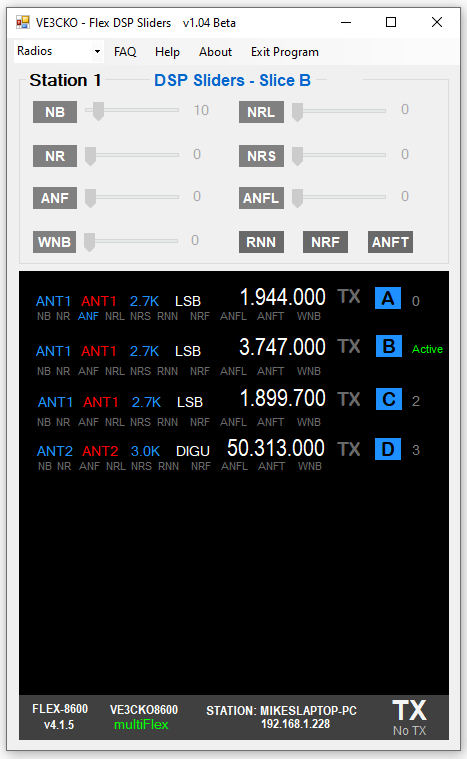
I'd like to introduce what I call Flex DSP Sliders, an app that allows adjustment of DSP levels for NB, NR, ANF and WNB. For those who have an 8000 or Aurora series radio, you can also play around and adjust NRL, NRS and ANFL levels.
How it works is, when first starting the program, it connects automatically to the first radio it sees on the LAN. The tray at the bottom conveniently show some information in similar fashion to SmartSDR. This includes the radio model, SSDR version, the connecting station and it's IP address as well as the TX and multiFLEX flags. If you have more than one FlexRadio on your LAN you'll be able to select which radio you wish to use, in a later release.
If no client is connected to the radio, the slice window will remains black, waiting. When a client is connected to the radio, the slice window will populate with all slices in use by that client, showing basic information and DSP status of each slice and an Active slice indicator. In order to toggle or adjust DSP, you must first select the slice letter of the targeted slice you want to change.
In order to toggle or adjust DSP, you must first select the slice letter of the targeted slice you want to change.
Here is what 6700 looks like with 8 slices, below that is an 8600 with all 4 slices:


Before I do a general release I'd like to get some feedback from a few testers. I have not setup GitHub yet and may just throw a website together instead. In the meantime, if you are interested please email me, ve3cko@interpc.ca this will be a short list. When ready, I'll send a current Beta version in a zip format.
I have some some testing but not nearly as much as is needed. Be looking for some feedback and any bugs. Depending how fast of a response I get, I'd like to get a general release out there shortly.
Donations are certainly welcome and will just encourage more development as I've got a few things up my sleeve. If your comfortable sending an etransfer that would be great. Please etransfer to ve3cko@interpc.ca. If you are not comfortable doing that let me know and see what I can setup until I get the website running.
Comments
-
nice work Mike. I’ll email you.
73 Dave wo2x0 -
new Beta v1.0.4 - Be sure to use Exit Program to close down app properly.
Changes - - -
- Added Radio drop-down in top menu for radio selection
- Fixed slice display window when client removes a slice(s) then adds a slice(s)
- Fixed client window when client is closed down
1 -
Mike, SlideMaster has been downloaded and installed. I'll start testing this evening and over the weekend. We're expecting the big weather event here in Amarillo starting this evening. Barring any antenna issues it will be a good weekend to play radio.
Rich - N5ZC
0



Leave a Comment
Categories
- All Categories
- 379 Community Topics
- 2.1K New Ideas
- 634 The Flea Market
- 8.3K Software
- 139 SmartSDR+
- 6.4K SmartSDR for Windows
- 186 SmartSDR for Maestro and M models
- 430 SmartSDR for Mac
- 272 SmartSDR for iOS
- 260 SmartSDR CAT
- 199 DAX
- 383 SmartSDR API
- 9.4K Radios and Accessories
- 44 Aurora
- 270 FLEX-8000 Signature Series
- 7.2K FLEX-6000 Signature Series
- 956 Maestro
- 57 FlexControl
- 866 FLEX Series (Legacy) Radios
- 929 Genius Products
- 464 Power Genius XL Amplifier
- 340 Tuner Genius XL
- 125 Antenna Genius
- 301 Shack Infrastructure
- 213 Networking
- 461 Remote Operation (SmartLink)
- 144 Contesting
- 792 Peripherals & Station Integration
- 140 Amateur Radio Interests
- 1K Third-Party Software