SmartSDR v4.2.20 | SmartSDR v4.2.20 Release Notes
SmartSDR v3.10.15 | SmartSDR v3.10.15 Release Notes
The latest 4O3A Genius Product Software:
The latest 4O3A Genius Product Software and Firmware
If you are needing assistance with FlexRadio products, please refer to the product documentation or check the Help Center for known solutions. Need technical support from FlexRadio? It's as simple as creating a HelpDesk ticket.
Is my external GPSDO working with the new FW/SW 4.1.5 ?

No controls for external GPSDO on the new 4.1.5 firmwareSoftware version, is it still working?
Answers
-
Which radio? SmartSDR?(Win? Mac?) or a Maestro?
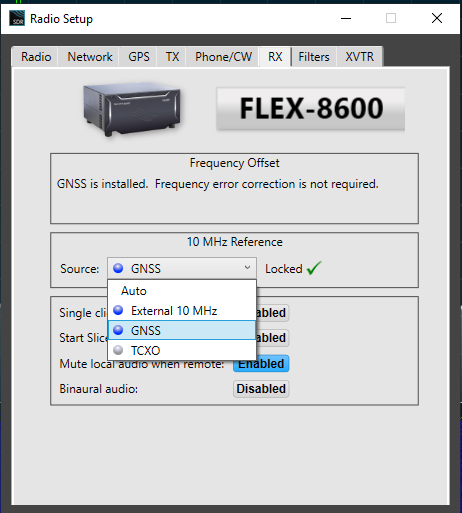
This is 4.1.5 on my 8600 using SmartSDR for Windows. If I select External 10 MHz, it locks right up.
 0
0 -
The radio is a 6500. I wanted to keep this short but a full explanation and more details are required. so here's the data.
In the Latest v4 Win smartSDR there is no ability to change setting to EXTERNAL furthermore no automatic way to check it for use with external GPSDO and no way to tell it's working, without manually checking like Zero beat WWV, etc which is absurd for a high-end radio like flex. I rarely use windows version, but had to use it to upgrade to v4 firmware and software.
I use the mac version mostly and it NOW always boots up to TCXO and I have to manually change it. I must change the tab to external manually every time I turn the radio on. Marcus says it's in the new Flex v4 firmware. Of course Flex doesn't support the MAC version's function only windows.
Flex has decided to totally remove ability to change this function in windows version? Mac version will change with tab, but "always" boots in TCXO and I have to change it every time i turn the radio on. This is why I'm questioning it. And, YES the GPSDO has been tested (I have a few) still working fine AND verifiable on all the lab test equipment in the shack.
I know the radios supposed automatic boot cycle to search for reference, however there is no automatic way to tell, and the MAC software says it not working the way it supposed to by booting into TCXO. There of course are ways to tell with zero beat WWV etc. but that's absurd on a high end radio like this.
By the way my rdio always booted into External before this upgrade. At this point I'm sure sorry I upgraded to v4 and paid for plus.
Ive been thinking of an 8600 but with this issue unresolved I'm considering alternatives.
I really like the 6500 but this part of the flex seems to be broke without answers.
0 -
Ranger,
With the 6500/6700, Windows SSDR never was an explict option to enable an external reference. It has aways been connect the source and boot the radio. And the only way to verify is to run the self calibration against WWV. If its near zero, the external GPSDO is working. If the calibrated offset it a several hundred ppb, its running on the TCXO. Technology has progressed since the 6500 was designed almost 15 years ago.
AL, K0VM
0



Leave a Comment
Categories
- All Categories
- 401 Community Topics
- 2.2K New Ideas
- 689 The Flea Market
- 8.6K Software
- 197 SmartSDR+
- 6.6K SmartSDR for Windows
- 200 SmartSDR for Maestro and M models
- 460 SmartSDR for Mac
- 279 SmartSDR for iOS
- 268 SmartSDR CAT
- 220 DAX
- 395 SmartSDR API
- 9.6K Radios and Accessories
- 109 Aurora
- 348 FLEX-8000 Signature Series
- 7.2K FLEX-6000 Signature Series
- 999 Maestro
- 58 FlexControl
- 872 FLEX Series (Legacy) Radios
- 975 Genius Products
- 482 Power Genius XL Amplifier
- 358 Tuner Genius XL
- 135 Antenna Genius
- 322 Shack Infrastructure
- 227 Networking
- 483 Remote Operation (SmartLink)
- 145 Contesting
- 847 Peripherals & Station Integration
- 147 Amateur Radio Interests
- 1.1K Third-Party Software