SmartSDR v4.2.20 | SmartSDR v4.2.20 Release Notes
SmartSDR v3.10.15 | SmartSDR v3.10.15 Release Notes
The latest 4O3A Genius Product Software:
The latest 4O3A Genius Product Software and Firmware
If you are needing assistance with FlexRadio products, please refer to the product documentation or check the Help Center for known solutions. Need technical support from FlexRadio? It's as simple as creating a HelpDesk ticket.
FreeDV 2.1.0 crashes after hitting Start

Well, I believe I've configured everything correctly — the 'Input to Computer from Radio' is set to DAX Audio RX1; the "Output from Computer to Speaker/Headphones" is set to the speakers attached to my PC; SmartSDR DAX is running and shows output to channel 1; the DAX setting in the slice flag is to channel one.
Nothing shows up in the waterfall in FreeDV 2.1.0 (latest version I can find). When I press the Start button on the right side of the panel, the window immediately closes, as if FreeDV as crashed.
What am I screwing up?
Comments
-
Hi Don, here is my setup. Sounds like it is the same as yours.
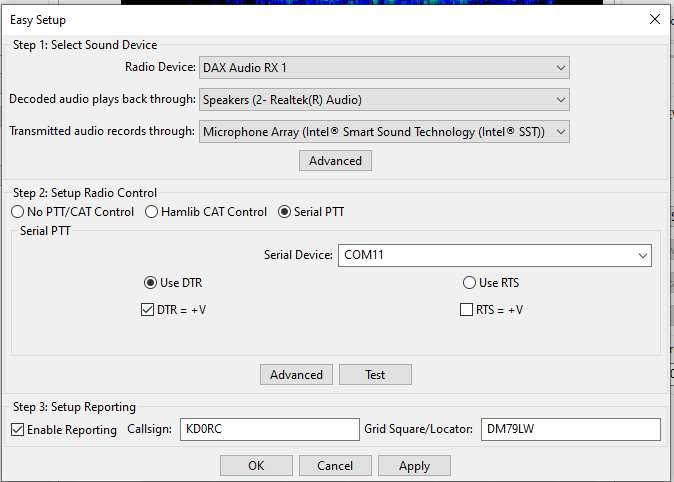
You might want to check on the FreeDV.org site to see if you can get some help.
0 -
Yep.. pretty much exactly the same, except I haven't set up PTT yet. I'm going to try uninstall, restart PC, then download and reinstall.
0 -
OK, that fixed the crash. Apparently, the first 'install' didn't complete properly — at least there was a WHOLE bunch of stuff loaded via the command prompt that I didn't remember seeing before.
So now, it doesn't crash when I hit 'Start Modem' and I'm seeing stuff in the waterfall. Now to see if I can get PTT and CAT working with it.
Thanks Len.
Still kind of bummed out that the ezDV module is dead. I guess there isn't enough RAM to include the RADE mode in a new version of firmware. Oh well…
0 -
Glad you got it working, Don. Yeah was a cool looking little box, but waaaay underpowered for the newer modes.
0


Leave a Comment
Categories
- All Categories
- 401 Community Topics
- 2.2K New Ideas
- 689 The Flea Market
- 8.6K Software
- 197 SmartSDR+
- 6.6K SmartSDR for Windows
- 200 SmartSDR for Maestro and M models
- 460 SmartSDR for Mac
- 279 SmartSDR for iOS
- 268 SmartSDR CAT
- 220 DAX
- 395 SmartSDR API
- 9.6K Radios and Accessories
- 109 Aurora
- 348 FLEX-8000 Signature Series
- 7.2K FLEX-6000 Signature Series
- 999 Maestro
- 58 FlexControl
- 872 FLEX Series (Legacy) Radios
- 975 Genius Products
- 482 Power Genius XL Amplifier
- 358 Tuner Genius XL
- 135 Antenna Genius
- 322 Shack Infrastructure
- 227 Networking
- 483 Remote Operation (SmartLink)
- 145 Contesting
- 847 Peripherals & Station Integration
- 147 Amateur Radio Interests
- 1.1K Third-Party Software