SmartSDR v4.2.20 | SmartSDR v4.2.20 Release Notes
SmartSDR v3.10.15 | SmartSDR v3.10.15 Release Notes
The latest 4O3A Genius Product Software:
The latest 4O3A Genius Product Software and Firmware
If you are needing assistance with FlexRadio products, please refer to the product documentation or check the Help Center for known solutions. Need technical support from FlexRadio? It's as simple as creating a HelpDesk ticket.
Paid for the SmartSDR+ but nothig happened

Folks,
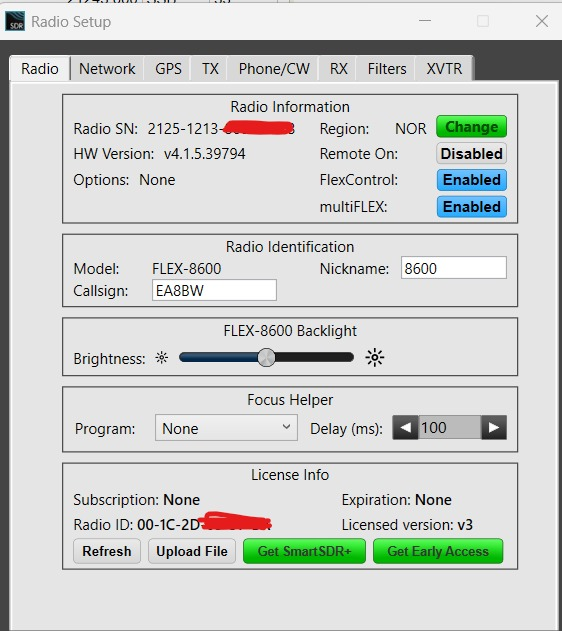
I have 8600 with the SDR Version 4.1.5.
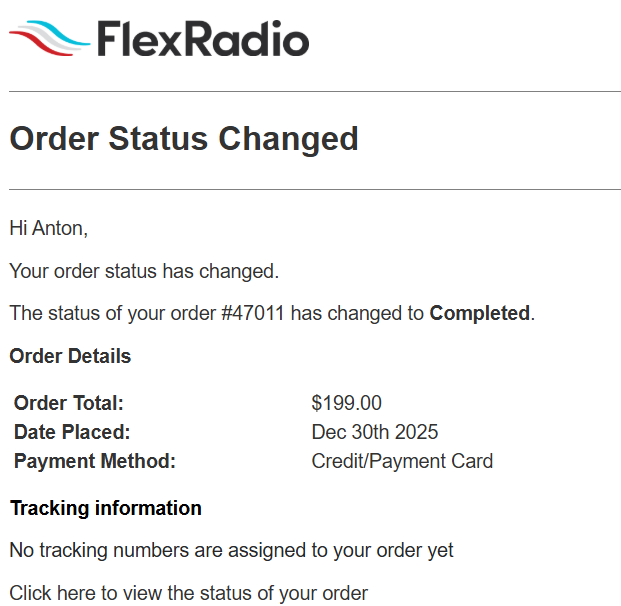
A few hours ago paid for the SmartSDR+, USD 199.
Received the 3 Emails from Flex, all ok.
I was expecting the immidiate change, but nothing happened ?
Checked the forum:
Powring the radio off and on did not help; still shows Subscription: None and Expiration: None ad License version v3 ?
What I am missing ?
Thank you.
Comments
-
 0
0 -
 0
0 -
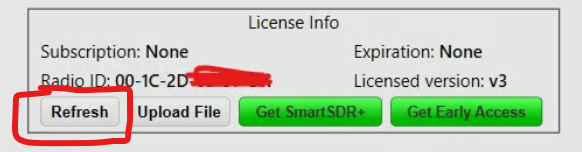
Have you clicked refresh? Radio will need to be connected to the internet to confirm subscription.
 0
0 -
Yea, about 10 times, and re-booted the radio, and re-installed the V 4.1.5, too.
Tried with a friend for an hour, all options, too (he has got an immidiate upgrade).
No luck.
NB I noted that since using the GPS module my region has changed from EUR 03 to NOR…
0 -
Might want to submit a ticket then, apparently Flex can send you a manual file that you upload.
0 -
Thank you.
I have replied to their sales Email (order completed) as it had an option to seek assistance if anything went wrong.
0 -
PS Since using the GPS module my regions has changed from the EUR 3 to NOR ? Does it matter ?
That said, the paid for SDR+ update did not work today and I have opened a separate thread
as well as replied to the orders@ Email asking for help.
0 -
SORTED thanks to the Flex Sales fast response.
Apparently, my 8600 was NOT directly connected to the internet. Having connected it the update has been done in 1 click.
Apparently, I have been running my Flexes solelt on the local network only all these years.
73 !
0 -
I'm working to help resolve this specific instance, but wanted to update the thread for anyone else that might find it. If you run into this problem, the most common issue that prevents the radio from downloading a new license is when the radio is connected directly to the PC. While the PC likely has internet via Wifi, the radio won't have internet access and thus won't pull the license down from our license server.
The general best answer to this issue is to put the radio on your local network. This article talks about how to do this: https://helpdesk.flexradio.com/hc/en-us/articles/202118558-How-to-Connect-your-FLEX-6000-FLEX-8000-to-a-LAN.
If this is not possible for whatever reason, we do have the capability of sending the license as a file. This can then be uploaded to the radio via the License Info > Upload button. This will solve the immediate license issue, but will require manual intervention each time you have a license update.
As a side note, this config also means that the radio won't be accessible for SmartLink — another reason to put the radio on your network if that is a desirable feature.
1





Leave a Comment
Categories
- All Categories
- 401 Community Topics
- 2.2K New Ideas
- 689 The Flea Market
- 8.6K Software
- 196 SmartSDR+
- 6.6K SmartSDR for Windows
- 200 SmartSDR for Maestro and M models
- 460 SmartSDR for Mac
- 279 SmartSDR for iOS
- 268 SmartSDR CAT
- 220 DAX
- 395 SmartSDR API
- 9.6K Radios and Accessories
- 109 Aurora
- 348 FLEX-8000 Signature Series
- 7.2K FLEX-6000 Signature Series
- 999 Maestro
- 58 FlexControl
- 872 FLEX Series (Legacy) Radios
- 975 Genius Products
- 482 Power Genius XL Amplifier
- 358 Tuner Genius XL
- 135 Antenna Genius
- 322 Shack Infrastructure
- 227 Networking
- 483 Remote Operation (SmartLink)
- 145 Contesting
- 847 Peripherals & Station Integration
- 147 Amateur Radio Interests
- 1.1K Third-Party Software