Welcome to the FlexRadio Community! Please review the new Community Rules and other important new Community information on the Message Board.
The latest SmartSDR Software:
SmartSDR v4.2.20 | SmartSDR v4.2.20 Release Notes
SmartSDR v3.10.15 | SmartSDR v3.10.15 Release Notes
The latest 4O3A Genius Product Software:
The latest 4O3A Genius Product Software and Firmware
SmartSDR v4.2.20 | SmartSDR v4.2.20 Release Notes
SmartSDR v3.10.15 | SmartSDR v3.10.15 Release Notes
The latest 4O3A Genius Product Software:
The latest 4O3A Genius Product Software and Firmware
How to Receive Technical Support::
If you are needing assistance with FlexRadio products, please refer to the product documentation or check the Help Center for known solutions. Need technical support from FlexRadio? It's as simple as creating a HelpDesk ticket.
If you are needing assistance with FlexRadio products, please refer to the product documentation or check the Help Center for known solutions. Need technical support from FlexRadio? It's as simple as creating a HelpDesk ticket.
second tune button with high power or tx carrier by ptt with no cw key? momentary button options?
Options

optional enabled through check box a second tune option with a new power level that the user can select? why? tuning tube amplifiers. first button as usual for the antenna tuners etc, then the second button raises the power level to high power for final load tuning on amplifiers. right now i have to find and change mode to fm to be able, since the cw dont tx with no key, otherwise, next best is allow cw to tx a carrier with the ptt input?
second related thought, can the tune buttons become "press and hold" so if something goes wrong, simply letting go of the mouse turns it off? i had fun scrambling for the button with my mouse while I had a high swr one day. even if some users wouldnt like it, it could be selectable in the software setup if you prefer momentary or toggles on tune buttons.
3rd point, can the mox also be selectable to be momentary if user desired? bigger even? for users on laptops with no external devices on remote. I think I would like it?
thanks, MN
second related thought, can the tune buttons become "press and hold" so if something goes wrong, simply letting go of the mouse turns it off? i had fun scrambling for the button with my mouse while I had a high swr one day. even if some users wouldnt like it, it could be selectable in the software setup if you prefer momentary or toggles on tune buttons.
3rd point, can the mox also be selectable to be momentary if user desired? bigger even? for users on laptops with no external devices on remote. I think I would like it?
thanks, MN
-2
Comments
-
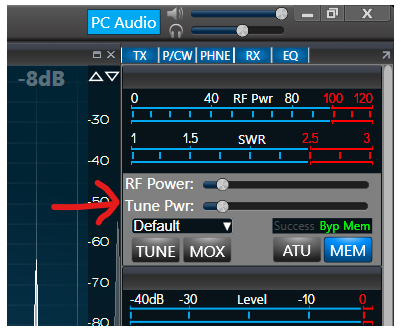
RE your first point, you can just turn up the tune power in Smart SDR. Move the slider to give more power?
Or you could create a couple of TX profiles, one with Tune at 10W and one with it at 80W and just switch between them, if you don't want to move the slider each time.
 0
0


Leave a Comment
Categories
- All Categories
- 401 Community Topics
- 2.2K New Ideas
- 689 The Flea Market
- 8.6K Software
- 196 SmartSDR+
- 6.6K SmartSDR for Windows
- 200 SmartSDR for Maestro and M models
- 460 SmartSDR for Mac
- 279 SmartSDR for iOS
- 268 SmartSDR CAT
- 220 DAX
- 395 SmartSDR API
- 9.6K Radios and Accessories
- 109 Aurora
- 348 FLEX-8000 Signature Series
- 7.2K FLEX-6000 Signature Series
- 999 Maestro
- 58 FlexControl
- 872 FLEX Series (Legacy) Radios
- 975 Genius Products
- 482 Power Genius XL Amplifier
- 358 Tuner Genius XL
- 135 Antenna Genius
- 321 Shack Infrastructure
- 226 Networking
- 483 Remote Operation (SmartLink)
- 145 Contesting
- 847 Peripherals & Station Integration
- 147 Amateur Radio Interests
- 1.1K Third-Party Software