SmartSDR v4.2.20 | SmartSDR v4.2.20 Release Notes
SmartSDR v3.10.15 | SmartSDR v3.10.15 Release Notes
The latest 4O3A Genius Product Software:
The latest 4O3A Genius Product Software and Firmware
If you are needing assistance with FlexRadio products, please refer to the product documentation or check the Help Center for known solutions. Need technical support from FlexRadio? It's as simple as creating a HelpDesk ticket.
How do I get my mic to work remotely.

Thanks in advance.
Scott, N3CRS
Best Answer
-
Hi Scott, what does the mic level peak indicator show when you speak into the mic? It should be near, but not past 0. I have mine set so that it is somewhere near -5 dB during normal speech. It is the little yellow, rectangular peak indicator, not the green bar that you need to set. Use the level slider to adjust the peak indicator.
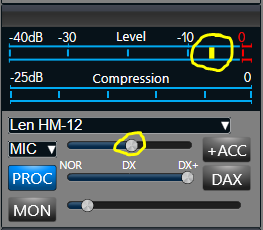
To help make the adjustment without transmitting, Enable the Level Meter During Receive if you haven't already. This makes it much easier to set the level. If you can't get enough mic gain, turn on the +20 dB boost. The Heil ProSet Elite uses a dynamic mic, so BIAS should be off. The source should be MIC if the mic is plugged into the radio, PC if plugged into the PC.

If all this doesn't help, post a screenshot of SmartSDR here.
0



Answers
-
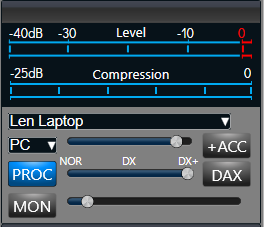
Hi Scott, do you have the audio source set to PC? You also should have DAX and +ACC off.
 1
1 -
Len,
Thanks for getting back to me. I tried what you suggested and no change. I am using a Heil Proset Elite and the closest profile I can find is the Proset HC-6. I set it to that and set it to SO2R_TX1 and I am able to get some deflection on the compression meter. The radio is transmitting when I hit the MOX button, but I don't think I am putting out a signal. I have a local SDR set up on my computer and am not seeing my signal at all.0 -
On your remote Machine is the MIC your using showing up in the Sound card settings?
Looks like Len has you set up on the Radio, You could try to use it on something like skype or other Software Audio app?
If your Remote Computer (Windows) doesn't have SmartSDR setup in the Sound settings Permissions and allowed to use the MIC it won't work until you do.
Anyway good luck and happy new year
0 -
Very helpful everyone. I got the mic working on the front of the radio. My next step is to get it set up when I am on the remote setup. Thanks all.0


Leave a Comment
Categories
- All Categories
- 401 Community Topics
- 2.2K New Ideas
- 689 The Flea Market
- 8.6K Software
- 197 SmartSDR+
- 6.6K SmartSDR for Windows
- 200 SmartSDR for Maestro and M models
- 460 SmartSDR for Mac
- 279 SmartSDR for iOS
- 268 SmartSDR CAT
- 220 DAX
- 395 SmartSDR API
- 9.6K Radios and Accessories
- 109 Aurora
- 348 FLEX-8000 Signature Series
- 7.2K FLEX-6000 Signature Series
- 999 Maestro
- 58 FlexControl
- 872 FLEX Series (Legacy) Radios
- 975 Genius Products
- 482 Power Genius XL Amplifier
- 358 Tuner Genius XL
- 135 Antenna Genius
- 322 Shack Infrastructure
- 227 Networking
- 483 Remote Operation (SmartLink)
- 145 Contesting
- 847 Peripherals & Station Integration
- 147 Amateur Radio Interests
- 1.1K Third-Party Software