SmartSDR v4.2.20 | SmartSDR v4.2.20 Release Notes
SmartSDR v3.10.15 | SmartSDR v3.10.15 Release Notes
The latest 4O3A Genius Product Software:
The latest 4O3A Genius Product Software and Firmware
If you are needing assistance with FlexRadio products, please refer to the product documentation or check the Help Center for known solutions. Need technical support from FlexRadio? It's as simple as creating a HelpDesk ticket.
SDR+ Activation

Comments
-
What radio do you have?
James
WD5GWY
0 -
66000
-
This chart will tell you which features should be activated with your radio.
The features with the green check marks below your radio model will be the ones that work with your radio.
 0
0 -
Thank you for the chart, but I already know what features apply to me. That's not the problem. All new features applicable to the flex 6600 in your chart above for me are greyed out; when I mouse over them, I get a popup-up indicating I need a subscription, which I paid for already. Before I posted this thread, I sent emails to sales, but they won't respond.
0 -
Hi Steve,
Can you send a screenshot of your Radio tab in Radio Setup? Here is mine for comparison:
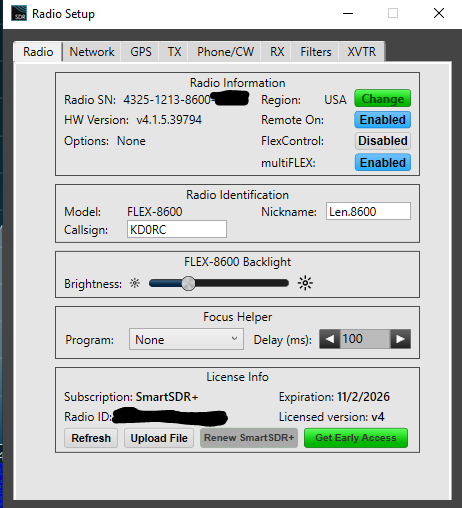 1
1 -
 0
0 -
If clicking “refresh” doesn’t resolve the issue, please open a ticket. Is this the only Flex radio you own?
0 -
yes, the only radio. I will open a ticket
0 -
I like to post an update to this thread. When I posted my issue, my flex radio was connected directly to my PC running Smart SDR (which the PC itself is connected to the internet) . I incorrectly assumed that meant my radio also had internet access. I temporarily connected my radio to my router and the license updated automatically. I'm back to a direct PC connection and that works fine.
background info: I'm not able to physically install a wired connection to my ISP router. Wifi didn't work for me, which is why I'm running a direct connection to the PC.
1 -
@Steve_AJ6TL Cool that makes sense. Yeah radio must have its own connection.
0 -
Just to expand on Flexed's comment — for upgrades to your subscription, yes, you must connect the radio to the internet for a brief moment, so it can contact the Flex servers. After that, you can reconnect the radio directly to the PC again. For updates like 4.1.3 to 4.1.5 (where no new features are added) it's not necessary to have the radio connected to the internet.
0 -
@VE7ATJ_Don At the risk of pedantry, you do not need to connect your radio to the internet. Flex can issue you a license file that you upload from your PC to the not-internet-connected radio. Mine took a week or so (over Thanksgiving holiday, so no complaint) and I just keep it (and a few backups) in safe places.
0







Leave a Comment
Categories
- All Categories
- 401 Community Topics
- 2.2K New Ideas
- 689 The Flea Market
- 8.6K Software
- 197 SmartSDR+
- 6.6K SmartSDR for Windows
- 200 SmartSDR for Maestro and M models
- 460 SmartSDR for Mac
- 279 SmartSDR for iOS
- 268 SmartSDR CAT
- 220 DAX
- 395 SmartSDR API
- 9.6K Radios and Accessories
- 109 Aurora
- 348 FLEX-8000 Signature Series
- 7.2K FLEX-6000 Signature Series
- 999 Maestro
- 58 FlexControl
- 872 FLEX Series (Legacy) Radios
- 975 Genius Products
- 482 Power Genius XL Amplifier
- 358 Tuner Genius XL
- 135 Antenna Genius
- 322 Shack Infrastructure
- 227 Networking
- 483 Remote Operation (SmartLink)
- 145 Contesting
- 847 Peripherals & Station Integration
- 147 Amateur Radio Interests
- 1.1K Third-Party Software