SmartSDR v4.2.20 | SmartSDR v4.2.20 Release Notes
SmartSDR v3.10.15 | SmartSDR v3.10.15 Release Notes
The latest 4O3A Genius Product Software:
The latest 4O3A Genius Product Software and Firmware
If you are needing assistance with FlexRadio products, please refer to the product documentation or check the Help Center for known solutions. Need technical support from FlexRadio? It's as simple as creating a HelpDesk ticket.
CW Key quit working with V4

My bug quit working with V4, checked the settings and everything looks ok…Is there a new setting with V4?
Comments
-
No new CW settings. You might try exporting your profiles, then do a factory reset. If that doesn't help, post a screenshot of SmartSDR here so that we can see your settings.
1 -
What CW keying method are you trying to use ?? Paddles to radio? Straight key? External keyer? CW macros ?
Al, K0VM
1 -
As I mentioned in the original post, using a bug….always worked before, suddenly quit.
0 -
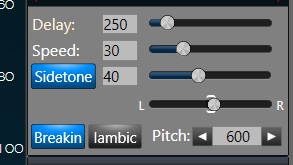
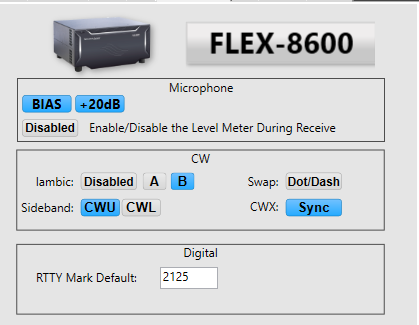 0
0 -
FYI, cable has been checked and is OK…
0 -
Did you try the factory reset?
1 -
Yes, did complete factory reset…
0 -
I am thinking there is a 8600 hardware failure….but no way to check the hardware
0 -
I have a help desk request, but no response yet…..been a few days…
0 -
Yep, that is the right thing to do. Hopefully they will get through the backlog soon.
1 -
I've seen the same. Note that you've got Iambic disabled (me too). If I enable Iambic, and hit the straight key, it'll make dits (so it's getting the input - just not acting on it when not Iambic). Then for some unknown reason, upon switching back to Iambic disabled it then seems to work. Sometimes I'd have to hit the key a few times to 'wake it up'… Give that a whirl and see how it plays.
0 -
@WA5YOM I use a bug too, and have the same settings that you do… and for me, it works as it always has. I get dits and dahs as always, from the Vibroplex bug.
I know it's not helpful to you 😞 but it's a data-point that does rule out the software…
Best wishes for a speedy and complete resolution
0



Leave a Comment
Categories
- All Categories
- 401 Community Topics
- 2.2K New Ideas
- 689 The Flea Market
- 8.6K Software
- 197 SmartSDR+
- 6.6K SmartSDR for Windows
- 200 SmartSDR for Maestro and M models
- 460 SmartSDR for Mac
- 279 SmartSDR for iOS
- 268 SmartSDR CAT
- 220 DAX
- 395 SmartSDR API
- 9.6K Radios and Accessories
- 109 Aurora
- 348 FLEX-8000 Signature Series
- 7.2K FLEX-6000 Signature Series
- 999 Maestro
- 58 FlexControl
- 872 FLEX Series (Legacy) Radios
- 975 Genius Products
- 482 Power Genius XL Amplifier
- 358 Tuner Genius XL
- 135 Antenna Genius
- 322 Shack Infrastructure
- 227 Networking
- 483 Remote Operation (SmartLink)
- 145 Contesting
- 847 Peripherals & Station Integration
- 147 Amateur Radio Interests
- 1.1K Third-Party Software