SmartSDR v4.2.20 | SmartSDR v4.2.20 Release Notes
SmartSDR v3.10.15 | SmartSDR v3.10.15 Release Notes
The latest 4O3A Genius Product Software:
The latest 4O3A Genius Product Software and Firmware
If you are needing assistance with FlexRadio products, please refer to the product documentation or check the Help Center for known solutions. Need technical support from FlexRadio? It's as simple as creating a HelpDesk ticket.
8600 & Elecraft KPA500/KAT500 Connection Help ?

New Flex 8600 owner who can't get the KPA/KAT duo to work properly to together.
I have the Elecraft Application Note on interfacing the Power combo with Flex 6000 series radios. I have all the cables indicated which I believe I have connected per the document, but not clear on the use of the KUSB cable and whether I need a new Flex CAT port for this to work.
I have an RCA cable running from the Flex TX1 port to the KPA PA Key port and the 80-6M bands selected under TX1 in the TX Band Settings window in SSDR v4.0.1. The KPA is not following freq changes on the radio, doesn't show any power indication on its display until the radio drive power is at 25w and then there is no amplification.
So, obviously I am missing something or several somethings in the setup and/or the cabling. Maybe someone who has this set up working could offer some assistance to get me up and running.
73 & Tnx in advance
Paul w2eck
Best Answer
-
Hi Paul, the diagrams on pages 5 and 6 are for a K3. The Flex diagram is on page 11. I don't know what will happen with that cable plugged into the Aux port on the amp, but I would remove it. The serial communication between amp and rig and between tuner and rig happen using the connections shown on page 11 and in my little diagram above.
0

Answers
-
Hi Paul, Here is a quick drawing of the connections. Check page 11 of the KAT 500 manual for a better picture. TX1 plugs into the top jack of the KAT500 and another RCA cable connects from the bottom jack of the KAT 500 to the PA Key jack of the amp.
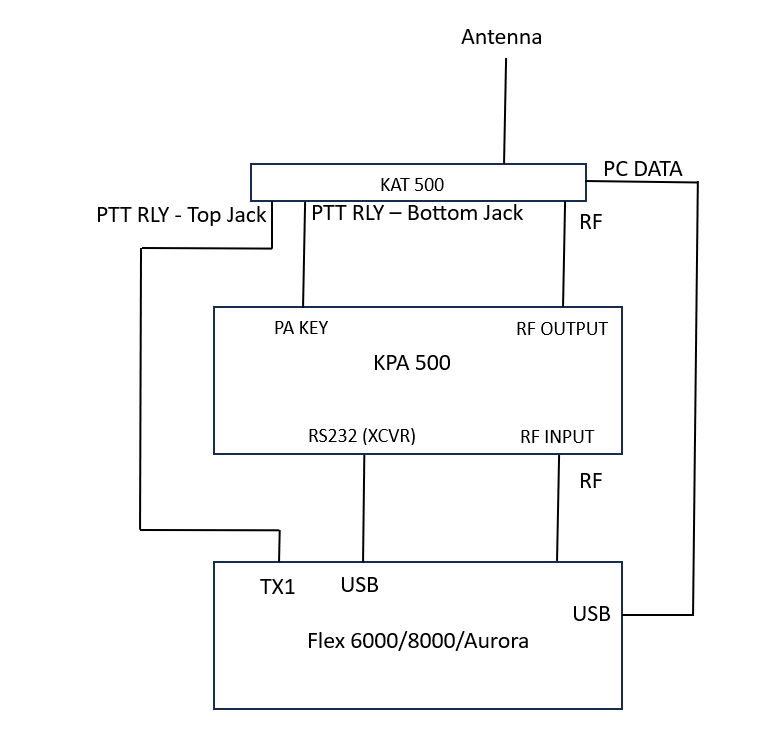
To get the KAT 500 to follow your Flex, plug a genuine FTDI cable between the PC DATA jack on the KAT 500 to one of the USB ports on the Flex.
To get the KPA 500 to follow your Flex, plug a genuine FTDI null modem cable between the RS232 (XCVR) jack on the KPA 500 and one of the USB ports on the Flex.
Go to Settings, USB Cables and you should see the cables (my KAT 500 cable is grayed out because I am doing something different here). Select a cable and click the Edit button. Now you can give the cable a meaningful name, set it to CAT, TX Slice, Auto-report Enabled, and set the Advanced boxes to match the settings on your Elecraft gear. If you have a hard time getting a higher speed to work, set it to 9600 - that is plenty fast. Do the same for the second cable.
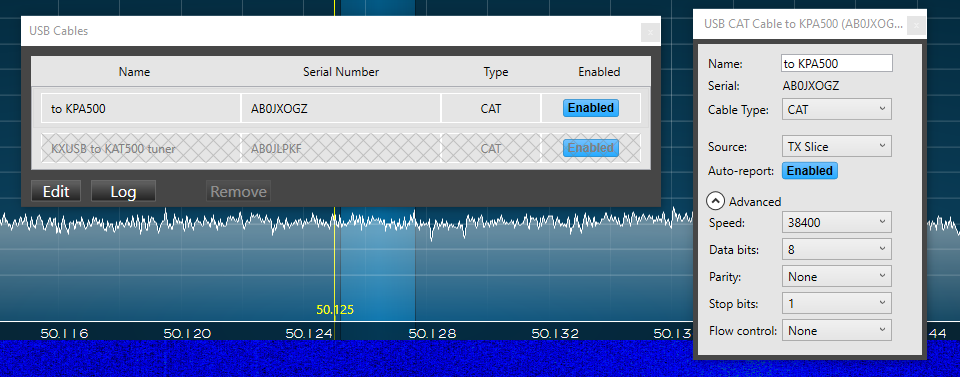
Note that you do not use SmartSDR CAT for any of this, it is all handled by the USB Cables menu.
1 -
Len
Tnx much.exactly what I needed. Lake me work on this tomorrow and will let you know how it comes out.
73 Paul w2eck
0 -
Len
A follow up question. I currently have an Elecraft’ serial cable from the amp Aux port to to the KAT Amp port as shown in KAT manual page 6 Should I remove that?
73 Paul
0 -
Len
Understand
Tnx
Paul
0 -
Additional question regarding this connection.
On V3 I connected our 8600 and set a transmit profile with maximum transmit power for each band, one profile for basic users limiting their output power to regulations, another for advanced users with higher power, and one barefoot with full power. That worked well as each profile entry is changed to drive the user maximum output power.
NOW by upgrading to SmartSDR V4 the following is happening. As soon as the amp is switch away from standby all the profile settings are temporarily dropped to 2W drive and back to initial setting when switched back to standby.
Suggestions?
0 -
Hi Stan, I'm not sure what is happening there. One suggestion is to run the FlexiCraft utility instead of using profiles for this purpose. Do a search for it and you should find my GitHub page. The software and a user manual can be found there.
It lets you set power out per band and mode based on amplifier status (operate/standby).
I am away from my station right now, but should be able to help later today if you have any questions or issues getting it working.
0 -
Len
Found all the necessary cables and got all the pieces wired as per your diagram and Presto- it all works. KAT/KPA are following 8600 band changes and KPA is amplifying as it should. So thanks for the very helpful assist.
1 -
You're very welcome!
0 -
Len -
I downloaded and installed your KD0RC Flexicraft Utility. So borderline dumb question ….
So both the KPA and KAT are no longer plugged into my Win11 pc, where they each had a Comport number assigned. The KAT & KPA utilities aren't connecting now. So how do we find the comport to assign to each in Flexicraft?
73 Paul w2eck
0 -
Hi Paul, to use the utility:
The KPA 500 amplifier should be on and the serial port labeled RS232 (XCVR) should be plugged into one of the USB ports on the Flex radio. The serial port labeled RS232 (PC) should be plugged into the computer where you run the utility. The computer needs to be on the same LAN segment as your Flex radio.
The KAT 500 tuner should be on and the serial port should be plugged into the computer where you run the utility. It needs to be on the same LAN segment as your Flex radio.
To know which ports to use for the KPA 500 and KAT 500, disconnect them both from your PC. Open Device Manager. Note the com ports. Now plug one of the Elecrtaft devices into your PC. The new port is the one for that device. Do the same for the other one. Now you will know what to select in the FlexiCraft Setup tab.
0 -
Len
- On the KAT500, which serial port, the XCVR OR AMP ?
- Need to acquire two new RS232 to USB cables for this, know any good sources? Just looking , prices are all over the lot.
73 Paul w2eck
0 -
Hi Paul, Neither - XCVR and AMP are only used to pass K3/K4 info from the rig to the amp and tuner. Plug PC DATA from the KAT 500 into your PC instead of into the Flex.
From the KPA 500, plug RS232(PC) into your PC (where it should have always been) and RS232(XCVR) into one of the USB jacks on the back of the Flex (where it should have always been).
The AUX jack on the KPA 500 is not used. The XCVR and AMP jacks on the KAT 500 are not used.
You would use the same cables that you currently have plugged into the back of your Flex. What cables do you have now?
0 -
Len
Right now I have the KAT500 PC Data plugged into a 8600 USB port ( believe that was what the diagram you sent had for KPA Hookup? )
The KPA500 RS232 (XCVR) is plugged into 2nd 8600 USB port.
I may be able come up with another serial to USB cable.
So to have the KPA/KAT power duo work correctly with the 8600 and have the Flexicraft Utility work , there is only one cable connected to the 8600 USB ports?
73 & tnx Paul w2eck
0 -
Hi Paul, yes, that is correct. Only the RS232(XCVR) from the amp connects to the Flex when using the FlexiCraft Utility.
0 -
Len
OK- have all the cables as described and the KAT is being recognized by the Flexicraft Utility. The RS232 from the KPA shows up as a port on PC, but not connecting/online in the Utility. The cable is suspect so will order a new one and try again. Will let you know once is all working 100%.
Thank You for all the assistance.
73 Paul w2eck
0 -
Len
So have a brand-new Serial/ USB cable for the KPA500 to win 11 PC connection. Have it plugged in to test. But now when I start the Flexicraft Utility, it opens and immediately shuts down. In addition, the cable is not being recognized by my Win11 PC- no new com port? Below is the cable I ordered – did I get an incorrect cable?
Suggestions?
73 Paul w2eck
USB to RS232, USB Serial Adapter with FTDI Chipset,USB 2.0 to Male DB9 Serial Cable for Windows 11,10, 8, 7, Vista, XP, 2000, Linux and Mac OS(6ft)
0 -
Hi Paul, I think that you need a null modem adapter with it. I am not where I can look that up right now, but I think that is the likely problem.
0 -
Len
Can you buy a null modem rs232 usb / ftdi cable? If so - I can just exchange for the one I bought ?
73 Paul w2eck
0 -
and if I need a Null Modem cable, it doesn’t require the FTDI chipset?
0 -
Len
Based on what I’ve read today, I agree and have ordered a null modem adapter
Thanks Paul w2eck
0 -
Hi Paul, sorry for the delay… Yes, I think that will do it. If not, maybe we can set up a zoom meeting to see what is going on and get it resolved,
0 -
Len
I got the null modem adapter, but still not working. In fact I’ve regressed. KPA not amplifying again. Pulled what little hair I have left out.
So I think I need an intervention, Zoom or whatever meathod you choose. I am available almost anytime, whatever works for you.
73 Paul w2eck0 -
Len
A followup question on this thread. I have the KPA500 and the KAT500 working and following my 8600.
Hooked up according to the diagram you sned in this thread on 15 November.
My question now is - how do I use the Elecraft Utilities for the KPA500 and KAT500 to make changes to the configurations in both?
I never did get the Flex Utility to work 😊
73 & Happy New Year
Paul w2eck
0


Leave a Comment
Categories
- All Categories
- 401 Community Topics
- 2.2K New Ideas
- 689 The Flea Market
- 8.6K Software
- 197 SmartSDR+
- 6.6K SmartSDR for Windows
- 200 SmartSDR for Maestro and M models
- 460 SmartSDR for Mac
- 279 SmartSDR for iOS
- 268 SmartSDR CAT
- 220 DAX
- 395 SmartSDR API
- 9.6K Radios and Accessories
- 109 Aurora
- 348 FLEX-8000 Signature Series
- 7.2K FLEX-6000 Signature Series
- 999 Maestro
- 58 FlexControl
- 872 FLEX Series (Legacy) Radios
- 975 Genius Products
- 482 Power Genius XL Amplifier
- 358 Tuner Genius XL
- 135 Antenna Genius
- 322 Shack Infrastructure
- 227 Networking
- 483 Remote Operation (SmartLink)
- 145 Contesting
- 847 Peripherals & Station Integration
- 147 Amateur Radio Interests
- 1.1K Third-Party Software